|
|
Zebra ET60/ET65 rugged enterprise tablets
A detailed look at both the Windows and the Android version of Zebra's versatile 10-inch 2-in-1 tablet platform
(by Conrad H. Blickenstorfer)
The Zebra ET65 is one of those rare rugged tablets that comes in two nearly identical variants — one running Windows, the other Android — each purpose-built to meet distinct operational needs. Both versions share virtually the same 10.1-inch housing, offer advanced connectivity and docking options, and are certified for use in demanding environments. Where they differ is in platform strategy: the Windows-based ET65W is designed for organizations that need full desktop integration, legacy software support, and enterprise-grade Windows management.
The Android-based ET65, on the other hand, likely targets mobile-first workflows with intuitive touch interfaces, streamlined app deployment, and real-time cloud-based operations. Zebra's approach gives enterprise and field-service customers the flexibility to choose the OS that best fits their existing infrastructure and future plans — without compromising on build quality or rugged performance. In this review, we evaluate both, starting with the Android version of the ET65.

Before diving into the specifics of each version, it's helpful to look at the ET6 series platform as a whole. In terms of form factor, the 10-inch class of rugged tablets strikes a compelling balance: it offers vastly more screen real estate than even the largest handheld or smartphone, yet remains light, mobile, and compact enough to be used virtually anywhere. Zebra designed the ET6 series as a true 2-in-1 solution — they function perfectly as standalone tablets, but can also be paired with an optional purpose-built keyboard to transform into fully functional laptops for more demanding data entry or productivity tasks.
It's worth noting two key points here. First, the only difference between the ET60 and ET65 models — whether running Windows or Android — is that the ET65 includes support for mobile broadband, while the ET60 does not. Second, although the Android-based ET65 was released in June 2023, the Windows-based ET65W wasn't announced until September 2024 and didn't didn't start shipping until October 2024, a full 16 months later.
That gap is significant because it coincided with the rapid mainstreaming of AI — artificial intelligence — in computing. By the time the Windows version was introduced, AI had become a major focus across many industries, and as a result, Zebra's marketing materials for the ET65W emphasize its AI-readiness and suitability for AI-enhanced workflows. In contrast, the Android version's documentation makes no mention of AI at all.
That doesn't mean the Android-based ET65 lacks AI capabilities. Quite the contrary — while the marketing didn't highlight it at the time, the hardware is certainly capable of handling various types of AI-augmented or AI-enabled processing. It's a reminder of how quickly priorities and positioning can shift in the tech world — in just a year and a half, AI went from a niche consideration to a defining feature.
That said, the Zebra ET60W/ET65W "AI-enabled" touchscreen, powered by a SigmaSense SDC300 controller, is a standout feature that efficiently and very effectively addresses a decades-old touchscreen problem — the inability to at all time sense whether input is bare finger touch, touch by a gloved finger, a stylus, or whether it's rain or other unwanted input. The SigmaSense AI Touch controller does continuously sense and classify everything that happens on the touchscreen, and modifies touch modes accordingly. While it may or may not directly use one of the tablet's signature features — its Intel Core Ultra processors with integrated NPU (Neural Processing Unit) — it exemplifies Zebra's leadership in deploying embedded intelligence at the hardware level to bring AI-value added to rugged mobile devices.

The Zebra ET65 for Android
Zebra has refined its platform strategy around screen size and operating system strengths and limitations: Android for tablets with 10-inch displays and smaller, and Windows for those with 10-inch screens and larger. The Android-based ET65 represents the next generation of the company's L10 series tablets, while the Windows-based ET65W is that as well, and also serves as a more compact alternative to Zebra's larger 12-inch ET85.
When it comes to hardware design, Zebra knows its customers value the sleek, modern appeal of consumer tablets, but need devices that can stand up to the rigors of real-world work environments. Rather than embracing a traditional "rugged" aesthetic with bulky bumpers and exposed fasteners, Zebra opted for a clean, refined industrial design that subtly suggests toughness. The ET65 features a flush all-glass front, a sleek silhouette, and protective perimeter framing. Its footprint is 10.8 x 7.8 inches, it's 0.7 inches thick, and it starts at around 2.3 pounds — noticeably more robust than a consumer tablet, but still compact and mobile enough for flexible deployment.
Visually, the ET65 strongly resembles a scaled-down version of the 12-inch ET85, which itself draws design cues from the Xplore R12 — a legacy product inherited through Zebra's acquisition of Xplore Technologies. The ET85 continues that chamfered-corner design language, and the ET65 carries it forward in a more compact form.
 Enterprise tablets are tools, first and foremost — tools built for work, where functionality, reliability, and practicality take precedence. In that regard, Zebra made several smart design decisions with the ET65. The housing is notably grippier and less slippery than most consumer tablets — a crucial feature given that the ET65 weighs over two pounds. A tablet this size must feel secure in the hand; no one wants to worry about it slipping during use. Enterprise tablets are tools, first and foremost — tools built for work, where functionality, reliability, and practicality take precedence. In that regard, Zebra made several smart design decisions with the ET65. The housing is notably grippier and less slippery than most consumer tablets — a crucial feature given that the ET65 weighs over two pounds. A tablet this size must feel secure in the hand; no one wants to worry about it slipping during use.
Unlike the larger Windows-based 12-inch ET85, the ET65 models include physical buttons. In addition to power and volume controls, there are three programmable buttons that can be mapped to streamline workflows. While touchscreens dominate today's interfaces, physical controls remain invaluable in the field, where gloves, wet hands, or high-pressure environments make quick tactile input more dependable.
As expected, the Android version of the ET65 features fewer ports than its Windows counterpart. Android users generally don't depend on legacy I/O, and modern USB-A and USB-C ports are sufficient for most tasks. The ET65 includes both USB-C and dual USB-A ports, which should cover the majority of connection needs. For anything beyond that, docks and adapters are available.
The ET65 is equipped with both front and rear cameras. Thanks to the generous bezel around the display, there's no need for a screen notch to house the front-facing camera — a welcome detail that preserves both aesthetics and usability. Importantly, both cameras feature physical privacy shutters, ensuring that no software can activate them without your knowledge. In keeping with enterprise needs, the battery is externally accessible and easily replaceable in the field.
The display is surrounded by a fairly wide bezel. While that increases the overall footprint, it has a functional benefit: you can hold the tablet without accidental touches being registered — a common issue with edge-to-edge consumer devices. Being a Zebra product, the ET65 also supports optional enterprise-grade scanning via the integrated SE55 1D/2D imager, with a dedicated scan button on the tablet's left side. Along the bottom edge, you'll find docking pins and no fewer than seven external antenna pass-throughs — a clear nod to the tablet's serious vehicle and field deployment potential.
The composite below shows the Zebra ET65 from the front and all four sides:

While the Zebra Android-based ET65 and the Windows-based ET65W look nearly identical from the front, their left and right sides reveal some key differences driven by their internal architectures.
On the right side, the Android version has two USB 3.1 Type-A ports and a USB Type-C port with DisplayPort 1.2 functionality. Unlike on the Windows version, there is no stylus garage, likely because Android is completely touch-oriented whereas Windows benefits from a stylus. Neither version includes a traditional barrel-style power jack. Instead, charging is through the USB-C port on the Android version and through either of the Thunderbolt 4 ports on the Windows model.
As far as battery power goes, the ET65's standard battery packs 36 watt-hours per specs (but only 33.9 watt-hours on the battery label). In our PCMark for Android battery test, the ET65 lasted 7:44 hours on a full charge. That translates into battery "fuel mileage" of 4.38 watt-hour per hour, about average for this class of machine. The PCMark test is very strenuous, continually exercising the system with various common tasks.  On the job, the ET65 should easily last a full shift. If that is not enough, Zebra offers an extended battery that doubles the capacity. Note that while the batteries for the Android and the Windows version of the ET65 series look almost identical, they are not interchangeable. On the job, the ET65 should easily last a full shift. If that is not enough, Zebra offers an extended battery that doubles the capacity. Note that while the batteries for the Android and the Windows version of the ET65 series look almost identical, they are not interchangeable.
In terms of performance, the ET65 represents a major step up from the L10, which was powered by the widely used Qualcomm Snapdragon SD660. While both the SD660 and the newer QCM6490 are octa-core chips, that's where the similarities end.
The QCM6490 — part of Qualcomm's "Dragonwing" platform — is a far more modern SoC, introduced roughly four years after the SD660. It replaces the older Kryo 260 cores (based on Cortex-A73/A53) with a combination of much more powerful ARM Cortex-A78 and Cortex-A55 cores, running at significantly higher clock speeds. Graphics performance sees a substantial boost as well, moving from the Adreno 512 GPU in the SD660 to the far more capable Adreno 643 in the QCM6490.
 Perhaps most notably, the QCM6490 includes the Hexagon 770 DSP, a key component of Qualcomm's 6th-generation AI Engine. This enables the ET65 to handle AI-enhanced workloads such as advanced imaging, voice recognition, and sensor fusion far more efficiently — offloading many of those tasks from the main CPU and GPU. Perhaps most notably, the QCM6490 includes the Hexagon 770 DSP, a key component of Qualcomm's 6th-generation AI Engine. This enables the ET65 to handle AI-enhanced workloads such as advanced imaging, voice recognition, and sensor fusion far more efficiently — offloading many of those tasks from the main CPU and GPU.
In our experience, systems built around the QCM6490 consistently outperform SD660-based hardware by a factor of approximately 3:1, depending on workload. That makes the ET65 not just an upgrade — it's a generational leap in capability.
Our extensive benchmark testing confirms that the ET65 delivers a substantial level of performance. In today's fast-moving tech landscape, hardware is constantly evolving, and competition is fierce. That said, the ET65 is clearly a major leap ahead of devices still relying on previous-generation technology, and it holds its own against many of the latest offerings in the rugged and enterprise space.
|
Zebra ET65 Android in comparison
|
|
Vendor
|
Zebra
|
Getac
|
Getac
|
Handheld
|
Samsung
|
RuggON
|
|
Model
|
ET65A
|
ZX10
|
ZX80
|
RT10
|
Tab Active4
|
SOL PA501
|
|
Year tested
|
2025
|
2025
|
2024
|
2022
|
2024
|
2020
|
|
Device type
|
tablet
|
tablet
|
tablet
|
tablet
|
tablet
|
tablet
|
|
Display size
|
10.1-inch
|
10.1-inch
|
8.0-inch
|
10.1-inch
|
10.1-inch
|
10.1-inch
|
|
Display resolution
|
1920 x 1200
|
1920 x 1200
|
1920 x 1200
|
1920 x 1200
|
1920 x 1200
|
1920 x 1200
|
|
Display ppi
|
224
|
224
|
283
|
224
|
224
|
224
|
|
Luminance
|
915 nits
|
913 nits
|
916 nits
|
582 nits
|
485 nits
|
810 nits
|
|
Processor
|
Qualcomm
|
Qualcomm
|
Qualcomm
|
Qualcomm
|
Qualcomm
|
Qualcomm
|
|
Processor Model
|
QCM6490
|
QCS6490
|
QCS6490
|
SM4350
|
SD778G
|
SD660
|
|
Processor cores
|
4xA78, 4xA55
|
4xA78, 4xA55
|
4xA78, 4xA55
|
2xA76, 6xA55
|
4xA78, 4xA55
|
4xA73, 4xA53
|
|
Footprint (inches)
|
10.80 x 7.80
|
10.80 x 7.56
|
9.21 x 5.90
|
10.80 x 7.30
|
9.56 x 6.70
|
11.00 x 7.70
|
|
Thickness (inches)
|
0.70
|
0.70
|
0.69
|
0.67
|
0.40
|
0.90
|
|
Volume (cu-in)
|
59.0
|
57.1
|
37.5
|
52.8
|
25.6
|
76.2
|
|
Weight as tested (lbs.)
|
2.50
|
2.00
|
1.57
|
2.20
|
1.50
|
3.10
|
|
Operating temp
|
-4° to 131° F
|
-20° to 145° F
|
-20° to 145° F
|
14° to 140° F
|
-20° to 145° F
|
-4° to 140° F
|
|
Ingress Protection rating
|
IP66
|
IP68
|
IP67
|
IP67
|
IP68
|
IP68
|
|
PCMark for Android
|
8,828
|
9,912
|
9,194
|
6,020
|
9,725
|
NA
|
|
-PCMark browsing
|
6,518
|
6,707
|
6,667
|
5,305
|
7,443
|
NA
|
|
-PCMark video
|
5,886
|
5,901
|
6,024
|
3,209
|
5,887
|
NA
|
|
-PCMark writing
|
11,011
|
12,3402
|
10,738
|
7,511
|
10,724
|
NA
|
|
-PCMark photo editing
|
17,556
|
18,660
|
23,059
|
10,714
|
21,029
|
NA
|
|
-PCMark data manip.
|
7,231
|
8,323
|
8,335
|
5,772
|
8,201
|
NA
|
|
Battery capacity
|
33.9 whr
|
76.6 whr
|
76.6 whr
|
44.5 whr
|
30.17 whr
|
???
|
|
PCMark Battery test
|
07:44 hours
|
19:09 hours
|
16:33 hours
|
NA
|
11:38 Hours
|
NA
|
|
PCMark Battery whr/hr
|
4.38 whr/hr
|
4.00 whr/hr
|
4.63 whr/hr
|
NA
|
2.59 whr/hr
|
NA
|
|
PassMark Mobile
|
14,110
|
14,827
|
14,889
|
8,205
|
12,070
|
10,011
|
|
AnTuTu
|
519,865
|
553,103
|
547,919
|
246,923
|
444,370
|
162,015
|
|
Vellamo Browser
|
14,080
|
10,916
|
11,450
|
7,644
|
NA
|
5,921
|
|
Vellamo Metal
|
5,865
|
5,964
|
5,984
|
4,117
|
NA
|
2,858
|
|
Vellamo Multicore
|
7,351
|
7,438
|
7,606
|
3,220
|
NA
|
3,840
|
|
Geekbench 5 Single
|
1,137
|
1,136
|
872
|
473
|
790
|
NA
|
|
Geekbench 5 Multi
|
3,080
|
3,055
|
3,006
|
1,509
|
2,826
|
NA
|
|
Geekbench Open CL
|
2,899
|
2,908
|
3,149
|
1,087
|
2,252
|
NA
|
|
Geekbench Vulkan
|
3,109
|
3,214
|
2,869
|
973
|
2,443
|
NA
|
|
Max Luminance
|
915 nits
|
913 nits
|
872 nits
|
582 nits
|
485 nits
|
810 nits
|
The thermal images below show our review Android ET65 running a demanding AI benchmark. Even without a fan and using just passive cooling, the tablet barely warms up at all.

Almost all photography these days is done by smartphones or, for very high quality documentation, by high-end SLRs. The Zebra ET65 comes with dual cameras, a 16mp rear camera with flash and auto-focus, and an 8mp user-facing camera for video conferencing. We won't go into detail with the cameras in this review, but below are sample pics. Click on the image for a full resolution file.

In the past, cameras integrated into rugged handhelds and tablets were of poor quality. That has changed for the better. The 16mp camera in the Zebra ET65 is quick and produces good images. It can also record 4k video.
The Zebra ET65W for Windows
As noted earlier, the Windows version of the ET65 — the ET65W — launched 16 months after its Android counterpart. In the world of technology, that's a long time, and in this case, it coincided with the rapid rise of artificial intelligence as a defining factor in computing.
As a result, the ET65W isn't just optimized for the Windows ecosystem; it also integrates AI-focused capabilities designed to enhance workflows, boost productivity, and support smarter, more efficient task management. Powered by an Intel Core Ultra processor with an integrated Neural Processing Unit (NPU), the ET65W is equipped to run AI-driven applications and utilities natively, offloading such workloads from the CPU and GPU to deliver faster, more responsive performance.
 Visually, the Windows-based Zebra ET65W is nearly indistinguishable from its Android counterpart. Both share the same dimensions — 10.8 x 7.8 x 0.7 inches — and an identical overall design. The key difference is weight: the ET65W starts at approximately 2.6 pounds, about a third of a pound heavier than the Android version. That extra weight comes from the significantly different internal architecture. Unlike the passively cooled Android model, the Windows-based ET65W requires active cooling, incorporating a fan and heat exchanger. Visually, the Windows-based Zebra ET65W is nearly indistinguishable from its Android counterpart. Both share the same dimensions — 10.8 x 7.8 x 0.7 inches — and an identical overall design. The key difference is weight: the ET65W starts at approximately 2.6 pounds, about a third of a pound heavier than the Android version. That extra weight comes from the significantly different internal architecture. Unlike the passively cooled Android model, the Windows-based ET65W requires active cooling, incorporating a fan and heat exchanger.
The front face of the ET65W is virtually identical, featuring the same 10-inch display, six physical buttons (three programmable function keys, volume or brightness down and up, and power/sleep), and the same flush-glass styling. Along the bottom edge, both versions share the same surface-mount docking pins for keyboard and accessory connection, as well as identical external antenna pass-throughs for vehicle or field deployment.
The composite below shows what the Zebra ET65W looks like from the front and from all four sides:

While the Zebra ET65W and Android-based ET65 look nearly identical from the front, their left and right sides reveal some key differences driven by their internal architectures.
On the right side, the Windows-based ET65W features one USB 3.1 Type-A port, a USB Type-C port with Thunderbolt 4 / USB 4 support, and a garage for a small stylus. The Android version, by contrast, offers two USB 3.1 Type-A ports and a USB Type-C port with DisplayPort 1.2 functionality — but no stylus garage.
On the left side, the ET65W adds a second Thunderbolt 4-compatible USB-C port, whereas the Android version has no ports on that side. Both models, however, include a programmable scanner trigger button on the left edge.
Neither version includes a traditional barrel-style power jack. Instead, charging is handled via USB-C — through either of the Thunderbolt 4 ports on the Windows model or through the USB-C port on the Android version.
Along the top edge, both models include a manually operated privacy shutter for the front-facing camera (in slightly different locations), as well as a window for the optional integrated barcode scanner. The ET65W also features a top-mounted exhaust vent for its internal cooling fan — a necessary addition due to the active thermal management required by its more powerful Intel processor.
As far as battery power goes, the ET65W's standard battery packs 36 watt-hours per specs (but only 33.9 watt-hours on the battery label).  In our PCMark battery test, the ET65W lasted 5:07 hours on a full charge. That translates into battery "fuel mileage" of 6.63 watt-hour per hour, over two watt-hours per hour more than the Android version. The PCMark test is very strenuous, continually exercising the system with various common tasks. On the job, the ET65W may still fall short of a full shift. If that is an issue, Zebra offers an extended battery that doubles the capacity. Note that while the batteries for the Android and the Windows version of the ET65 series look almost identical, they are not interchangeable. In our PCMark battery test, the ET65W lasted 5:07 hours on a full charge. That translates into battery "fuel mileage" of 6.63 watt-hour per hour, over two watt-hours per hour more than the Android version. The PCMark test is very strenuous, continually exercising the system with various common tasks. On the job, the ET65W may still fall short of a full shift. If that is an issue, Zebra offers an extended battery that doubles the capacity. Note that while the batteries for the Android and the Windows version of the ET65 series look almost identical, they are not interchangeable.
Both versions of the ET65 feature the same optically bonded 10.1-inch display, protected by Corning Gorilla Glass. Resolution is 1920 x 1200 pixels, and brightness is rated at a very high 1000 nits — more than sufficient for outdoor and high-glare environments. While the display hardware is the same across both platforms, the Windows-based ET65W is equipped with what Zebra calls an "AI-enabled" touchscreen. This enhanced touch interface improves accuracy and responsiveness and can automatically adapt to input method — whether finger, glove, passive or active stylus, or use in rain. The optional stylus is compatible with the Microsoft Pen Protocol (MPP) 2.0.
Under the hood, however, the hardware differences between the two models are substantial — and expected, given that Windows was originally developed for desktop computing, while Android evolved from mobile roots as a smartphone OS. The ET65W supports up to 32GB of LPDDR5 RAM and up to 2TB of removable M.2 PCIe NVMe solid-state storage. The Android-based ET65, in contrast, is equipped with a fixed 8GB of RAM and 128GB of onboard UFS flash storage.
There's also a large disparity in processing power and architecture.  The ET65W is available with a choice of four Intel Core Ultra processors, each with a thermal design power (TDP) of 15 to 57 watts. The Android model, by comparison, runs on Qualcomm's QCM6490 system-on-chip, which typically draws only 5 to 7 watts — a significant power and thermal efficiency advantage, though at the expense of raw computational performance. The ET65W is available with a choice of four Intel Core Ultra processors, each with a thermal design power (TDP) of 15 to 57 watts. The Android model, by comparison, runs on Qualcomm's QCM6490 system-on-chip, which typically draws only 5 to 7 watts — a significant power and thermal efficiency advantage, though at the expense of raw computational performance.
What sets the Intel Core Ultra line apart is its forward-looking architecture. These 14th-generation "Meteor Lake" chips depart from traditional CPU design and incorporate integrated NPUs — Neural Processing Units — specifically to handle AI workloads. Unlike conventional sequential logic processing, AI tasks are massively parallel and require specialized hardware to be handled efficiently. That's where Intel's NPU, branded Intel AI Boost, comes in — offloading AI tasks from the CPU and GPU to ensure optimal performance and responsiveness for next-gen applications. Below is a table that shows the four Core Ultra processors Zebra ET65W customers can pick from (for direct link to the full table, click here):
|
Zebra ET65W: Available Intel Core Ultra processor options
|
|
Available CPUs
|
Intel Core Ultra i7
|
Intel Core Ultra i7
|
Intel Core Ultra i5
|
Intel Core Ultra i5
|
|
Model
|
165U
|
155U
|
135U
|
125U
|
|
Cores/Threads
|
12/14 (2 power, 8 efficient)
|
12/14 (2 power, 8 efficient)
|
12/14 (2 power, 8 efficient)
|
12/14 (2 power, 8 efficient)
|
|
Performance Core Base Speed
|
1.70 GHz
|
1.70 GHz
|
1.60 GHz
|
1.30 GHz
|
|
Performance Core Turbo Speed
|
4.90 GHz
|
4.80 GHz
|
4.40 GHz
|
4.30 GHz
|
|
TDP Base/Max Turbo
|
15/57 watts
|
15/57 watts
|
15/57 watts
|
15/57 watts
|
|
Smart Cache
|
12MB
|
12MB
|
12MB
|
12MB
|
|
Integrated graphics
|
Intel Graphics
|
Intel Graphics
|
Intel Graphics
|
Intel Graphics
|
|
Graphics max speed
|
2.00 GHz
|
1.95 GHz
|
1.90 GHz
|
1.85 GHz
|
|
Intel Stable Image Platform Program
|
Yes
|
No
|
Yes
|
No
|
|
Intel Active Management Technology
|
Yes
|
No
|
Yes
|
No
|
|
Intel Trusted Execution
|
Yes
|
Yes
|
Yes
|
Yes
|
|
Intel vPro
|
Yes, Enterprise
|
Yes, Essentials
|
Yes, Enterprise
|
Yes, Essentials
|
All of the available Intel Core Ultra processor options for the ET65W deliver strong performance and, as of mid-2025, remain close to the cutting edge — though, in tech, that's always a moving target. Between the four processor choices, differences are relatively minor, primarily involving clock speeds for both CPU and integrated GPU. For many enterprise customers, Intel's integrated advanced security and management technologies may matter more than the marginal variations in raw performance. As noted earlier in the comparison table, a few of these features are highlighted — though Intel lists over three dozen such technologies that may or may not be implemented depending on the specific processor configuration.
To evaluate real-world CPU performance, we tested our Zebra ET65W review unit equipped with the Intel Core Ultra 7 155U using several industry-standard benchmarking tools. These included PassMark PerformanceTest versions 6.1 and 9.0, the widely used PCMark 10 suite, Geekbench 5, and the 3DMark Time Spy graphics benchmark. We also ran CrystalMark, one of our long-standing benchmarks that provides useful insight into single-core CPU performance.
We compared the results with other 10.1-inch rugged tablets previously tested in our lab. The performance figures are as follows:
|
Zebra ET65 Windows in comparison
|
|
Company
|
Zebra
|
Juniper
|
Dell
|
DT Research
|
Getac
|
Mobile Demand
|
|
Model
|
ET65W
|
Mesa Pro
|
7030
|
DT302RP
|
UX10
|
T1175
|
|
Year tested
|
2025
|
2024
|
2024
|
2024
|
2021
|
2024
|
|
Device type
|
tablet
|
tablet
|
tablet
|
tablet
|
tablet
|
tablet
|
|
Display size
|
10.1-inch
|
10.1-inch
|
10.0-inch
|
10.1-inch
|
10.1-inch
|
10.1-inch
|
|
Display resolution
|
1920 x 1200
|
1920 x 1200
|
1920 x 1200
|
1920 x 1200
|
1920 x 1200
|
1920 x 1200
|
|
Display ppi
|
224
|
224
|
226
|
224
|
224
|
224
|
|
Luminance
|
898 nits
|
841 nits
|
1195 nits
|
825 nits
|
1004 nits
|
688 nits
|
|
Processor
|
Intel Core 7 Ultra
|
Intel Core
|
Intel Core
|
Intel Core
|
Intel Core
|
Intel Core
|
|
CPU model
|
155U
|
i7-1165G7
|
i7-1260U
|
i7-1355U
|
i7-10510U
|
i5-1335U
|
|
Processor Cores
|
2xPwr, 8xEco
|
4xPwr
|
2xPwr, 8xEco
|
2xPwr, 8xEco
|
4xPwr
|
2xPwr, 8xEco
|
|
Footprint (inches)
|
10.80 x 7.80
|
11.20 x 7.70
|
10.36 x 7.40
|
10.71 x 7.70
|
10.80 x 7.50
|
11.54 x 7.56
|
|
Thickness (inches)
|
0.70
|
1.20
|
1.00
|
0.79
|
0.88
|
0.67
|
|
Volume (cu-in)
|
59.0
|
86.2
|
76.7
|
65.1
|
71.3
|
58.5
|
|
Weight as tested (lbs.)
|
2.81
|
4.16
|
2.24
|
2.91
|
2.68
|
2.73
|
|
Operating temp
|
-20° to 145° F
|
-4° to 122° F
|
-20° to 145° F
|
14° to 140° F
|
-20° to 145° F
|
-14° to 122° F
|
|
Ingress Protection rating
|
IP66
|
IP68
|
IP65
|
IP65
|
IP65
|
IP65
|
|
PassMark 6.1
|
8,139
|
10,256
|
7,624
|
8,534.9
|
6,627
|
8,240
|
|
PassMark 9.0
|
4,847
|
5,482
|
5,607
|
5,391
|
3,869
|
5,067
|
|
CrystalMark
|
446,888
|
536,918
|
465,144
|
463,183
|
315,866
|
465,528
|
|
PCMark 10 Overall
|
4,986
|
5,096
|
5,052
|
5,235
|
3,869
|
4,801
|
|
-PCMark 10 Essentials
|
8,900
|
9,830
|
10,002
|
10,191
|
8,439
|
9,659
|
|
-PCMark 10 Productivity
|
7,634
|
6,667
|
6,368
|
6,890
|
6,304
|
6,819
|
|
-PCMark 10 Dig. Content
|
4,951
|
5,480
|
5,495
|
5,545
|
2,956
|
4,557
|
|
PCMark 10 Disk
|
1,801
|
2,310
|
2,184
|
2,111
|
1,949
|
1,838
|
|
PCMark 10 Battery
|
5:07 hrs
|
13:49 hrs
|
8:16 hrs
|
5:43 hrs
|
NA
|
6:01 hrs
|
|
PCMark 10 Whr/hr
|
6.63 Whr/hr
|
6.25 Whr/hr
|
4:35 Whr/hr
|
7.57 Whr/hr
|
NA
|
10.64 Whr/hr
|
|
3DMark TimeSpy
|
NA
|
1,604
|
1,383
|
1,231
|
414
|
1,237
|
|
GeekBench 5 single core
|
2,025
|
1,504
|
1,562
|
1,619
|
1,123
|
1,565
|
|
GeekBench 5 multi core
|
7,474
|
5,562
|
7,001
|
4,252
|
2,839
|
4,810
|
|
GeekBench 5 Open CL
|
13,847
|
18,227
|
13,525
|
12,535
|
NA
|
12,377
|
Below, the same thermal images taken of our review Windows ET65W running benchmarks. Operating temperatures are significantly higher, but, thanks to the unit's active fan cooling, still well within normal range.

The tablets included in the comparison table all come from well-established, experienced manufacturers in the rugged computing space. Each features a 10-inch class display with 1920 x 1200 resolution and is equipped with a high-performance mobile Intel processor.
That said, not all of these devices are aimed at the same industries or customer needs. Each vendor targets different verticals, with varying priorities such as size, ruggedness, battery life, or field-replaceability. Company scale also varies significantly — yet despite these differences, the performance results are remarkably close. In fact, what's striking is the near-parity in benchmark scores across systems powered by Intel Core processors spanning five different generations.
  One outlier in our table is the Getac unit, which posted lower scores. However, that reflects the age of the hardware in our test unit, which dates back several years. The current model now uses 12th-generation Intel chips, though we haven't yet had the opportunity to benchmark it. One outlier in our table is the Getac unit, which posted lower scores. However, that reflects the age of the hardware in our test unit, which dates back several years. The current model now uses 12th-generation Intel chips, though we haven't yet had the opportunity to benchmark it.
The takeaway? In this class of rugged Windows tablets, performance is generally no longer the primary differentiator — it's consistently strong across the board. That puts the spotlight on other factors, such as weight, size, design, I/O, battery life, and vendor ecosystem.
Here, the Zebra ET65W stands out for being among the lightest and most compact tablets in the group. It also benefits from Zebra's deep enterprise focus and scale, with annual revenues around US$5 billion. Dell, by comparison, is a far larger company (~US$100 billion), but rugged systems represent only a small part of its business.
For some buyers, battery life is the top concern. On that front, the heavier Juniper Mesa Pro leads the pack, thanks to its large, high-capacity battery. At RuggedPCReview, we also compute a system's "gas mileage" — how many watt-hours it consumes per hour of operation — to help assess efficiency, not just endurance.
On Windows tablets, cameras are generally not a high customer priority, and that may be the reason why, in our experience, cameras in Windows systems lag behind what's available on Android systems. As is, the Zebra ET65W comes with dual cameras, a 13mp rear camera, and an 5mp user-facing camera for video conferencing, and the ET65W also uses IR for Windows Hello authentication. We won't go into detail with the cameras in this review, but below are sample pics from the ET65W Windows version (which can do record in 4k video). Click on the image for a full resolution file.

In the past, cameras integrated into rugged handhelds and tablets were of poor quality. That has changed with the advent of Android in rugged systems, but less so on the Windows side. The 13mp camera in the Zebra ET65 is quick enough, and produces decent images, although not at the level of the Android version of the ET65.
What does "AI-driven" mean?
Note that the benchmark table above focuses solely on traditional computing performance. But today, much of the conversation revolves around AI — Artificial Intelligence. That includes the large language models behind tools like ChatGPT, but also a growing range of AI-powered applications and utilities designed for real-time data analysis, pattern recognition, automation, and more.
In its product brochure, Zebra describes the ET65W as a "AI-driven Windows tablet delivering unmatched performance and productivity." The company emphasizes that the tablet is embedded with AI features, including an AI-powered touchscreen that automatically adjusts to any method of input under any operating condition, and AI-powered audio that recognizes and cuts noise. And also that the dedicated AI engine in the Core Ultra chip is designed to handle heavy AI processing by running applications up to 70% faster. Zebra also claimed "a substantial decrease in power requirements offsets the intensive processing requirements of AI applications, allowing batteries to power the tablet longer on a single charge."
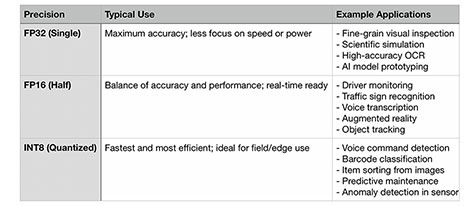 This requires a brief intro to AI processing. In essence, computing is about speed and precision. There are complex computing tasks that require exact results, and there are computing tasks that quickly require approximate results. FP32 — "32-bit floating point" — processing yields the highest precision, and that is that is the standard for CPUs. But there is also FP16 — "16-bit floating point" — processing that's faster on GPUs or NPUs that support it, but not as precise. Finally, there are simple, super-quick lower-precision formats, such as INT8, that are ideal for running on NPU neural processors. The table above shows what kinds of tasks and applications are best for each processing precision. Note the INT8 "AI tasks" — that's the kind of work an "AI-PC" or "AI-enhanced" system can quickly and efficiently do in the background. This requires a brief intro to AI processing. In essence, computing is about speed and precision. There are complex computing tasks that require exact results, and there are computing tasks that quickly require approximate results. FP32 — "32-bit floating point" — processing yields the highest precision, and that is that is the standard for CPUs. But there is also FP16 — "16-bit floating point" — processing that's faster on GPUs or NPUs that support it, but not as precise. Finally, there are simple, super-quick lower-precision formats, such as INT8, that are ideal for running on NPU neural processors. The table above shows what kinds of tasks and applications are best for each processing precision. Note the INT8 "AI tasks" — that's the kind of work an "AI-PC" or "AI-enhanced" system can quickly and efficiently do in the background.
 This is where AI benchmarking becomes essential. The new Geekbench AI benchmark suite evaluates how efficiently a system performs AI-related computations, breaking down results by precision levels — 32-bit, 16-bit, and 8-bit — and by processing unit: CPU, GPU, and, if available, NPU (Neural Processing Unit). This is where AI benchmarking becomes essential. The new Geekbench AI benchmark suite evaluates how efficiently a system performs AI-related computations, breaking down results by precision levels — 32-bit, 16-bit, and 8-bit — and by processing unit: CPU, GPU, and, if available, NPU (Neural Processing Unit).
This approach differs significantly from traditional benchmarks, which focus on CPU, RAM, storage, and graphics performance. Geekbench AI measures performance in IPS — Inferences Per Second — which represents how many predictions a system can generate per second using a specific AI model and framework. IPS is a practical way to see how efficiently a device handles real-time AI tasks such as image recognition, pattern detection, or voice processing. "Frameworks," in this context, serve as translators between the software algorithms and the underlying hardware, enabling efficient execution of AI workloads.
|
|
Zebra ET65W AI IPS performance (Geekbench AI)
|
|
|
Framework
|
Hardware
|
Single (32bit)
|
Half (16bit)
|
Quantized (8bit)
|
|
|
ONNX
|
CPU
|
1,836
|
792
|
3,640
|
|
|
ONNX
|
DirectML
|
1,462
|
3,530
|
1,125
|
|
|
OpenVINO
|
CPU
|
1,920
|
1,933
|
4,802
|
|
|
OpenVINO
|
GPU
|
3,050
|
5,034
|
7,249
|
|
|
OpenVINO
|
NPU
|
1,941
|
6,810
|
10,385
|
To assess the AI processing capabilities of the Zebra ET65W equipped with an Intel Core Ultra 5 155U, we ran the Geekbench AI benchmark, which evaluates inference performance in IPS across popular frameworks and hardware accelerators. It shows IPS performance on different frameworks and on different parts of the processor for the different precision modes.
The table to the right shows the results. For inference performance, Intel's OpenVINO framework worked best on this Intel-powered platform. The ET65W's integrated NPU (Intel AI Boost) hit a peak of 10,385 IPS on quantized int8 inference, greatly outperforming both CPU and GPU-based results. So for running int8-based AI applications on an ET65W, the best approach would be coding for OpenVINO and targeting the NPU. If it were a 16-bit type of application, OpenVINO and the GPU would be the best-performing choice. Overall, the table shows that the ET65W is clearly AI-capable and can handle modern AI workloads efficiently, with the NPU doing exactly what it was designed for: offloading and accelerating edge inference without taxing the CPU or draining battery life unnecessarily.
 Taking full advantage of these AI capabilities, however, requires customized software. As is, most off-the-shelf Windows applications and general-purpose AI frameworks are still in the process of adopting consistent NPU support. That means real-world use of the NPU typically requires custom programming, or at least integration work using vendor-optimized toolkits. Taking full advantage of these AI capabilities, however, requires customized software. As is, most off-the-shelf Windows applications and general-purpose AI frameworks are still in the process of adopting consistent NPU support. That means real-world use of the NPU typically requires custom programming, or at least integration work using vendor-optimized toolkits.
In general, that means using Intel's OpenVINO toolkit that includes APIs, model optimizers, and various runtime components designed to offload inference workloads to either the Intel CPU, the GPU or the NPU as needed. This, for now, means an additional development layer, but it allows creating and running AI-powered applications in addition what Zebra already included in the ET65W.
What it all means is that the value of local AI processing on platforms like the ET65W tablet lies in its ability to run intelligent workloads directly on the device, without reliance on the cloud. Examples of such workloads might include AI-powered barcode validation or object classification that speeds up scanning operations and cuts down on errors. In public safety or utilities, real-time voice command recognition may streamline interaction with apps when driving or when wearing gloves. In field service or inspections, AI-enhanced image analysis may quickly identify defects, missing parts, or wear patterns on equipment, flagging anomalies for action. With on-device AI accelerated by the NPU, all of this happens in real time, with minimal latency, and even in disconnected environments. All of this now seems open to the ET65W.
The Zebra Control Hub
Another standout feature of the ET65 Windows platform is its integrated Zebra Control Hub, a centralized management utility that allows both end users and IT administrators to configure and personalize the tablet to meet specific operational needs.
On the IT side, administrators can program hardware keys as shortcuts to and in applications, or call frequently used functions. Device functionality can be enabled or disabled depending on deployment requirements. This allows optimization of the tablet for various operating modes and conditions. For example, IT may limit the maximum display brightness for indoor deployments in order to preserve battery life. A system management screen provides quick device info as well as customized comprehensive system data logs in over a dozen areas.
On the user side, having a quickly accessible central hub is much easier than having to wade through the full Windows settings menus or having to use multiple utilities. Programmable shortcuts can also greatly enhance productivity in application software, as can the ability to quickly reconfigure the tablet for different usage modes or personal preferences.
Below are the four Zebra Control Hub sections — Productivity, Tablet Modes, System Management, and Help. Click/tap on the image for a larger version.

This is the type of value added that can make a big difference in daily use on the job, especially for Windows tablets where it can be frustrating to have to scroll and click through lengthy system popups and pulldowns.
The AI-enabled touchscreen
In the opening section of this review, we mentioned one of the more quietly revolutionary features built into the ET65W: its AI-enhanced touchscreen. It's not something most users will actively notice — because it does its job so seamlessly and unobtrusively in the background. This is the kind of technology that simply makes a touchscreen behave the way it should.
Touchscreens have come a long way since the early days of tablet computing. Over the years, numerous technologies have vied for dominance, each with its strengths and limitations. Today, projected capacitive multi-touch has become the standard across smartphones, tablets, and even many industrial and commercial devices. We've grown accustomed to the smooth tapping, dragging, pinching, and zooming that capacitive touch makes possible.
But capacitive touch isn't without flaws. Finger input, for instance, lacks precision. That's not a problem for mobile operating systems like Android or iOS, which were designed from the ground up for touch. Windows, by contrast, was built for a mouse. While Windows 10 and 11 are more touch-friendly than their predecessors, portions of the interface still work best with a precise pointing device.
Some tablets offer different operating modes — glove mode, pen mode, wet mode, etc. — to accommodate varied input conditions. But switching between modes usually means digging into system settings and waiting for the device to reconfigure. That's not always practical in the field—and in some cases, such as sudden rainfall, the screen may already be too impaired to navigate menus.
Zebra solves this problem with its AI-enabled touchscreen, powered by the SigmaSense SDC300 controller. A dedicated sensing layer continuously monitors the display surface, intelligently classifies the type of input — finger, stylus, glove, or wet — and dynamically shifts to the appropriate touch mode in real time.

We tested this feature extensively. The ET65W consistently and instantly recognized different input types, adapting without the user needing to intervene. Stylus, bare finger, or gloved hand—all worked smoothly and interchangeably. This capability alone is a major asset for users in fast-paced or unpredictable environments. As for liquids: the controller handles droplets well, but it may struggle under heavy rain or a direct stream of water.
The 2-in-1 keyboard — a valuable option
Ever since the dawn of tablet computing — which dates back several decades — users have appreciated tablets for their compact size, low weight, and superior mobility. Tablets can go where laptops often can't, making them indispensable in many jobs and environments. They're ideal for viewing, scanning, navigating, and communicating. But for one thing, they still fall short: text and data entry.

Early hopes were pinned on handwriting recognition to solve the keyboard problem. It helped in some use cases but never became a universal solution. The reality is that in many situations, especially in the enterprise world, nothing beats a physical keyboard for fast, accurate, and comfortable input.
Over the years, various hybrid and detachable keyboard concepts have emerged, trying to bridge the gap between tablets and laptops. Many proved too heavy, too awkward, or too fragile. Permanently attached keyboards add bulk and reduce the tablet's mobility. Detached keyboards can be unreliable or clumsy in the field. In truth, there's no perfect solution — but there are good, workable ones, and Zebra offers one of them for the ET65 platform.
Zebra's optional 2-in-1 keyboard is custom-designed for the ET6 series. The tablet locks securely into a reinforced friction hinge, converting it into a fully functional laptop — albeit a relatively heavy one at roughly 4.5 pounds total. This is typical for rugged 2-in-1s, where durability and utility take priority over sleekness.
 To address weight distribution and balance — a common problem in 2-in-1 designs, where the "screen" contains the entire computer and battery — Zebra integrated a sturdy carry handle into the keyboard base. Unlike some competing units, the ET65 keyboard does not add additional ports or a secondary battery. It just wants to be a rugged, reliable full-function keyboard, with 78 island-style keys, a touchpad, and separate left and right mouse buttons. It supports a full range of tilt angles, including laying flat, and integrates with Zebra's docking ecosystem. It's IP65 sealed, Kensington lock-compatible, and features backlighting with both color and brightness controls. To address weight distribution and balance — a common problem in 2-in-1 designs, where the "screen" contains the entire computer and battery — Zebra integrated a sturdy carry handle into the keyboard base. Unlike some competing units, the ET65 keyboard does not add additional ports or a secondary battery. It just wants to be a rugged, reliable full-function keyboard, with 78 island-style keys, a touchpad, and separate left and right mouse buttons. It supports a full range of tilt angles, including laying flat, and integrates with Zebra's docking ecosystem. It's IP65 sealed, Kensington lock-compatible, and features backlighting with both color and brightness controls.
Zebra describes the keys as "full-sized," but that deserves some clarification. A standard 100% full-size QWERTY layout measures exactly 6.75 inches from the center of the "Q" key to the center of the "P" key, something touch typists rely on and even casual users intuitively expect. On the Zebra ET65 keyboard, that distance is just 6 inches, making it 89% scale. There's enough room on the device for a full-size layout — especially if narrower keys had been used for lesser-used functions — so this feels like a missed opportunity.
That said, the keyboard is a valuable option. It's rugged, practical, and significantly enhances the ET65's utility. For users who do frequent data entry, documentation, or email in the field, it's a highly recommended add-on that transforms the tablet into a versatile mobile workstation.
Ruggedness
Defining "ruggedness" isn't as straightforward as it might seem. There are no universal, binding standards that precisely dictate what qualifies a device as rugged, or how rugged it must be. Even the commonly cited MIL-STD-810H testing procedures, while useful, are broad in scope and open to interpretation — allowing manufacturers flexibility in how they test and report results.

As is, rugged systems customers expect a rugged tablet to meet certain standards. That includes surviving drops, resisting vibration, withstanding rain, dust, and extreme temperatures, continuing to function in unpredictable field conditions and so on. Zebra very well knows the environments their customers operate in — whether that's manufacturing floors, logistics hubs, public safety vehicles, or outdoor fieldwork, and ET65 tablets are designed to meet and exceed the real-world demands of those jobs.
To determine real world ruggedness, systems must pass a variety of MIL-STD-810H tests, the U.S. military's benchmark for environmental durability. In these tests, the ET65 survived drops from up to five feet onto concrete, with the Windows versions' spec mentioning also six feet to plywood over concrete. It handles exposure to shock and vibration — a key requirement for vehicle-mounted or mobile use — per MIL-STD-810H Method 514.8 and 516.8. It can handle extreme operating temperatures ranging from -20°F to 145°F (-29°C to 63°C) for the Windows version, and -4°F to 131°F (-20°C to 55°C) for the passive-cooled Android version. On the Android side, there's also a special heated "freezer" model that can handle -22°F to 131°F (-30°C to 55°C).
The tablet is also IP66-rated, which means it's fully protected against dust ingress and can withstand strong water jets from any direction. The optional keyboard is IP65 rated, fully dust-proof, and it can handle low-pressure water jets.
For specialized use cases, Zebra also offers configurations of the ET65 that are certified for use in Class 1, Division 2 hazardous locations, which may be mandatory for certain industries such as petrochemical, mining, or utilities where explosive gases may occasionally be present. And for regulated environments like hospitals or transportation hubs, the ET65 complies with electromagnetic compatibility and emissions standards so it won't interfere with sensitive systems.
Note that the ruggedness specs for the Windows and the Android version vary slightly in some areas. And since no two use cases are ever exactly the same, we always recommend customers study in detail whatever environmental tests results the manufacturer has available.
Summary: The Zebra ET6 series of rugged tablets
Building on the legacy of the L10 tablets that came to Zebra via its acquisition of Xplore Technologies, the ET6 series represents Zebra Technologies' current offering in the market of rugged 10-inch enterprise tablets. These are high-performance tools for the job in a wide variety of demanding applications. The ET65 series comes in both a Windows and an Android version. While the two versions look virtually identical, the hardware inside is completely different, each optimized for its operating system.
As the above image shows, the Zebra ET 65 tablets were designed as 2-in-1 devices. They are pure tablets, but with the optional keyboard — designed specifically for the ET6 series — they can be used both as tablets or as full-function laptops with an integrated handle.
Overall, the line consists of four models, an ET60 and an ET65 version for each OS. The primary difference is that the ET65 models include mobile broadband whereas the ET60 models don't.
The Android-based ET60/ET65 models efficiently run on a powerful octacore Qualcomm QCM6490 processor. The tablets benefit from "Zebra DNA" — a powerful suite of enterprise-grade software based on the company's decades' worth of Android experience, as well as a massive portfolio of scanners, printers and accessories.
The Windows-based ET60W/ET65W models — launched 16 months after the Android versions — runs on high-performance mobile Intel Core Ultra processors that include NPUs (neural processing units) to power not online onboard AI features such as AI-enabled touch screens and audio, but also make the line suitable for running advanced AI custom programming.
Combined, the Zebra ET6 tablets are highly competitive in both the Android and Windows segments of the Tier 1 rugged tablet market. -- Conrad H. Blickenstorfer, July 2025
|
Zebra ET60/ET65 specifications
|
| Version
|
ET65W Windows version
|
ET65 Android version
|
| Status
|
Full review 06/2025
|
Full review 06/2025
|
| Product type |
Rugged 2-in-1 Windows tablet
|
Rugged 2-in-1 Android tablet
|
| Processor
|
Intel Core Ultra i7 165U (10 cores, 4.9 GHz max turbo)
Intel Core Ultra i7 155U (10 cores, 4.8 GHz max turbo)
Intel Core Ultra i5 135U (10 cores, 4.4 GHz max turbo)
Intel Core Ultra i5 125U (10 cores, 4.3 GHz max turbo)
|
Octa-core Qualcomm QCM6490 (4 x Cortex-A55, 3 x Cortex-A78, 1 x Cortex-A78 fast)
|
| Graphics
|
Intel Core Ultra i7 165U: Intel Graphics 2.00GHz
Intel Core Ultra i7 155U: Intel Graphics 1.95GHz
Intel Core Ultra i5 135U: Intel Graphics 1.90GHz
Intel Core Ultra i5 125U: Intel Graphics 1.85GHz)
|
Qualcomm Adreno 643 (up to 812MHz)
|
| OS
|
Windows 11 Pro or 11 IoT Enterprise
|
Android 13, 14, support through 16
|
| Memory
|
8 to 32GB LPDDR5 RAM
|
8GB RAM
|
| Display type
|
Optically bonded transmissive LCD with Gorilla Glass, night-vision mode, 1,000 nits luminance (900 nits as tested)
|
Optically bonded transmissive LCD with Gorilla Glass, night-vision mode, 1,000 nits luminance (915 nits as tested)
|
| Display size and resolution
|
16:9 10.1-inch 1920 x 1080 pixel (226 ppi)
|
16:9 10.1-inch 1920 x 1080 pixel (226 ppi)
|
| Digitizer/Pens
|
Capacitive multi-touch, AI-powered touch control, passive stylus, Corning Glass, MPP 2.0 Active Pen compatible
|
Multi mode capacitive multi-touch with bare or gloved fingertip input or conductive stylus, Corning Glass, anti-smudge, fingerprint resistant
|
| Keyboard
|
Power; Scan; Up/Down (volume or brightness); three programmable keys
|
Power; Scan; Up/Down (volume or brightness); three programmable keys
|
| Storage
|
128GB up to 2TB tool-less user removable M.2 2230 PCIe NVMe SSD
Also 256GB or 512 GB tool-less user removable M.2 2230 Opal SED SSD
|
128 GB UFS Flash
|
| Slots
|
ET65W only: 1 x eSIM, 1 x Nano SIM
|
User accessible MicroSD card; supports up to 2 TB; ET65 only: 1 x eSIM, 1 x Nano SIM
|
| Operating temperature
|
-20° to 145°F (-29° to 63°F |
-4° to 131°F (-20° to 55°F)
|
| Humidity
|
5-95% non-condensing |
5-95% non-condensing
|
| Drop
|
Exceeds MIL-STD-810H
5 ft. (1.5m) to concrete; meets MIL-STD-810H 6 ft. (1.8m) to plywood over concrete
|
5 ft./1.5 m drop to concrete exceeds MIL-STD-810H
|
| Vibration
|
MIL-STD-810H Method 514.8 and 516.8
|
MIL-STD-810H Method 514.8 Operating, MIL-STD-810H Method 514.8 E-1 Minimum Integrity 7.7 Grms
non-operating
|
| Enclosure Class
|
IP66 per IEC 60529 |
IP66 per IEC 60529
|
| Electrostatic discharge
|
± 15kV air discharge; ± 8 kV contact; ± 8 kV indirect |
± 15kV air discharge; ± 8 kV contact; ± 8 kV indirect
|
| EMI
|
MIL-STD-461G, MIL-STD-464D (HERO Certification), EN 55032, EN 55024
|
Unknown
|
| HasLoc
|
Class 1 Division 2 (select configs)
|
Class 1 Division 2
|
| Size (inches)
|
10.8 x 7.8 x 0.7 inches (275mm x 199mm x 18.3mm) |
10.8 x 7.8 x 0.7 inches (275mm x 199mm x 18.3mm)
|
| Weight
|
2.6 lbs (1.2kg)
|
2.3 lbs (1.07kg)
|
| Power
|
Standard capacity: 36Wh
Extended capacity: 72Wh
|
Standard capacity: 33.4Wh
Extended capacity: 66.8Wh
|
| Sensors
|
Ambient light, motion, magnetometer, fingerprint
|
Ambient light, motion, magnetometer, humidity
|
| Camera(s)
|
Front: 5MP with privacy shade, IR Windows Hello; Rear: 13mp AF w/ flash;
|
Front: 8MP with privacy shade; Rear: 16mp AF w/ flash; camera scanning 1D/2D barcodes; optional OCR for documents, license plates, VINs and more
|
| Scanning
|
Integrated SE55 1D/2D |
Integrated SE55 1D/2D
|
| Wireless
|
WiFi 6E, 802.11a/b/g/n/ac, Class 1 Bluetooth 5.4 BLE; WWAN (ET65W only) 4G LTE, 5G; GNSS (GPS, GLONASS, BDS (BeiDou), Galileo, QZSS), NFC
|
802.11 a/b/g/n/ac/, Class 1 Bluetooth 5.2 BLE; WWAN (ET65W only) 4G LTE, 5G; GNSS (GPS, GLONASS, Galileo, Beidou, QZSS Dual-Band), NFC
|
| Interface
|
1 x USB-A 3.1, 2 x Thunderbolt4/USB4 Type-C ports
|
2 x USB-A 3.1, 1 x USB-C 3.1 with DisplayPort 1.2 support,
|
Price
|
Inquire
|
Inquire
|
| Product page
|
Zebra ET65W product page |
Zebra ET65W Android product page
|
| Warranty
|
3 years
|
3 years
|
|
| |