DT Research LT355
A thoughtfully engineered rugged mobile workstation, purpose-built for demanding field work
by Conrad H. Blickenstorfer
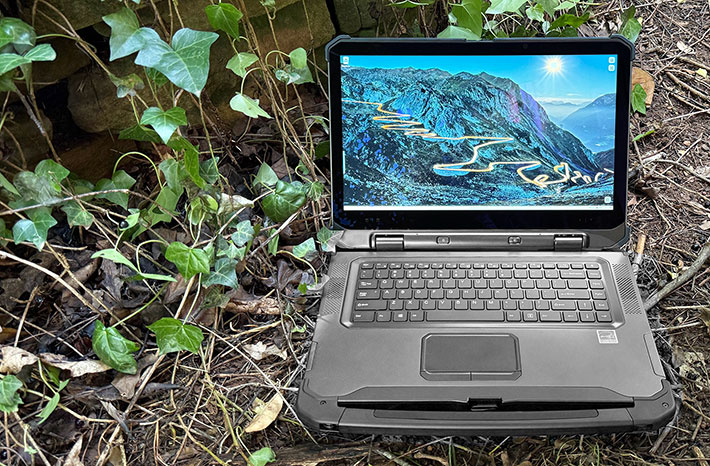
San Jose, California-based DT Research has been designing and manufacturing specialized computing systems for more than three decades. Best known for its information appliances, medical computing solutions, and rugged tablet computers for vertical markets, the company also offers an interesting line of fully rugged laptops. In this review we're taking a close look at the DT Research LT355, a 15.6-inch mobile workstation that can be equipped with NVIDIA RTX A2000 discrete graphics, making it suitable for graphics-intensive field applications such as engineering, BIM modeling, laser scanning, imaging, and GIS.
DT Research first established itself with compact Windows-based information appliances and rugged tablets, gradually expanding its portfolio to include increasingly powerful mobile systems. We reviewed the company's 14-inch DT340T rugged tablet in 2019, a large Windows tablet that could be transformed into a capable notebook by attaching an optional full-size keyboard. That product reflected DT Research's long-standing emphasis on modular, application-specific mobile computing rather than simply following mainstream PC trends.
In 2021 the company entered the rugged laptop market with its LT300 family. Those systems featured a distinctive dual-hinge display that could rotate a full 360 degrees, allowing the computer to function as either a conventional notebook or a large tablet. While the LT355 retains the same robust dual-hinge architecture, the display now opens to a conventional 180 degrees. Rather than serving as a convertible, the LT355 is designed as a traditional rugged notebook computer.

Entering the rugged laptop market was an ambitious step. Panasonic's Toughbook line had effectively defined the category decades earlier, and today several established manufacturers offer mature product families covering a wide range of screen sizes and performance levels. Rather than attempting to duplicate those products, DT Research chose to develop laptops that reflect its own design philosophy.
Instead of competing primarily on minimum weight or the thinnest possible design, DT Research emphasizes workstation-class capability, generous battery capacity, integrated expansion, and solid construction.
The LT355 illustrates that philosophy well. It is available in multiple performance configurations, including an optional NVIDIA RTX A2000 professional graphics processor, offers exceptionally large battery capacity, incorporates thoughtfully integrated options rather than external add-ons, and features a bright 15.6-inch display designed for demanding field work. Even details such as the magnetic protective port covers and the distinctive dual-hinge display mechanism reflect an emphasis on practical engineering rather than marketing novelty.
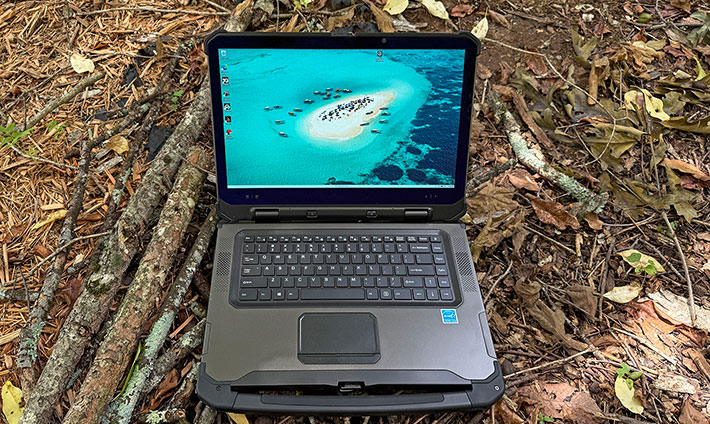
The result is a rugged notebook that feels different from many of its competitors. Rather than chasing the lightest weight or the newest processor generation, the LT355 is designed as a dependable mobile workstation intended for professionals who value durability, expandability, graphics performance, and long-term reliability in demanding environments.
Taking a closer look at the DT Research LT355
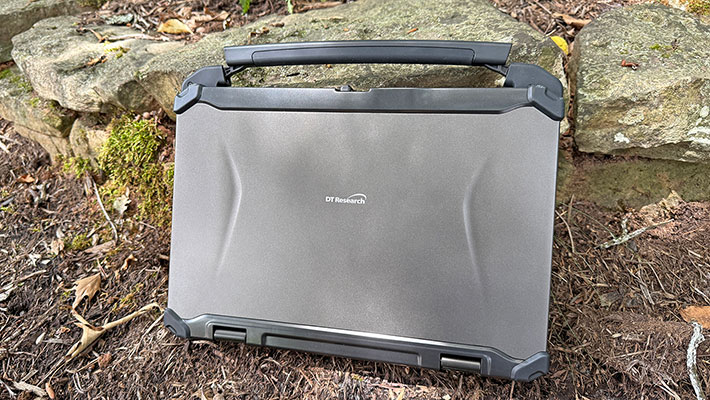
The preliminaries out of the way, let's take a look at the machine itself. With its integrated carry handle aside, the LT355 initially looks like a larger version of a conventional business laptop. At the same time, it projects a much more substantial and durable appearance. Its 15.6-inch display is unusually large in the rugged laptop market, where 13.3- and 14-inch screens remain the norm. Despite its size, the LT355's 16:9 widescreen format, restrained color scheme, and clean industrial design give it a surprisingly sleek appearance.
Once opened, several details reveal the LT355's tablet heritage. The edge-to-edge cover glass extends beyond the active LCD area, and the display lacks the raised protective bezel commonly found on rugged laptops. The power and display control buttons are located alongside the screen rather than on the keyboard deck, another carry-over from the smaller LT-series convertibles. Although the LT355 retains the distinctive dual-hinge design, its display opens to 180 degrees rather than rotating through a full 360 degrees.
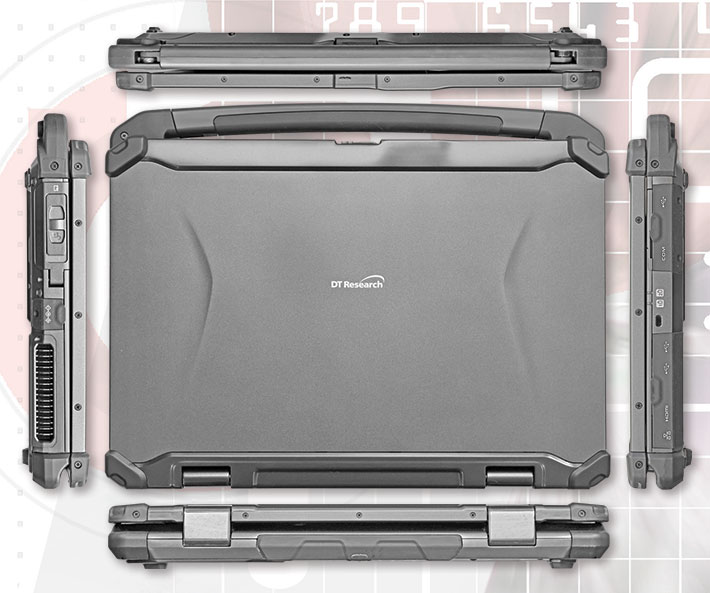
The LT355 shares the understated elegance common to most DT Research products. As with the company's tablets, function clearly takes precedence, but considerable attention has been paid to appearance and finish. Instead of Panasonic's familiar coarse silver powder coating, DT Research uses a finer metallic finish reminiscent of premium automotive paint. Even the protective corner bumpers are carefully integrated into the design without sacrificing their effectiveness.
The LT355 also communicates its purpose without exaggeration. Clearly marked ports line both sides of the chassis, the protective corner guards inspire confidence, and everything appears designed for long-term field use rather than showroom appeal. Most LT300-series models rely entirely on passive cooling, but our review unit's optional NVIDIA RTX A2000 graphics generate sufficient heat to require an internal cooling fan.
Drawing on its extensive experience designing medical computing equipment, DT Research also incorporates antimicrobial enclosure materials into the LT355. Originally developed for healthcare environments where frequent cleaning and disinfecting are routine, the technology also benefits many industrial and public-sector deployments.
Like the smaller LT-series models, several controls are located on the display rather than the keyboard base. These include the power button and the Night Vision button, which instantly switches the display between normal operation, off, and an ultra-dim 20-nit mode for nighttime use. The feature works well, although the button is perhaps a bit too easy to press accidentally during daytime operation. Brightness controls are duplicated on the display bezel, a practical solution inherited from the convertible LT models where the keyboard is not always accessible.

The image above shows the left side of the LT355 with the hinged protective covers removed for better viewing. The magnetic protective covers are one of DT Research's nicer engineering touches. They attach securely, are easy to remove and replace, and proved entirely practical during everyday use.
From left to right, the LT355 has its RJ45 LAN jack, an HDMI output port, a couple of USB 3.0 Type-A ports, then a Kensington lock slot, a DB9 serial port, and finally another USB Type-A port.
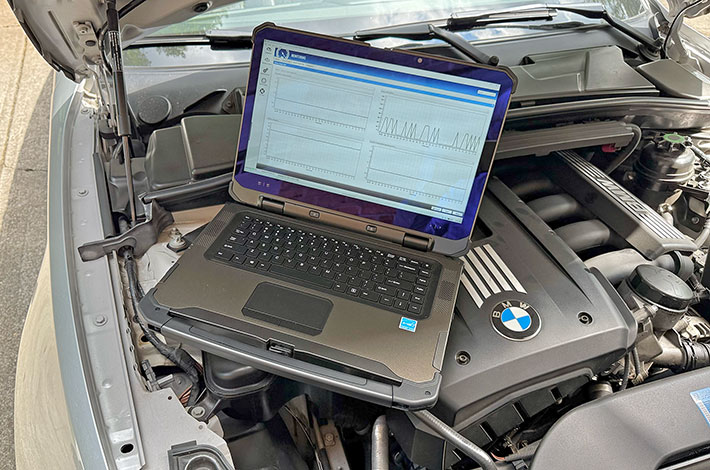
Heavy-duty construction
When it comes to industrial design, appearances can be deceptive. What looks like metal may be painted plastic, what appears solid may be little more than clever styling. That's one reason we routinely open up — and sometimes completely disassemble — the rugged computers we review. With the LT355, however, that's hardly necessary. It is immediately apparent that this is the real thing. The chassis is almost entirely magnesium-aluminum alloy with DT Research's anti-microbial coating. Beyond that there is little more than ABS+PC plastic, the protective rubber bumpers, and glass. Everything about the LT355 feels solid, purposeful, and built to last.
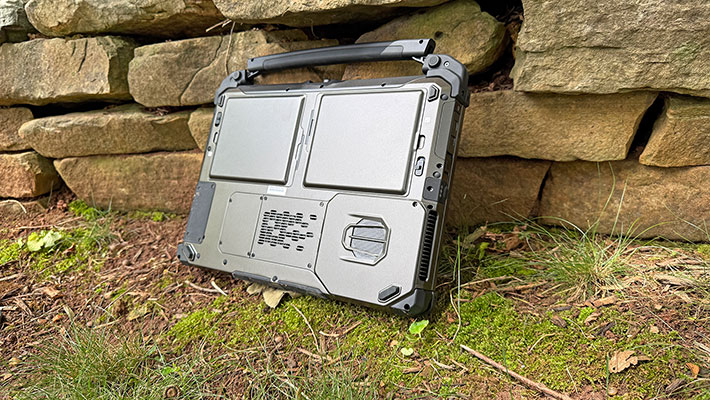
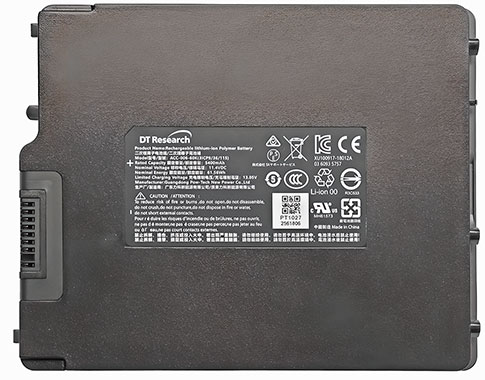
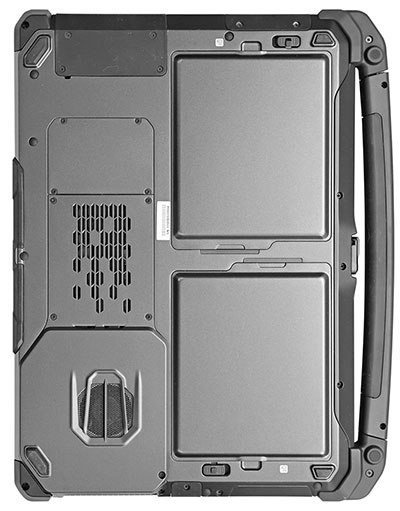 The first thing one notices on the backside of the LT355 are its two removable battery packs. They are fully exposed and can be exchanged in seconds. The standard batteries each provide 61.6 watt-hours, for a combined capacity of 123.2 watt-hours. Optional extended batteries increase that to an impressive 91.2 watt-hours each, or a total of 182.4 watt-hours.
DT Research clearly believes in providing plenty of onboard battery power. Even the standard 123.2 watt-hour configuration exceeds the battery capacity of most competing rugged laptops, while the optional extended batteries offer substantially more energy than virtually any competitor. The larger batteries protrude only about 3/8 inch beyond the rear surface of the computer, yet each weighs approximately one pound — more than an entire Apple iPad. They snap securely into place and are held by robust spring-loaded locking levers that inspire confidence.
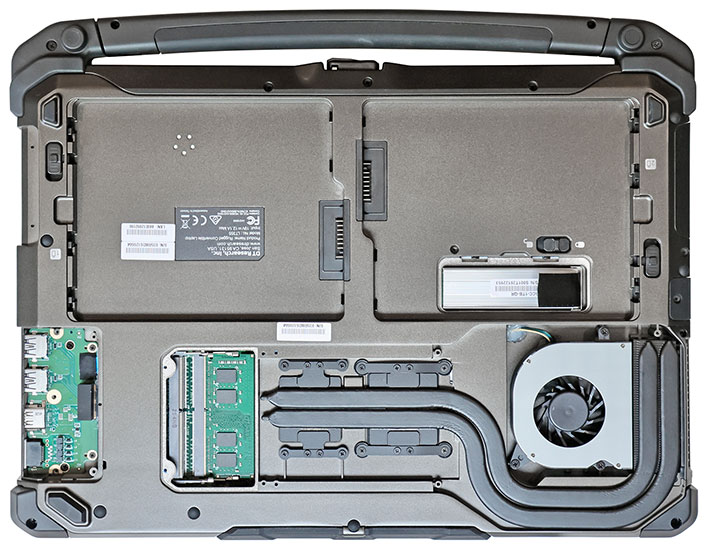
The backside also provides access to three service compartments (two on systems without the optional NVIDIA graphics). One covers the primary I/O module. That may seem unusual, but it reflects thoughtful engineering. I/O connectors are among the most difficult parts of any rugged computer to seal against water and dust. By concentrating all external connectors onto a dedicated module, only a single ribbon-cable opening needs to be sealed between the I/O compartment and the computer's main interior. Should moisture ever enter the compartment, it can be dried or serviced without exposing the rest of the system. The modular design also simplifies repairs and makes it easier for DT Research to offer customized I/O configurations for specialized applications.
A second compartment, located inside one of the battery bays, provides tool-free access to the primary PCIe NVMe SSD. A spring-loaded quick-release latch allows the storage module to be removed in seconds, a feature required in many government, military, and other security-sensitive environments where storage devices must be removed before equipment leaves a secure facility.
The third compartment provides access to the LT355's two RAM expansion slots. Unlike the smaller LT330 we previously reviewed, the LT355 limits access to memory only. The LT330 additionally exposed a SIM card slot, a second SSD connector, and a half-size PCIe expansion slot.
The LT355 is definitely not a generic laptop design. Virtually every aspect of its construction reflects practical engineering decisions aimed at durability, serviceability, and long-term field reliability. Sealing a rugged laptop is considerably more difficult than sealing a tablet because of the large display opening, hinged construction, and integrated keyboard. Whereas semi-rugged laptops often provide only IP52 or IP53 ingress protection, the LT355 achieves a full IP65 rating despite its more complex architecture.
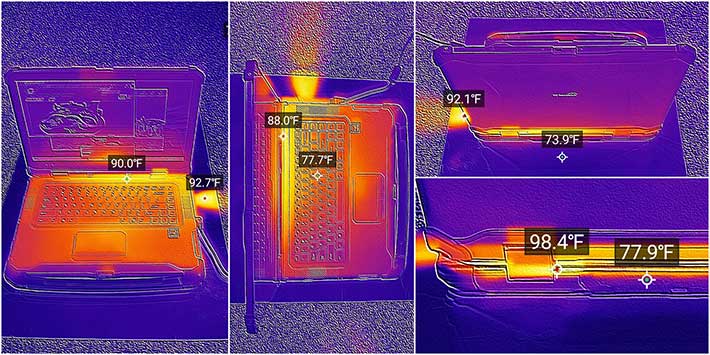
One consequence of the LT355's heavy magnesium-alloy chassis is that it also serves as a substantial heat spreader. Standard LT355 configurations therefore require no cooling fan at all, relying instead on passive heat dissipation through the enclosure itself. The optional NVIDIA RTX A2000 graphics processor, however, increases the system's thermal load sufficiently to require an internal cooling fan and an extensive heat-pipe assembly.
We used our thermal imaging camera to examine the LT355's heat distribution under load. The images clearly show that the magnesium-alloy chassis itself functions as an effective heat sink, spreading thermal energy away from the processor and electronics over a large area of the enclosure. The brightest area corresponds to the processor location, with heat gradually dissipating throughout the case. Even under sustained full-load operation in our lab, no exterior surface exceeded 100 degrees Fahrenheit, leaving substantial thermal headroom for operation in demanding field environments.
Keyboard and touch pad
The DT Research LT355 features a full-size 86-key keyboard. It uses the now-common island-style key design with flat keycaps, relatively short key travel, and good tactile feedback. While there is little key movement compared to older notebook keyboards, the LT355 remains comfortable for extended typing sessions.
The central QWERTY layout is full scale, with the standard 6.75-inch spacing between the centers of the Q and P keys. That makes the keyboard well suited for touch typists. The black keys are clearly labeled with white letters, numbers, and symbols that provide excellent contrast and readability.
Below the keyboard is a 4 x 2-inch capacitive touchpad. It strikes a good balance in size — neither too small nor overly large — and is surrounded by a subtle raised frame that allows users to easily locate the active touch area by feel. Two generously sized mechanical mouse buttons are positioned below the touchpad. They provide positive tactile feedback with a distinct audible click. The touchpad itself proved responsive and accurate during testing and can even be operated while wearing light gloves.
Below you can see a close-up of the LT355 keyboard:
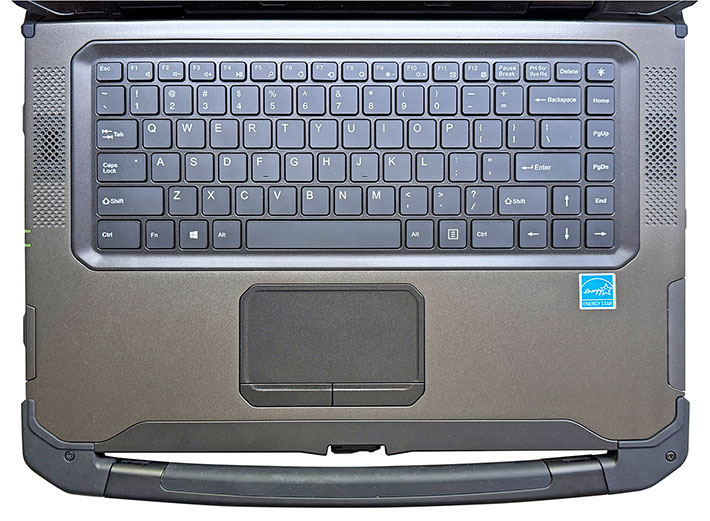
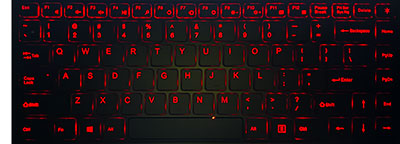 The keyboard includes a full row of F1 through F12 function keys along with Windows shortcuts, media controls, display brightness adjustment, volume controls, and the standard assortment of PC function keys. As mentioned earlier, the power button and Night Vision display control are located on the display rather than the keyboard deck, reflecting the LT series' convertible heritage.
The keyboard is illuminated by red LED backlighting with seven selectable brightness levels controlled through a keyboard function key combination.
Powerful Intel "Raptor Lake" processors
Being mobile devices, all laptops are designed to provide the best possible balance between performance, size, weight, battery life and cost. High performance is always an asset, but it generates more heat and draws more battery power. That can be handled with higher battery capacity, but that adds extra size and weight. If a customer wants a compact, quiet computer without a fan, it will probably have less performance. In general, higher performance means more heat, less battery life. Or more battery life, less performance, less heat. If you want more performance AND more battery life, it's more weight, AND more heat. It's always a compromise.
 As is, the LT355 is available with either Intel's Core i5-1340P or the more powerful Core i7-1370P processor, both members of Intel's 13th generation Core family, code-named "Raptor Lake." Introduced in early 2023, Raptor Lake represented an evolutionary refinement of Intel's hybrid-performance architecture, combining high-performance P-cores with energy-efficient E-cores in a single processor package.
Both available LT355 processors use a 28-watt base power envelope and feature a total of 12 cores consisting of four Performance cores and eight Efficient cores. The Core i5-1340P supports 16 execution threads and turbo frequencies of up to 4.6GHz, whereas the Core i7-1370P increases maximum turbo speed to 5.2GHz and adds Intel vPro Enterprise management and security capabilities. The Core i7 also offers larger cache resources and generally delivers somewhat higher performance in demanding workloads.
|
Available DT Research LT355 CPUs
|
Intel Core i7
|
Intel Core i5
|
|
|
Model
|
1370P
|
1340P
|
|
Performance cores
|
6 (12 threads)
|
4 (8 threads)
|
|
Efficient cores
|
8
|
8
|
|
Max Turbo Performance Core
|
5.20 GHz
|
4.60 GHz
|
|
Max Turbo Efficient Core
|
3.90 GHz
|
3.40 GHz
|
|
Thermal Design Power (TDP)
|
28/64 watts
|
28/64 watts
|
|
Smart Cache
|
24MB
|
12MB
|
|
Integrated graphics
|
Intel Iris Xe
|
Intel Iris Xe
|
|
Graphics max speed
|
1.50 GHz
|
1.45 GHz
|
|
Graphics Execution Units
|
96
|
80
|
|
Intel vPro
|
Enterprise
|
Essentials
|
The Core i7 1370P option offers a slight but probably noticeable performance edge in its integrated Intel Iris Xe graphics, having 96 execution units instead of just 80, and having a slightly higher maximum frequency. That, in conjunction with twice the Smart Cache, may make for quicker graphics processing. That said, adding the optional NVIDIA RTX A1000 or A2000 graphics will substantially boost graphics performance regardless of the chosen processor.
While Intel has since introduced newer Core Ultra processor families featuring integrated neural processing units (NPUs) for accelerating AI workloads, Raptor Lake remains a capable platform for traditional business, engineering, public safety, and industrial applications. For many rugged-computing deployments, long-term platform stability, proven compatibility, and established software support are often more important than adopting the latest processor generation at the earliest opportunity.
To see how the DT Research LT355 laptop performs compared to the high-performance rugged 15.6-inch laptop competitors from Durabook, Getac and Winmate, we ran our standard benchmark suites that perform dozens of tests covering CPU, 2D graphics, 3D graphics, memory, disk efficiency and more. The results are as follows:
|
DT Research LT355 rugged laptop vs 15.6-inch competition
|
|
Company
|
DT Research
|
Durabook
|
Getac
|
Getac
|
Winmate
|
|
Model
|
LT355
|
S15
|
S510
|
X600
|
L156AD
|
|
Year tested
|
2026
|
2023
|
2024
|
2023
|
2024
|
|
CPU Type
|
Intel Core
|
Intel Core
|
Intel Core Ultra
|
Intel Core
|
Intel Core
|
|
CPU model
|
i7 1370P
|
i7 1255U
|
7 165U
|
i7-11950H
|
i7-13700H
|
|
Graphics
|
RTX A2000
|
Intel Iris
|
GTX1650
|
RTX3000
|
Intel Iris
|
|
Display size
|
15.6-inch
|
15.6-inch
|
15.6-inch
|
15.6-inch
|
15.6-inch
|
|
Resolution (pixels)
|
1920 x 1080
|
1920 x 1080
|
1920 x 1080
|
1920 x 1080
|
1920 x 1080
|
|
Luminance
|
1,225 nits
|
1,033 nits
|
1,062 nits
|
1,223 nits
|
766 nits
|
|
Footprint (inches)
|
15.16 x 10.57
|
14.76 x 10.75
|
14.80 x 10.90
|
16.20 x 12.70
|
15.28 x 10.08
|
|
Thickness (inches)
|
1.66
|
1.16
|
1.50
|
2.10
|
1.54
|
|
Volume (cu-in)
|
266.0
|
184.1
|
242.0
|
432.0
|
237.2
|
|
Weight as tested (lbs.)
|
9.43
|
5.73
|
5.18
|
9.70
|
8.38
|
|
Operating temp
|
14° to 140° F
|
-4° to 140° F
|
-20° to 145° F
|
-20° to 145° F
|
-1° to 140° F
|
|
Ingress Protection rating
|
IP65
|
IP5x
|
IP53
|
IP66
|
IP65
|
|
PassMark 6.1
|
11,598
|
8,185
|
13,599
|
8,221
|
18,369
|
|
PassMark 9.0
|
6,509
|
5,881
|
5,817
|
6,562
|
7,613
|
|
CrystalMark
|
1,015,554
|
424,336
|
469,111
|
1,016,250
|
947,568
|
|
PCMark 10 Overall
|
7,923
|
5,568
|
5,599
|
6,258
|
6,546
|
|
PCMark 10 Disk
|
1,468
|
1,785
|
1,094
|
2,059
|
1,119
|
|
PCMark 10 Battery
|
8:04 hrs
|
7:08 hrs
|
13:24 hrs
|
9:02 hrs
|
4:15 hrs
|
|
Battery watt-hrs
|
123.1
|
56.0
|
149.0
|
149.0
|
74.4
|
|
Watt-hrs/hour
|
15.26
|
7.85
|
11.12
|
16.49
|
15.50
|
|
3DMark TimeSpy
|
NA
|
1,624
|
2,937
|
5,989
|
2,478
|
|
GeekBench 5 single core
|
2,634
|
1,163
|
1,644
|
1,589
|
1,787
|
|
GeekBench 5 multi core
|
7,855
|
6,471
|
6,280
|
5,794
|
10,429
|
|
GeekBench 5 Open CL
|
67,135
|
17,404
|
37,375
|
76,335
|
19,990
|
Before going into a discussion of benchmark results, keep in mind that the laptops listed above really only share one specification — their large 15.6-inch display. The Durabook S15 and the Getac S510 are compact and comparatively light rugged laptops for the field. The Getac X600 is a maximum connectivity and performance workstation. Whereas the DT Research LT355 and the Winmate entry are somewhere in-between.
Compared to competing 15.6-inch rugged laptops, the DT Research LT355 occupies an interesting middle ground. It is neither the lightest nor the fastest system in the group, nor does it employ the latest processor technology. Yet the LT355 consistently places near the top in many categories that matter to rugged-computing users, including display brightness, battery capacity, graphics capability, overall benchmark performance, and environmental sealing. As a result, the LT355 comes across as an exceptionally well-balanced platform.
One of the LT355's key strengths is its workstation-class orientation. The review unit's optional NVIDIA RTX A2000 discrete graphics substantially boost graphics and compute performance beyond what is available from the integrated graphics solutions used in most competing systems. Combined with a bright 1,200-nit display, substantial 123 watt-hour battery capacity, and IP65 sealing, the LT355 is well suited for engineering, utility, industrial deployments, as a command center for public safety/services and first responders, and other field applications where both ruggedness and computing power are required.
Although DT Research has not yet migrated the LT355 to Intel's newest Core Ultra processor architecture, benchmark results show that the Core i7-1370P remains a very capable performer. In fact, the LT355 posted some surprisingly strong results in several tests, including exceptionally high GeekBench 5 single-core scores. Overall, the LT355 demonstrates that a mature and proven platform can compete effectively when paired with ample battery capacity, professional graphics options, and a design focused on the practical requirements of demanding field users.
The discrete graphics option
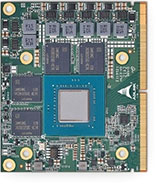 One feature that clearly distinguishes the LT355 from most competing rugged laptops is the availability of optional NVIDIA discrete graphics. While virtually all rugged notebooks rely entirely on integrated graphics, DT Research offers embedded NVIDIA RTX A1000 and RTX A2000 (shown on the left) graphics modules that transform the LT355 into a genuine mobile workstation capable of handling demanding graphics and GPU-accelerated computing tasks.
Unlike desktop graphics cards, which occupy expansion slots and require substantial space, power, and dedicated cooling, the LT355 uses compact embedded graphics modules based on NVIDIA's Mobile PCI Express Module (MXM) 3.1 standard. Measuring just 82 x 70 mm, these modules plug directly into the system motherboard while providing much of the functionality of their desktop counterparts.
Desktop and embedded RTX processors share the same NVIDIA architecture, but laptop implementations inevitably operate within much tighter thermal and power constraints. As a result, embedded GPUs generally run at lower clock speeds and may throttle performance under sustained heavy workloads. Even with those limitations, however, they can dramatically outperform integrated graphics in applications that benefit from GPU acceleration.
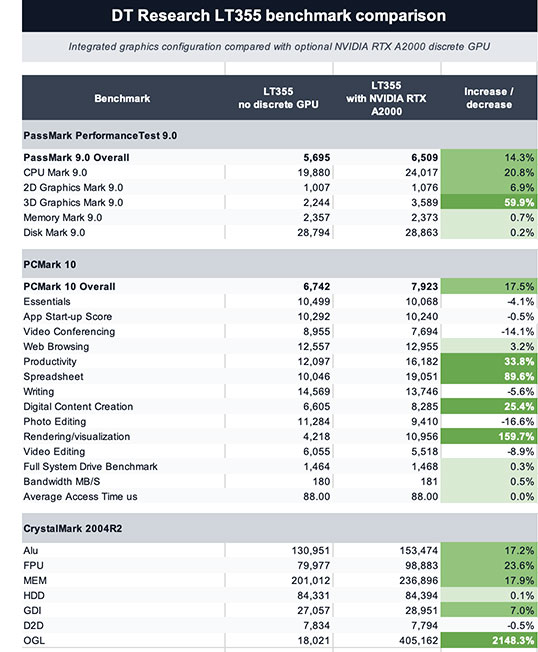 Our benchmark testing clearly demonstrated the impact of the optional RTX A2000 graphics module. In CrystalMark's OpenGL benchmark, for example, the LT355 achieved scores roughly ten to twenty times higher than the integrated graphics configuration. OpenGL remains widely used in CAD, engineering, GIS, medical imaging, scientific visualization, simulation, and numerous other professional graphics applications. As shown in the table to the right, the greatest gains occur in graphics-intensive workloads, but several compute-oriented benchmarks also benefit substantially from the addition of the discrete GPU.
DT Research also states that the optional NVIDIA graphics provide "powerful graphics for AI development." That claim is justified, although some context is helpful. The RTX A1000 and A2000 modules support CUDA, TensorRT, and other NVIDIA GPU technologies that can significantly accelerate AI inference, machine vision, and many GPU-computing workloads. However, the LT355's Intel 13th-generation "Raptor Lake" processors predate Intel's Core Ultra families with integrated neural processing units (NPUs). As a result, the LT355 is best viewed as a rugged GPU-accelerated mobile workstation that is fully capable of supporting many AI workloads, rather than as a next-generation AI-native platform designed around dedicated on-chip AI acceleration.
As always, additional performance comes at a cost. During our PCMark 10 Battery benchmark, the LT355 averaged just 7.87 watt-hours of energy consumption per hour with the discrete GPU disabled, but nearly doubled that to 15.26 watt-hours per hour when the RTX A2000 was enabled. That translated into excellent battery life of approximately 15 hours and 39 minutes without the discrete GPU, compared to 8 hours and 4 minutes with it enabled. When operating from AC power, the increased consumption is of little consequence. For extended battery-powered field operation, however, users should carefully consider whether the additional graphics performance is required for the task at hand.
Given the substantial impact the RTX A2000 has on both performance and battery life, users would benefit from an easier way to switch between integrated and discrete graphics. At present, changing graphics modes requires navigating through Windows' Advanced Startup options into the system BIOS. While hardly difficult, the process is cumbersome enough that most users are unlikely to change modes very often.
Battery life: it depends
As stated in the prior section, battery life of the big LT355 workstation depends on whether or not one of the two available discrete graphics options are installed. Just like on the desktop where discrete graphics cards can draw more power than the entire PC, the same holds true when adding discrete graphics to a laptop or mobile workstation.
 Just what kind of impact a graphics option has on battery life depends on the application. As is our standard procedure, we used Passmark Software's BatteryMon power management benchmark utility to measure the DT Research LT355 laptop's power draw at idle under different Windows power settings and different screen backlight levels both with and without the NVIDIA RTX A2000 discrete graphics engaged.
First we disabled discrete graphics and set the Windows 11 power options to "Best power efficiency" and display brightness to its lowest setting (0%). That way we saw an idle power draw of 5.8 watts. We then cranked the backlight up to 50%, and draw increased to 11.0 watts. Then we cranked brightness all the way up to 100% and saw 13.4 watts. Again, that's with the laptop being awake, but just idling along.
Next we set the Windows 11 power options to "Best performance" and display brightness at its lowest setting (0%). That way we saw an idle power draw of 5.9 watts. We then cranked the backlight up to 50% and draw increased to 711.3 watts. Then we cranked brightness all the way up to 100% and saw 13.7 watts.
|
|
DT Research LT330 Power Draws WITHOUT discrete graphics
|
|
|
Backlight level
|
Lowest (0%)
|
50%
|
Maximum (100%)
|
|
|
Best efficiency
|
5.8 watts (21.2 hrs)
|
11.0 watts (11.2 hrs)
|
13.4 watts (9.2 hrs)
|
|
|
Best performance
|
5.9 watts (20.9 hrs.)
|
11.3 watts (10.9 hrs.)
|
13.7 watts (9.0 hrs.)
|
What do those power draw figures mean in terms of projected theoretical battery life? The two big Li-Ion batteries of in review LT355 have a combined capacity of 121.5 watt-hours. Dividing that by the modest 5.8 watt minimum observed draw would indicate a very impressive 21.2 hours of battery life with the system staying awake the whole time. In the best performance settings and with the backlight going at 100%, theoretical battery life would drop to a still quite acceptable 9.0 hours.
|
|
DT Research LT330 Power Draws WITH NVIDIA RTX A2000 graphics
|
|
|
Backlight level
|
Lowest (0%)
|
50%
|
Maximum (100%)
|
|
|
Best efficiency
|
11.6 watts (10.6 hrs)
|
15.1 watts (8.2 hrs)
|
18.5 watts (6.7 hrs)
|
|
|
Best performance
|
12.1 watts (10.2 hrs.)
|
15.3 watts (8.0 hrs.)
|
18.9 watts (6.5 hrs.)
|
The picture is quite different with the RTX A2000 graphics installed and engaged. That way, even in the Windows 11 Best power efficiency mode, power draw is twice as much as without the discrete graphics, at 11.6 watts, good for a theoretical battery life of 10.6 hours. In the Windows 11 Best power mode and screen brightness up as high as it goes, draw rises to 8.9 hours, good for a theoretical 6.5 hours.
How do those numbers compare to the PCMark 10 Battery test, where the system continuously performs typical tasks at a steady display brightness of 200 nits? There, the LT355 lasted 15:39 hours without discrete graphics, and with graphics engaged 15:39 hours, almost twice as long. In terms of power draw, it was 15.26 watt-hours per hour with graphics, and 7.87 watt-hours per hour without. That's a big difference. What it means is that customers should configure their LT355 laptop according to anticipated workflows.
Big, bright display
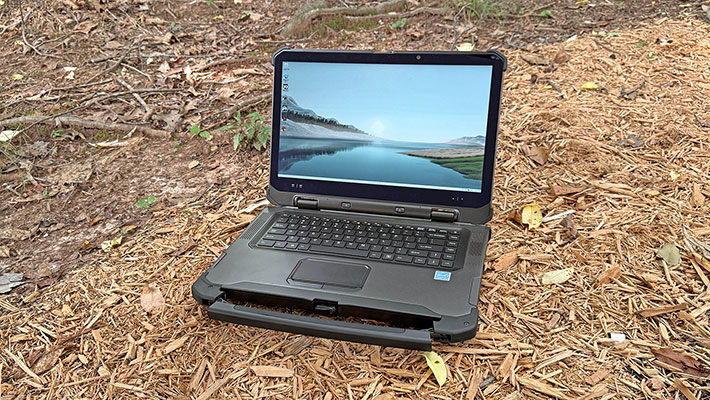
The LT355's large display measures 15.6 inches diagonally and it uses the "full HD" 1920 x 1080 pixel resolution, which translates into a wide-format 16:9 aspect ratio. 1920 x 1080 resolution in this size display makes for 141 pixels per inch. Full HD is still pretty much the norm in semi-rugged and fully-rugged laptops. Given the very high pixel density of today's smartphones and consumer tablets, as well as the 4k resolution of many PC monitors and almost all TVs, it'd be desirable to have higher resolution on professional laptops as well, even if only as an option.
Most laptop, tablet and smartphone screens on the market today are of the glossy variety, and the LT355 has one of those as well. That makes for colors that pop but — as is the case with all glossy screens — also for considerable reflections outdoors. That's not that much of an issue anymore. We've all become used to handling such reflections on our smartphones and tablets — simply hold them so as to avoid reflections. With a heavy laptop that's not always so easy.
Not too many years ago, outdoor viewability was the weak point of most rugged mobile computing devices. Display technologies came and went, none yielding acceptable results. Eventually the industry decided that modifying conventional transmissive LCDs for daylight and sunlight use was the best available way to go.
 That's done by reducing the display's internal reflection of ambient light so that, in conjunction with a reasonably strong backlight, there is enough contrast to make the screen viewable outdoors. This reduction of internal reflection is accomplished via a combination of polarizers, filters, coatings and elimination of air spaces between the various layers of the LCD.
Almost all mobile devices use this technology today but the exact implementation varies from manufacturer to manufacturer. As does the strength of the backlight (a stronger backlight means a larger battery or shorter battery life).
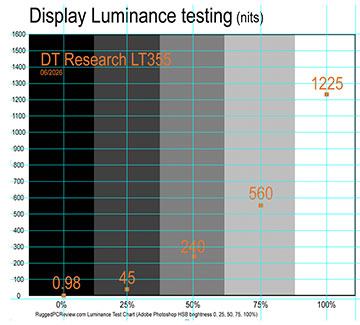
DT Research has plenty of experience in this and it shows. The LT355 display is not only excellent indoors, it also remains very usable outdoors. The laptop's 1,200 nits (we measured 1225 nits) backlight is plenty strong enough to boost contrast and viewability in broad daylight.
The table to the right shows our measurements of the light emitted by the LT355's display. The light emitted by a display backlight is given in a unit called candela per meter squared, or cd/m2, usually just called "nits." Standard laptops generate about 250 nits. A good tablet or smartphone between 500 and 600 nits. Some rugged laptops can generate as much as 1,500 nits, but very strong backlights can quickly gobble up battery power.
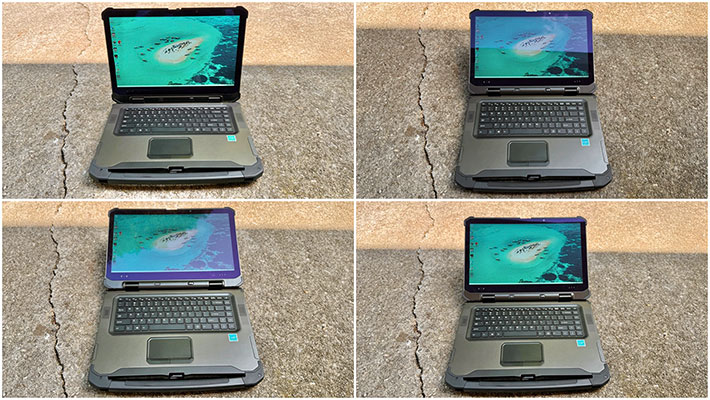
Viewing angle is another display quality that we consider relevant in laptops. It's important because it's annoying of the screen image changes when you look at it from a different angle. What's on the screen must remain easily viewable regardless of the viewing angle, and there must not be any changes in color, contrast or brightness.
The LT355 display scores high in that regard. It offers near perfect horizontal and vertical viewing angles. Colors, and contrast remain true and unchanged when viewed from various angles.
Interestingly, the smaller LT330 rugged laptop we tested some time ago had a semi-matte display instead of the glossy display of the LT355. Semi-matte displays don't have the often harsh reflections of glossy displays. Instead, they defuse reflected light with their anti-glare features. That makes for slight milkiness and perceived brightness reduction. Both approaches work, and it may come down to personal preference on what is preferred. As is, the display of the LT355 is about as good as it gets with current display technology.
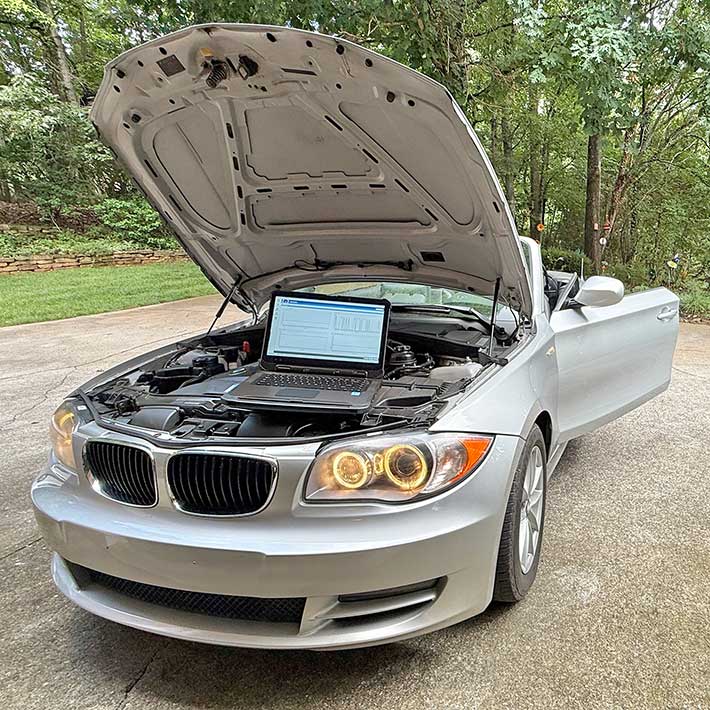
Note that the LT355 is also available with two MIL-STD-3009 Class B NVIS screen options. The MIL-STD-3009 standard sets the lighting requirement of devices so that they can be used in conjunction with night vision imaging systems. That includes infrared suppression, wavelength cut-offs, and other measures, while still affording comfortable, reliable reading of the display. Both NVIS options available for the LT355 top out at 800 nits. The difference between them is that the NVIS mode in option 1 is 0 to 20 nits, whereas option 2 goes from 0 to 0.7 nits.
Ruggedness
The LT355 clearly is a tough and very rugged laptop. Its heavy and extremely solid construction alone see to that. However, do keep in mind that while a simple silicon sleeve can protect a smartphone from most harm, it's much more complex to shield a ten pound laptop from impact damage. It's the same laws-of-physics thing that makes an ant able to lift several times its own weight where as infinitely stronger elephant can do no such thing.
As a result, don't look for a long list of impressive ruggedness specs, the kind you'd expect from a two or three pound tablet. And don't expect to toss it onto the bed of a pickup truck, rattling around, and not emerge scratched up a bit. 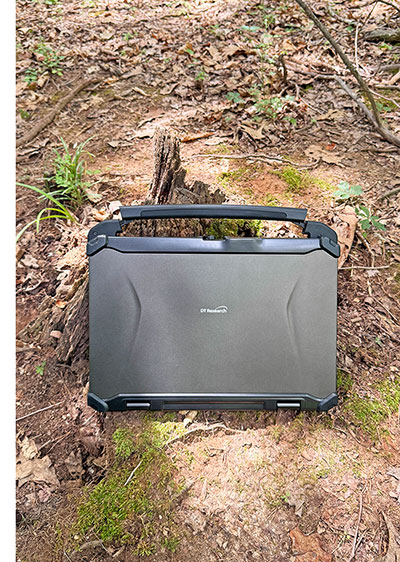 Given its solid, heavy ABS + PC plastics and magnesium-aluminum alloy construction it won't break, but physics are physics.
Think of a Mercedes Benz G-Class Geländewagen. It can handle an awful lot and won't break. But it's big and heavy and you wouldn't want it all scratched up.
The specs state IP65 sealing, which means the device is fully protected against dust, and also protected against low pressure water jets from all directions, albeit with, according to the spec, "limited ingress permitted."
IP65 is pretty much the expected norm for ultra-rugged tablets in this class. In essence, IP65 here means you can use it in the rain, it won't mind sitting in a puddle or being washed off, but dropping it into a stream isn't a good idea. And do make sure the protective doors are closed when using the tablet in wet conditions.
The standard operating temperature range is a very wide -4 to 140 degrees, making the system deployable almost anywhere, including in commercial freezers. If that's not enough, DT Research offers a low temperature option that enables operation down to -22°F (-30°C).
DT Research also claims MIL-STD-810G/H testing for drop, shock and vibration.
Here it would be good to see more detailed information in the spec sheet and promotional materials. Customers are interested in rugged systems because they can handle more abuse, so specific information on exactly how much how much abuse should be included. The laptop feels extremely solid and trust-inspiring, without, of course, any flex or creaking. That said, it would be good to know what sort of strengthened glass DT Research used and also what sort of scratch resistance the metallic surfaces provide.
Summary: DT Research LT355 rugged laptop
With the LT355, DT Research offers a well-conceived and thoughtfully engineered competitor in the 15.6-inch rugged laptop class. Rather than attempting to produce the lightest or thinnest rugged notebook, the company has created a true mobile workstation designed for professionals who need dependable computing power, expandability, long battery life, and field-ready durability.
The LT355 combines a very bright 15.6-inch Full HD daylight-viewable capacitive multi-touch display with excellent viewing angles, an optional pressure-sensitive active digitizer, generous battery capacity, and a solid magnesium-alloy chassis that inspires confidence. The enclosure is exceptionally well built, provides IP65 ingress protection, incorporates antimicrobial materials originally developed for healthcare environments, and is designed for straightforward serviceability in the field. The tradeoff for that capability is weight — our fully configured review unit tipped the scales at nearly ten pounds.
Connectivity is comprehensive, with three USB 3.0 Type-A ports, HDMI, Gigabit Ethernet, serial, Smart Card/CAC reader, and numerous configuration options, including MIL-STD-3009 Class B compliant night vision capability. Users with graphics-intensive workloads can further transform the LT355 into a genuine rugged mobile workstation by selecting optional embedded NVIDIA RTX A1000 or RTX A2000 discrete graphics.
Although based on Intel's proven 13th-generation Core processor family rather than the latest Core Ultra architecture, the LT355 consistently delivered strong benchmark results throughout our testing. Combined with fast PCIe NVMe storage, class-leading battery capacity, and optional professional NVIDIA graphics, the result is a rugged notebook whose strengths lie not in chasing the newest technology, but in providing a balanced, highly capable platform for demanding real-world applications. -- Conrad H. Blickenstorfer, June 2026
DT Research LT355 Specs:
| Status |
Full review June 2026
|
| Type |
Rugged mobile workstation
|
| Processor |
Intel 13th generation "Raptor Lake" 14-core i7-1370P (up to 5.2GHz turbo)
Intel 13th generation "Raptor Lake" 12-core i5-1340P (up to 4.6GHz turbo)
|
| Graphics |
Core i7-1370P: Intel Iris Xe Graphics (96 execution units/1.50GHz max frequency)
Core i5-1340P: Intel Iris Xe Graphics (80 execution units/1.45GHz max frequency)
|
| CPU Thermal Design Power |
Both 28/64 watts |
| OS |
Microsoft Windows 11 IoT Enterprise
|
| Memory |
8GB to 64GB RAM in two slots
|
| Display |
Sunlight-readable TFT with LED backlight, 1,200 nits (measured 1,225 nits); optional NVIS screens with 800 nits max, NVS mode 0 to 0.7 nits or 0 to 20 nits.
|
| Display Size/Resolution |
15.6-inch/1920 x 1080 pixel FHD (141 ppi) |
| Digitizer |
Capacitive multi-touch, optional eGalaxPen active pen with replaceable 1.5mm tip (uses AAAA battery) |
| Discrete Graphics |
Optional NVIDIA RTX A1000 or RTX A2000 embedded modules
|
| Keyboard/buttons |
100%-scale 86-key keyboard with full row of F1 to F12 function keys, Windows shortcuts, media controls, screen brightness, 1 power button, 2 programmable buttons, 2 brightness control buttons, 1 NVIS/Normal toggle |
| Navigation |
Touchpad, keyboard, stylus, optional mouse |
| Storage |
64GB to 2TB SSD, supports quick release and RAID 0/RAID 1 (sample unit had ???? PCIe NVMe SSD)
|
| Expansion slots |
1 x micro SD card, full-slot Smart Card/CAC reader, SIM card |
| Housing |
Antimicrobial ABS + PC plastics and magnesium-aluminum alloy
|
| Size |
1.66 x 15.16 x 10.57 inches (42 x 385 x 269 mm)
|
| Weight |
9.75 lbs. (4.4kg) with two batteries
|
| Operating temperature |
14° to 140°F (-10° to 60°C), optional -30°C to 60°C (-22°F to 140°F)
|
| Ingress protection |
IP65 |
| Altitude |
unknown
|
| Drop/shock |
MIL-STD-810G/H |
| Vibration |
MIL-STD-810G/H |
| Humidity |
0% to 90% non-condensing |
| Regulatory |
FCC Class B, CE, RoHS compliant |
| Power |
2 x hot-swappable 11.4V 5,400mAH Li-Ion (61.6 watt-hour) for 123.2 watt-hour total, optional 2 x hot-swappable 11.4V 8,000mAH Li-Ion (91.2 watt-hour) for 182.4 watt-hour total
|
| Cameras |
Optional front and back full-HD cameras with auto white balance and gain/exposure control enable facial recognition security
|
| Interface |
3 x USB-A 3.0, 1 x HDMI, 1 x RJ45, 1 x DB9 RS232, power
|
| Wireless options |
802.11ax WiFi, Bluetooth 5.2
|
| Price |
Inquire |
| Product page |
LT355 rugged laptops web page and LT355 product page |
| Spec sheet |
 LT355 brochure (PDF) LT355 brochure (PDF)
|
| Warranty |
Standard 3 year warranty.
|
|
Contact
|
DT Research
2000 Concourse Drive
San Jose, CA 95131, USA
Tel: (408) 934-6220
Fax: (408) 934-6222
Web: www.dtresearch.com
|
(copyright 2026 RuggedPCReview.com)