RuggON SOL 7
State-of-the-art, rugged, and easily customizable high-performance 12-inch Windows tablet
By Conrad H. Blickenstorfer; photography by Carol Cotton
RuggON Corporation launched the SOL 7 rugged 12-inch Windows tablet in June 2025 as a high-performance mobile computing solution for use in demanding environments. The SOL 7 tablet was designed to bring robust durability and seamless connectivity to sectors such as public safety, automotive applications, warehousing, logistics, agricultural and the like. The SOL 7 also supports AI capabilities and, at the time of its release, was the first such device powered by Intel's groundbreaking Arrow Lake processors. The SOL 7 also filled a gap in RuggON's tablet lineup, that of an entry in the increasingly popular 12-inch class of industrial tablet computers.
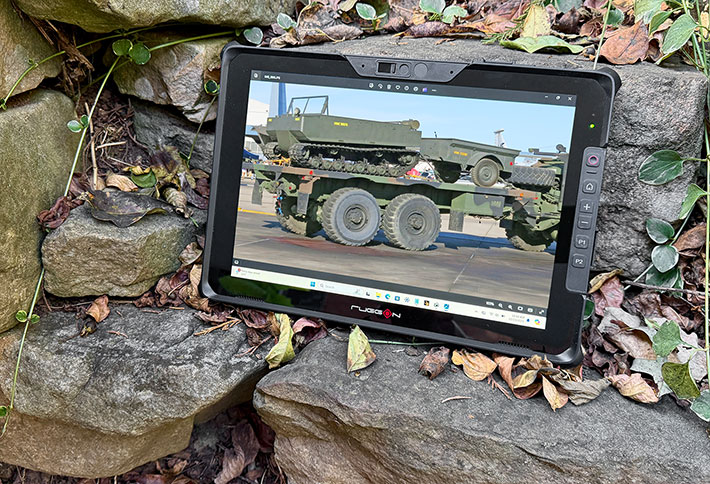
For those unfamiliar with RuggON, the company is a subsidiary of Ubiqconn Technology, a proven designer and manufacturer of rugged mobile computing solutions with literally decades of experience and expertise in improving mobile productivity in harsh environments. The SOL7 is an entirely new platform, which gave RuggON the opportunity to build a state-of-the-art tablet from scratch, integrating, rather than retrofitting, the latest tech.
With the SOL 7, RuggON adds a 12-inch class rugged tablet to its lineup, and a lot of existing and potential customers will appreciate that. That's because each type and class of computing equipment has its optimal size, a size that works well with its intended purpose. That optimal size may change over time, for a variety of reasons.
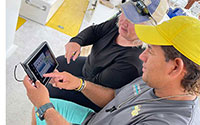 One can run Windows on small tablets, as RuggON's own 8-inch LUNA 3 proves quite well (see Case Study: Computers in Diving and Marine Exploration). The picture to the right shows the RuggON LUNA 3 that we used on a marine exploration project. Small screen tablets bring full Windows into the field or wherever you need Windows in a small package, and back in the office it's easy to hook a tablet up to a big desktop display.
But let's face it; Windows was and is an operating environment that works best on larger screens. And that's were larger tablets come in.
So why did RuggON wait so long to come up with a bigger tablet? Probably because size and weight still matter in mobility, especially in rugged tablets that with their stronger build and extra protection are larger and heavier than consumer tech. And that still means that the 10-inch class probably has about 3/4 of the rugged tablet market, and the 12-inch class just 20-30%. Still, not having a 12-inch offering is a drawback in a model lineup, and may make some customers look elsewhere. And that is what RuggON is now addressing with the new SOL 7.
Where the SOL 7 fits into RuggON's lineup
The vast majority of rugged tablets come in three classes — 8-inch, 10-inch, and 12-inch displays. There are tablets wth displays smaller than eight inches, but those are usually special purposes products. With smartphone displays approaching seven inches, there's simply no general need for seven inch tablets. There are tablets with displays larger than twelve inches, but those are generally too big and heavy to be truly mobile.
So with the SOL 7, RuggON now has a modern, competent rugged tablet in each of the three popular display size classes. 10-inch tablets generally have the largest market share, and there RuggON is represented with the PA501 and PX501, both mature tablet products that have been on the market for several years, and have been kept up to date.
The 10-inch Windows-based PX501 is currently at the 13th generation of Intel Core processors — Raptor Lake. The also 10-inch Android-based RuggON SOL PA501B was initially introduced in 2019 and still runs on a SnapDragon SD660, but has been updated in various areas and is currently at Android 12 GMS. The 8-inch LUNA 3, as mentioned above, is smaller and handier than most rugged Windows tablets. It's powered by an Intel 11th generation "Tiger Lake" Core processor and thus offers significantly higher performance than is common in that class.
|
RuggON Rugged Tablets: Where the SOL 7 fits in
|
|
Model
|
LUNA 3
|
SOL PA501B
|
PX501
|
SOL 7
|
|
|
|
|

|
|
|
Operating system
|
Windows 11 IoT Enterprise
|
Android 12
|
Windows 11 GAC
|
Windows 11 GAC
|
|
Display size
|
8.0-inch
|
10.1-inch
|
10.1-inch
|
12.0-inch
|
|
Resolution
|
1280 x 800
|
1920 x 1200
|
1920 x 1080
|
2160 x 1440
|
|
Pixels/inch
|
189 ppi
|
224 ppi
|
224 ppi
|
216 ppi
|
|
Aspect ratio
|
16 : 10
|
16 : 10
|
16 : 10
|
3 : 2
|
|
Luminance
|
1000 nits
|
1000 nits
|
1000 nits
|
1000 nits
|
|
Size
|
8.9 x 6.2 x 0.9 inches
|
11.0 x 7.7 x 0.9 inches
|
11.0 x 7.7 x 0.9 inches
|
12.0 x 8.2 x 0.94 inches
|
|
Volume
|
49.7 cubic inches
|
76.2 cubic inches
|
76.2 cubic inches
|
92.5 cubic inches
|
|
Weight (lbs.)
|
2.00
|
3.10
|
3.00
|
3.30
|
|
Top CPUs
|
Intel Core i5-1145G7E
|
Qualcomm SDM660
|
Intel Core i7-1365G7UE
|
Intel Core Ultra 7 255U
|
|
CPU Code
|
11th Tiger Lake
|
NA
|
13th Raptor Lake
|
Arrow Lake
|
|
Max RAM
|
8GB DDR4x
|
4GB LPDDR4
|
32GB DDR5
|
32GB DDR5
|
|
Max primary storage
|
512GB M.2 2242 SSD
|
64GB eMMC
|
1TB PCIe M.2 SSD
|
1TB PCIe M.2 SSD
|
|
Std. Battery
|
22.7 whr
|
48.6 whr
|
48.6 whr
|
33.5 whr
|
|
Extd. Battery
|
45.4 whr
|
97.2 whr
|
97.2 whr
|
67.0 whr
|
|
Operating temp
|
-4° to 122° F
|
-4° to 140° F
|
-4° to 140° F
|
-4° to 145° F
|
|
IP rating
|
IP65
|
IP65
|
IP65
|
IP65
|
The RuggON SOL 7 — design, look and feel
The new RuggON SOL 7 has a 12.0 x 8.2 inch footprint. That allows for generous margins around the actual LCD display, so this is a fairly substantial tablet. As a rugged design, the SOL 7, of course, is also considerably thicker than an iPad or a consumer Android tablet. But despite packing an entire high-performance Windows PC into a heavily fortified body, it's still only about an inch thick. As far as weight goes, our review SOL 7 clocked in at three pounds and seven ounces.
The image below shows the RuggON SOL 7 from the front and from all four sides.
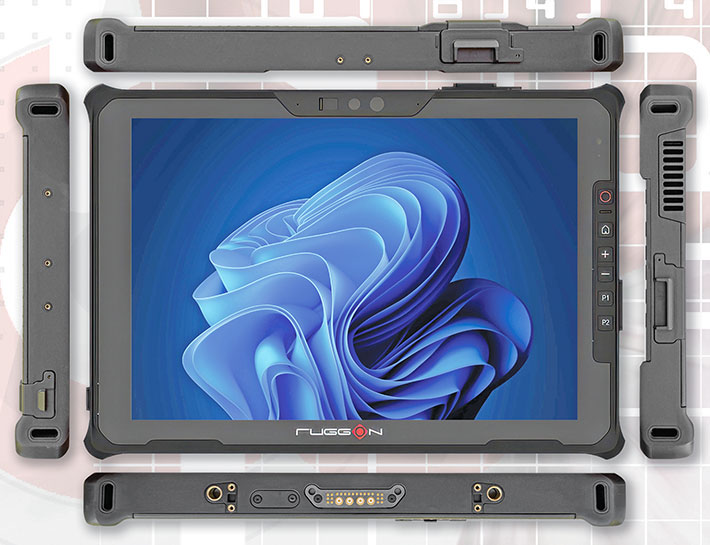
The SOL 7's case is all black with a grippy, rubberized perimeter with integrated protected corner bumpers, and slip-resistant surface design that makes the tablet easy to hold and operate. Ergonomic design is further augmented by a 1/2 inch to 3/4-inch bezel area around the actual LCD. Modern consumer tablets hardly have any bezel area anymore, which makes them cumbersome to operate and frustratingly prone to inadvertent touch action just from holding them.
The generous bezel area also allowed RuggON's to add physical push-buttons along the right side of the tablet. In additional to the power/sleep and Windows buttons, there are volume up/down buttons, as well as two programmable buttons that can be assigned to some two dozen actions and functions. This can be a huge plus in deployments that require gloves, or where tactile push simply works better than capacitive touch.
Centered above the display is the SOL 7's Full-HD front camera for video conferencing. It has a has a physical privacy slider than no hacker or AI can remotely activate. To the right of the camera is the cutout for the optional 5MP Windows Hello camera. Windows Hello can be a convenient and secure way to log in bia face recognition.
While older rugged tablet designs often included a large number of different current and legacy plugs and connectors (all of which had to be sealed), the SOL 7 covers all of that with a couple of Thunderbolt 4 ports, using the small, reversible USB-C plug, plus a single Type-A port of the USB 3.2 Gen 2 variety. There's also an expansion area on top that can be used for a legacy RS232 serial port, an RJ45 LAN port, another USB Type-A 2.0 port, or a 2D barcode reader.
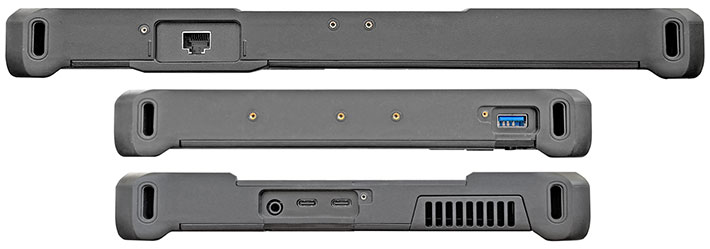
The SOL 7, like almost all tablets today, uses capacitive multi-touch. RuggON offers a 2mm hard-tip stylus that can be secured in a bolt-on clip on the left side. Some other RuggON tablets offer an optional active digitizer; we're not sure if that is available for the SOL 7.
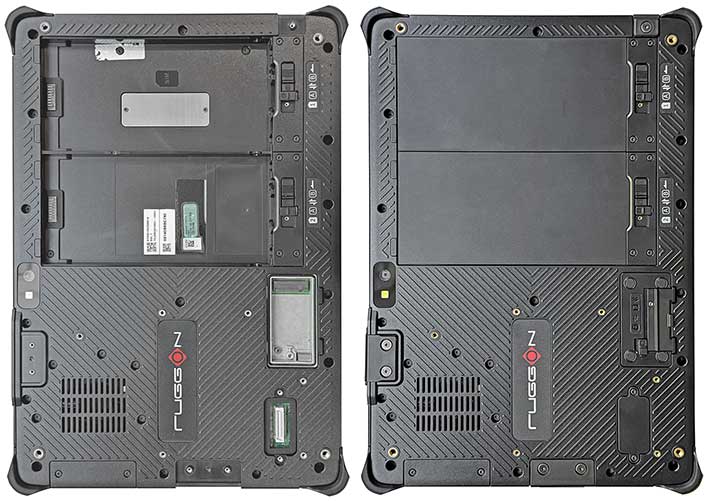
The pictures below show the backside of the SOL 7. It looks more like the bottom of a business laptop than the back of a slender, fragile consumer tablet. On the right is the backside as is, on the left with the expansion port covers and the batteries removed.
Powered by Intel Core Ultra Series 2 processor technology
When it comes to deciding what processor to use for a brand-new product (or even upgrading an existing product), hardware manufacturers don't have it easy. There are so many things to consider. There's performance, there's power consumption, there's cost, there are cooling requirements, there's picking the best fit for target markets and target customers. That's not an easy task, and Intel certainly doesn't make it any easier with its rapid-fire new product release and its endless reshuffling of product lines and nomenclature.
In recent years we've seen a rush to increase core count, from single to dual, to quad, and then octa. and those could also have two threads each or just one. Then came turbo boost, just like in cars where one can idle along in the city and then step on it on the open road. More recently, Intel began putting both performance and economy cores into a processor, just like smartphone chips have had for years. And just like hybrid vehicles that both have an electric and a combustion engine, with each doing what it does best.
 Now it's all about AI — artificial intelligence — and all that comes with it. Back in the day, the CPU handled everything. In time, a GPU was added, to handle all the graphics that have different mathematical requirements and are best processed by their own dedicated hardware. And so the NPU was added, the Neural Processing Unit where performance is measured in TPS (transactions per second) and TOPS (Tera Operations Per Second).
Amidst all these advancements and changes that necessitated new and different CPU architectures, Intel's traditional practice of using code-named generations of Core processors made less and less sense. The 14th generation of Core processors, for example, began as the latest in Intel's by now traditional hybrid processors and was codenamed "Raptor Lake Refresh", but there was AI, and so gen 14 also had "Meteor Lake" that was called "Core Ultra" and those processors now included an NPU, which Intel named "Intel AI Boost".
|
|
RuggON SOL 7 CPUs (see full specs)
|
|
|
Intel CPU
|
Core Ultra 5
Series 2
|
Core Ultra 7
Series 2
|
|
|
Model
|
225U
|
255U
|
|
|
P-Cores
|
2
|
2
|
|
|
E-Cores
|
8
|
8
|
|
|
Low Power E-Cores
|
2
|
2
|
|
|
Total Threads
|
14
|
14
|
|
|
P-cores Max Turbo
|
4.80 GHz
|
5.20 GHz
|
|
|
E-cores Max Turbo
|
4.20 GHz
|
3.80 GHz
|
|
|
Thermal Design Power
|
15/57 watts
|
15/57 watts
|
|
|
Smart Cache
|
12MB
|
12MB
|
|
|
Integrated graphics
|
Intel Graphics
|
Intel Graphics
|
|
|
Graphics max speed
|
2.00 GHz
|
2.10 GHz
|
|
|
GPU Peak TOPS
|
8
|
8
|
|
|
NPU Peak TOPS
|
12
|
12
|
Progress, however, is so fast in the AI area, that Intel — likely in response to Microsoft's 40 TOPS requirement for "CoPilot+ PC" certification — quickly added a Core Ultra Series 2, still technically part of the 14th generation of Core processors, but also further subdivided into Arrow Lake on the higher end, and Lunar Lake on the ultra-low power side of chips.
Further muddying the picture is that Intel's Core Ultra Series 2 processors come in various classes, such as "H" for higher performance mobiles, "U" for thin&light mobiles, "V" for AI-oriented mobile devices. And even that is not all. Intel also equips some Core Ultra Series 2 processors with standard "Intel Graphics" and others with considerably more powerful Arc graphics.
As is, RuggON chose the Core Ultra 5 225U and Core Ultra 7 255U as the two available processor options for the new SOL 7. Intel designed those two for thin&light mobile devices. The two chips do have an NPU, although with lower specs than the NPUs used in "H" class Series 2 processors, and they use "Intel Graphics" and not the powerful Intel Arc GPUs. Ruggon probably chose those processors because they present a good balance of performance, AI-capability, economy and thermal suitability for rugged tablet targeted for field and industrial use.
At least on paper, the difference between the two chip options seems fairly minor. As the tablet to the right shows, both have the same number and arrangement of cores. The i7 has slightly higher base and max turbo clock frequencies, and the max graphics clock frequency is also a bit higher. It is conceivable that RuggON uses Intel DTT dynamic tuning to configure the two options differently, but there's no mention of that in the spec materials.
The tablet below shows how the RuggON SOL 7 compares to its primary 12-inch class rugged tablet competitors.
|
RuggON SOL 7 Benchmarks and Comparisons
|
|
Manufacturer
|
RuggON
|
Dell
|
Durabook
|
Getac
|
Panasonic
|
|
Model
|
SOL 7
|
7230
|
U11
|
F120
|
TB 33
|
|
Year tested
|
2025
|
2023
|
2023
|
2025
|
2024
|
|
Type
|
Tablet
|
Tablet
|
Tablet
|
Tablet
|
Tablet
|
|
Display
|
12.0" (2160x1440)
|
12.0" (1920x1200)
|
11.6" (1920x1080)
|
12.2" (1920x1200)
|
12.0" (2160x1440)
|
|
Luminance
|
1,075 nits
|
1,335 nits
|
1,080
|
1,060
|
1,220
|
|
Processor Type: Intel
|
Core Ultra
|
Core i5
|
Core i7
|
Core Ultra
|
Core i5
|
|
Processor Model
|
i5 225U
|
1240U
|
1250U
|
i7 268V
|
1245U
|
|
Performance cores
|
2
|
4
|
4
|
4
|
2
|
|
Efficient cores
|
8
|
4
|
4
|
0
|
8
|
|
LP efficient cores
|
2
|
0
|
0
|
4
|
0
|
|
Max Turbo Speed
|
4.80 GHz
|
4.40 GHz
|
4.70 GHz
|
5.00 GHz
|
4.40 GHz
|
|
Thermal Design Power (TDP)
|
15/57 watts
|
9/29 watts
|
9/29 watts
|
17/37 watts
|
15/55 watts
|
|
Cooling
|
fan
|
fan
|
fanless
|
fan
|
fan
|
|
PassMark 9.0
|
4,687
|
5,516
|
4,154
|
6,328
|
5,761
|
|
CrystalMark
|
473,760
|
401,322
|
318.914
|
565,380
|
433,823
|
|
PCMark 10 Overall
|
5,470
|
4,847
|
4,051
|
7,448
|
3,858
|
|
-- PCMark10 Essentials
|
9,026
|
9,776
|
8,370
|
10,370
|
7,388
|
|
-- PCMark10 Productivity
|
8,821
|
6,416
|
6,052
|
10,793
|
4,895
|
|
-- PCMark10 Content Creation
|
5,580
|
4,929
|
3,561
|
10,018
|
4,313
|
|
PCMark10 Drive
|
1,539
|
2,015
|
1,723
|
1,950
|
2,061
|
|
PCMark10 Battery (Hours)
|
9:11 hrs
|
11.51 hrs
|
5:41 hrs
|
14:03 hrs
|
7:51 hrs
|
|
PCMark10 Battery (whr/hr)
|
7.60
|
6.01
|
6.42
|
4.19
|
5.61
|
|
3DMark Time Spy
|
1,539
|
1,142
|
1,033
|
4,113
|
1,443
|
|
GeekBench 5 Single Core
|
1,592
|
1,496
|
1,394
|
1,998
|
946
|
|
GeekBench 5 Multi Core
|
6,054
|
7,049
|
4,181
|
9,817
|
4,619
|
|
GeekBench 5 Open CL
|
12,547
|
10,713
|
10,259
|
33,393
|
14,001
|
|
GeekBench AI OpenVINO CPU
|
5,430
|
NA
|
NA
|
7,521
|
NA
|
|
GeekBench AI OpenVINO GPU
|
8,728
|
NA
|
NA
|
31,253
|
NA
|
|
GeekBench AI OpenVINO NPU
|
11,953
|
NA
|
NA
|
36,958
|
NA
|
What does the table above show? First, that unless one buys ancient military tech that's often several tech generations behind the state-of-the-art, there's remarkable parity between comparable products from Tier one competitors. All offer enough configuration options to taylor a product for the job at hand.
That said, going with the latest tech is always a good thing. Apart from downright benchmark performance, newer tech also means better support for the latest standards, interfaces, functionality and more. Being at the state-of-the-art is an ever-moving target, but for now, the SOL 7 tablet is right at the forefront, supporting next-gen connectivity, interface, and processing features.
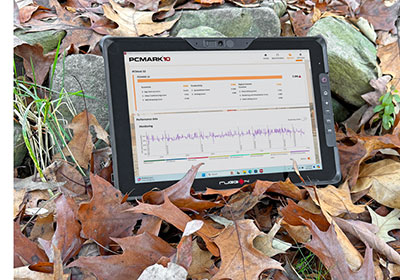 Despite the remarkable overall parity in modern processing tech, there are considerable differences between these products, and not all of them are reflected in the above table. In our testing, for example, we have long been noting often large differences between device performance when plugged in versus running on battery.
As is, we report plugged-in performance, because battery performance often depends on charge level, making fair comparisons impossible. Thermal design differences have an impact on benchmark performance, but an even larger one on day-to-day use. Overheating or intrusive fan noise can make a big difference. We measure display luminance, but there really are other factors that matter as much more more, such as reflections, viewing angles, etc. Here, we very much appreciate RuggON's decision to go beyond the by now quite old "Full HD" resolution standard and go up to 2160 x 1440. Definitely a competitive edge.
Battery life is important, but that really depends as much on the size of the battery than on operational economy. We've now been reporting not just how long a device runs on a charge, but also how many watt-hours it consumers per hour, i.e. the "gas mileage" of the device. Battery capacity, of course, matters, as does the availability of extended range batteries.
What are the implications of RuggON's decision to go with "U" instead of "H" or "V" class Core Ultra Series 2 chips? That depends. The latter have higher graphics performance, especially in 3D graphics. So that may or may not matter. In pure AI processing, the "H" and "V" chips have a much higher ceiling, but how much that matters in the field is up for discussion.
We did pose those question to RuggON. The company's response was that when the SOL 7 was designed, the "U" series offered the most stable roadmap and long-term availability, which is critical for their IPC and industrial customers who rely on extended lifecycle support.
On the AI performance side, RuggON said that for customers who require higher AI performance, the company offers external AI acceleration modules, such as Hailo-8, to provide additional TOPS and flexibility without compromising system stability or thermal balance.
Battery life: balancing size, weight and performance
Early rugged laptops and tablets managed only very limited run time on a battery charge — sometimes barely an hour, and if a machine lasted three hours it was cause for celebration. Needless to say, such modest battery life significantly limited the usefulness of mobile technology in the field. Battery technology has come a long way since then, but providing adequate run time is still a challenge even with today's advances.
 And that is especially true for devices with power-hungry electronics, such as most high-performance mobile Windows systems. Rugged laptops generally address the issue with large battery packs, but rugged tablet users value maximum mobility and expect their devices to remain slim and light enough to carry all day, which means big, heavy batteries are simply not an option.
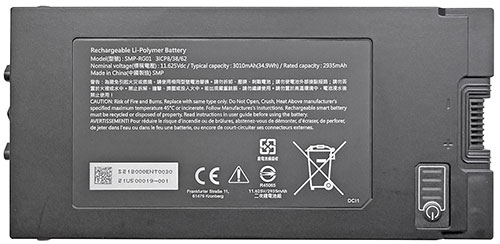
That was one of the challenges RuggON's engineers faced when designing the SOL 7. It needed to be a full-featured, high-performance Windows tablet in a light, compact housing less than an inch thick. Their solution was a pair of slim 34.9 watt-hour rechargeable battery packs that fit flush into the bottom of the tablet. The dual-battery design allows hot-swapping, and the flush mounting makes it possible to offer optional thicker extended batteries for users who need maximum run time.
|
RuggON SOL 7
Power Draws (at idle)
|
|
Backlight level
|
Darkest (0%)
|
Recommended (50%)
|
Brightest (100%)
|
|
Max Battery
|
4.7 watts (14.6 hrs)
|
7.5 watts (9.3 hrs)
|
10.0 watts (7.0 hrs)
|
|
Max Performance
|
4.8 watts (14.5 hrs)
|
7.7 watts (9.1 hrs)
|
10.3 watts (6.8 hrs)
|
Even for a high-performance tablet like the SOL 7, the combined 69.8 watt-hours should be sufficient to carry the system through a full shift, and that is exactly what today's users expect. Ever since the original iPad established the benchmark of roughly 10 hours of operation on a single charge, tablet customers have viewed full-day battery life as a basic requirement rather than a premium feature. Rugged-tablet users are no different. They may not always need an entire shift's worth of untethered runtime, but when they do — during inspections, field service calls, documentation work, or outdoor deployments — they need to count on the tablet lasting without interruption.
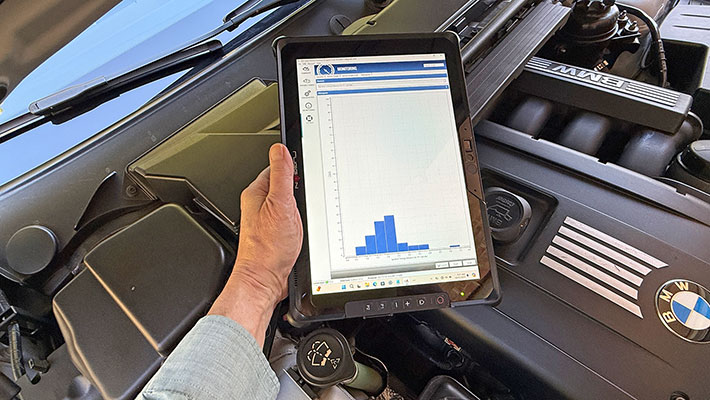
We used PassMark's BatteryMon utility to get an initial sense of expected runtime. With the tablet set to Windows' "Best battery life" mode and the backlight at its lowest setting, we observed a minimum power draw of 4.7 watts. At 50% brightness it rose to 7.5 watts, and at full brightness to about 10.0 watts. Using the available 69.8 watt-hours from two fully charged batteries, the lowest observed draw of 4.7 watts translates into a theoretical maximum of approximately 14.6 hours.
Switching Windows 11 to "Best performance" mode produced very similar results at low brightness — 4.8 watts — essentially identical to the battery-saver setting. At 50% brightness we measured 7.7 watts, and at full brightness 10.3 watts, which would yield about 6.8 hours of operation. Interestingly, at both low and medium brightness levels, this is lower power consumption than we saw on RuggON's 8-inch LUNA 3 tablet. Even at maximum brightness, the SOL 7 draws only slightly more power than our test LUNA 3 unit did.
The BatMon utility, of course, measures power draw at idle, with only background processes running. In real-world use, systems typically enter standby after periods of inactivity, consuming even less power, but when called upon to perform actual work they draw significantly more. As a result, real-life battery life can vary widely.
This is why the UL PCMark 10 Battery benchmark — which continuously exercises the system with a variety of common computing tasks until the battery is exhausted — is a far more reliable predictor of real-world runtime.
In the PCMark 10 Battery test, with the tablet in economy mode and the display set to 200 nits, the SOL 7 lasted 9:11 hours, easily exceeding the eight-hour full-shift requirement. With substantially higher battery capacity than the LUNA 3 tablet we tested earlier, improved power management in the latest electronics, and both Microsoft's and RuggON's optimization efforts, the new SOL 7 therefore delivers what is expected from a rugged tablet designed for field deployment: it makes it through a full shift and then some. The system's effective "gas mileage" of 7.6 watt-hours per hour of operation, however, is still a bit higher than we would prefer — likely explained by our test unit being an early pre-production model.
What's inside the RuggON SOL 7?
There is little reason to ever fully open up a RuggON SOL 7 tablet. Anything that could possibly require access in the field can be accessed from the outside. That includes the Expansion VMC port, the SSD storage module interface, and the micro SIM card slot beneath the battery compartment.
But what about the RuggON SOL 7's overall construction? For years, creators of rugged tablet computers have faced a difficult task. They must come up with a device that is strong enough to hold up to all the potential hazards and punishments tablets face on the job, but also one that observes the rules of ergonomic design and provides the proper functionality. And let's face it, good looks and visual appeal matter, too. On top of all that, there's the challenge of packing an entire Windows computer that can run on batteries into a tablet compact and light enough to be used and carried around on the job.
How did RuggON cover all that? If for some reason, full disassembly is required, the SOL 7 housing is essentially a shallow PVC box that consists of a front pan that has the display and system chassis mounted on it, and then a back cover that contains no electronics other than the cellular SIM antenna. Sealing between the two parts is via a tongue and groove design where a thin rubber seal sits in a groove around the perimeter of the back cover, and presses against the front pan.
Separating the two parts of the housing requires undoing about two dozen small Torx T6 screws. Once that's done, the back cover can be very carefully lifted from the front pan. There is just one thin ribbon cable between the two halves, the one that connects the SIM module to the to its antenna. Why that antenna couldn't be mounted to the side of the front pan is unclear. As is, utmost care is required not to rip the tiny ribbon out of its tiny connector.
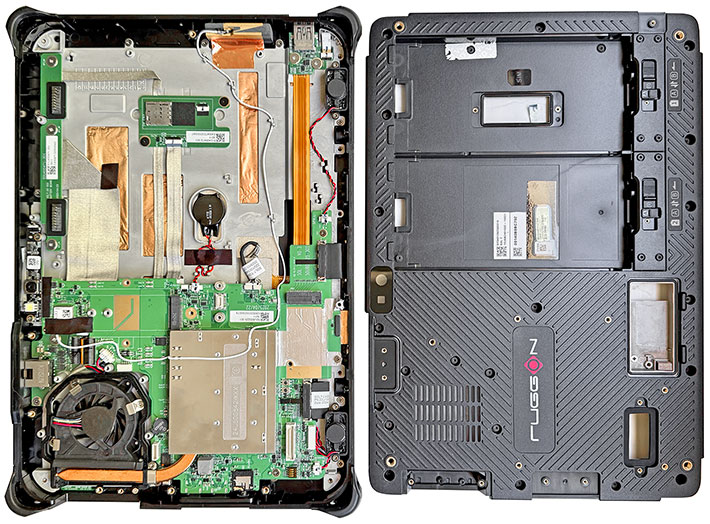
The SOL 7 chassis consists of a solid magnesium plate securely mounted to the four inside corners of the front pan. The roughly 5 x 7 inch motherboard is mounted onto the magnesium chassis.
As is usually the case in Windows-based rugged tablets, the overall design is highly modular, with components connected with ribbon cables and wires. It looks laptop-like, in contrast to consumer tablets that often pack everything into one small and hyper-integrated system board and nothing else. Ruggon and Uniqconn have plenty of experience of doing this right, so no concerns here.
Unlike RuggON's 8-inch LUNA 3 tablet, where the company chose passive cooling as the optimal solution, the SOL 7 uses active fan cooling, and so there is a small roughly 2-inch fan that connects via a copper tube to the CPU and ancillary electronics compartment that sits underneath a metal cover.
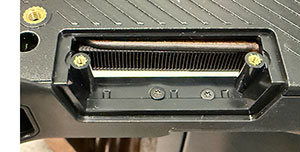 The fan, of course, requires an air intake and exhaust, which means liquids can get into the fan compartment. The fan can handle that, and the compartment is sealed towards the inside of the tablet.
A nice detail here: fan air intakes tend to accumulate gunk over time. RuggON knows that and therefore made the intake cover removable. So if debris accumulates, all you have to do is undo two screws, take that cover off, and clean out the gunk. It's this type of attention to important details that separates experts from wannabes.
All modern computer systems have numerous sensors that continuously report temperature levels throughout the system. If things get too hot, the fan may run faster or the system slows down, or both.
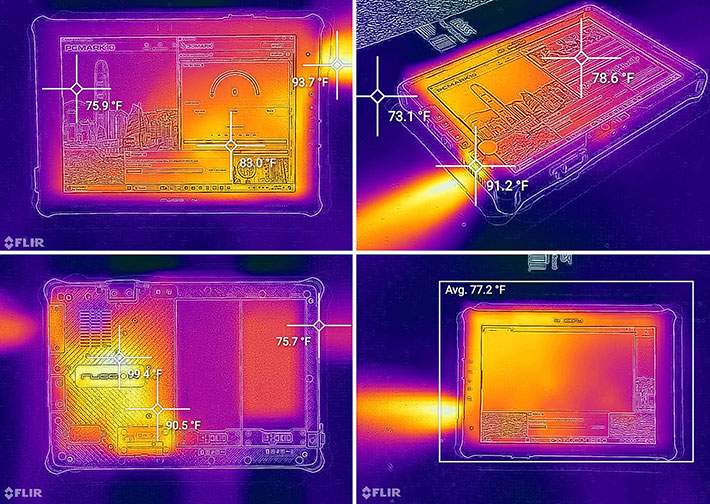
The image collage below shows the SOL 7 through one of the RuggedPCReview.com lab's thermal imaging camera, running the demanding PCVMark 10 and 3DMark Time Spy benchmarks simultaneously. Ambient tempwerature in the lab was in the low F70s. Even under such heavy load, the SOL 7 barely heated up. We saw a maximum temperature of just under 100F at the exhaust fan.
The image compilation below show some of the interesting details of the RuggON SOL 7:
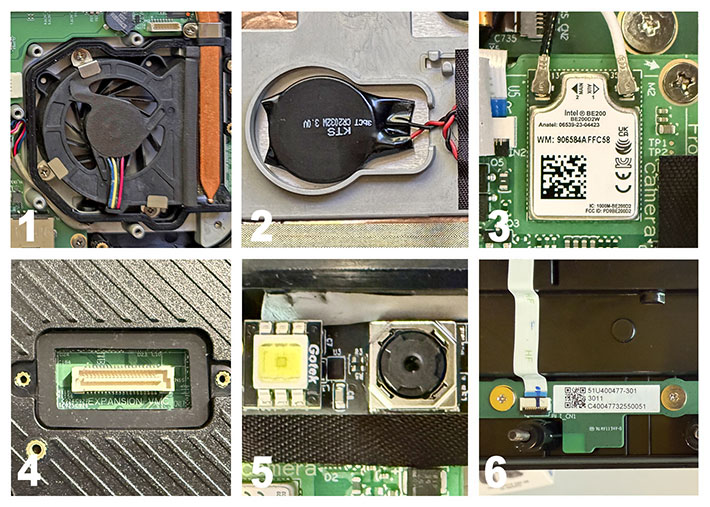
- The fan housing of the SOL 7 — active cooling systems rely on a adjustable-speed mechanical fans. Copper heat pipes are used to syphon heat off the CPU and ancillary electronics. The integrated fan is sealed against the inside of the housing; liquid may get inside the fan housing (the fan doesn't mind), but the actual interior of the tablet is sealed.
- Replaceable button battery.
- The SOL 7's Intel BE200 supports Wi-Fi 7 (802.11be), which supports three frequency bands simultaneously and maximum theoretical wireless speeds of up to 5.8 Gbps. And Bluetooth 5.4 brings improved connection stability, lower latency, stronger and anti-interference capabilities.
- Sealed expansion port for a variety of bolt-on modules for additional functionality.
- A look at the tiny 11MB auto-focus rear camera and LED flash module. Almost everyone uses smartphone cameras today, but having one onboard for project documentation comes in handy, and the SOL 7 makes for a much bigger display than any smartphone has.
- One of the SOL 7's internal antennas. Those benefit from being placed around the inside perimeter of the tablet.
Bright, sharp 10-point procap multi-touch display
There was a time when tablet and laptop displays were nearly unreadable outdoors. Those days are largely gone, but display quality — and especially outdoor readability — remains a critical issue. Most high-end brand-name tablets now have very good screens, and even many consumer tablets remain reasonably viewable outside. Consumer-grade devices typically use backlights in the 400-nit range, and most modern displays provide the wide, almost 180-degree viewing angles that we consider essential in a tablet.
 Rugged tablets are often used outdoors in bright, direct sunlight. Most standard transmissive LCDs, however, tend to wash out in daylight, which is why sunlight readability has become a major selling point in rugged mobile computing. The current standard for outdoor-viewable displays combines a strong backlight, anti-reflective coatings, linear and circular polarizers, and direct bonding of as many LCD layers as possible to reduce internal reflections. All major rugged vendors employ these techniques, but optical coatings are expensive, and performance depends greatly on how the coatings are applied and how well the layers are bonded.
In our testing, RuggON displays have traditionally performed very well, and the panel used in the SOL 7 is no exception. Its 2160 × 1440 resolution yields 216 pixels per inch on a 12-inch screen. That is not especially high by modern premium smartphone standards, which often feature extremely dense displays, but 216 ppi is still close to what Apple defines as "retina" — meaning that at normal viewing distances, individual pixels are not discernible. Aspect ratio also matters, and the SOL 7's 3:2 layout is, to many users, an ideal balance: neither too boxy nor overly wide.
As for the 2160 × 1440 resolution itself, it is a very welcome step up from the 1920 × 1080 or 1920 × 1200 formats still used in most rugged tablets. It remains puzzling that, in an era when nearly every aspect of tablet technology has advanced dramatically — processors, memory, storage, connectivity, and graphics — display resolutions in the rugged sector have largely stayed at levels established more than a decade ago. Higher pixel density brings clearer text, sharper graphics, and greater precision for modern applications, yet many rugged tablets continue to rely on legacy resolutions. RuggON took a different approach with the SOL 7, and the result is an appreciably better display. 2160 × 1440 provides roughly 50% more pixels than traditional "Full HD" 1920 × 1080. Thank you, RuggON.
Resolution, of course, isn't everything. For outdoor use, backlight brightness is critical. Here again, RuggON did well by giving the SOL 7 a 1,000-nit maximum luminance rating. "Luminance" is the technical measure of perceived brightness and is expressed in candelas per square meter, a term that doesn't mean much to most users. That's why the industry generally refers to the same measurement as "nits," a simpler, more familiar term that has become the standard shorthand for display brightness.
The four pictures below show the SOL 7 outdoors on a medium-bright afternoon. Clockwise starting at the upper left are the display head-on, then slightly tilted away where you can see some reflection, then what it looks like with the entire screen showing reflection, and finally that the screen remains bright and readable even at increasing viewing angles with inevitable reflections.
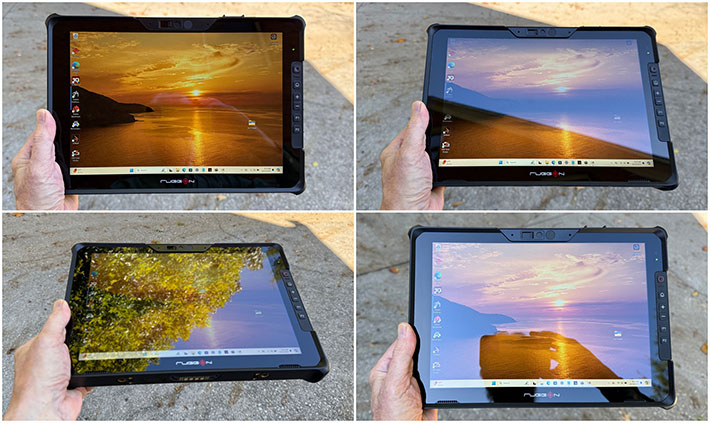
Wide viewing angles without degrading viewability and appearance of what is on the display are very important. Lesser displays may show annoying, distracting contrast and/or color shifts at wider viewing angles; the SOL 7 doesn't.
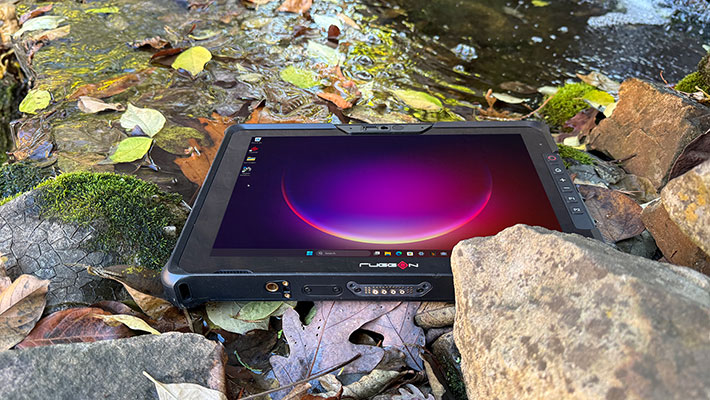
Capacitive multi-touch works as quickly and effortlessly as users expect from a modern tablet. Capacitive controllers have become more sensitive in recent years, and the one used in the RuggON SOL 7 can even be operated while wearing certain types of thin gloves.
As capable as capacitive multi-touch is, Windows — with its small scroll bars, check boxes, and pull-down menus — is not always an ideal match for finger input, even when the OS is configured for touch. And because Windows does not automatically scale all user-interface elements to match screen resolution, some controls can appear quite small on high-resolution tablet displays like the SOL 7's. Perhaps for this reason, in addition to the standard 2 mm hard-tip stylus, RuggON offers an optional active pen for their smaller tablets, though at this time no active pen option is listed for the SOL 7.
Tough enough for rough jobs out there
The reason for choosing a rugged tablet over a lower-cost consumer device is durability and reliability under duress. A rugged tablet must operate consistently across a wide temperature range and withstand shock and vibration. It must also survive a variety of environmental hazards and conditions, including salt fog, high-altitude use, and exposure to common solvents and cleaners. Designers of rugged mobile computing gear achieve this through robust materials, deliberate physical protection, proper sealing, and attention to every detail that can affect reliability and longevity.
So how did RuggON address these requirements in the SOL 7?
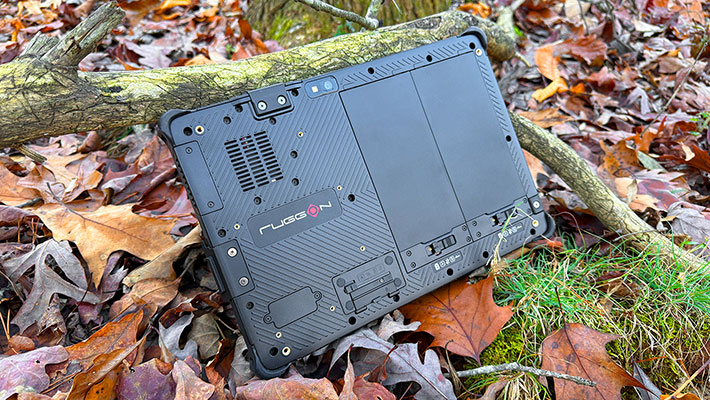
With respect to protection from the elements, the SOL 7 carries an IP65 rating, where the "6" indicates complete protection against dust ingress and the "5" signifies resistance to low-pressure water jets from all directions. This is significantly better sealing than what standard consumer tablets typically offer, and is in line with expectations for rugged tablets.
Consumer smartphones, however, have begun to raise the bar. Many now offer IP67 or even IP68 protection, which has influenced user expectations. 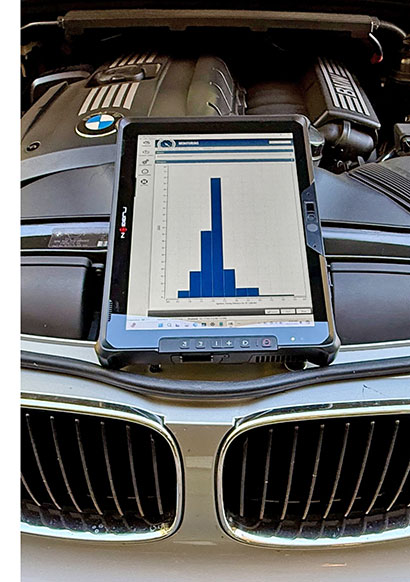 In general, sealing larger devices is more challenging than sealing smaller ones, and systems with numerous ports and controls are harder to protect than those with only one or two. We expect the rugged industry to move increasingly toward IP67-level protection, if not strictly for operational necessity, then for the added peace of mind it provides.
The SOL 7 can withstand repeated drops from five feet, which is higher than the norm for rugged tablets in this class. Four feet is generally considered standard, as that approximates the height from which a tablet is likely to fall when dropped during use in a standing position. It's worth noting that RuggON achieved this rating with corner protection that is cleanly integrated into the overall design rather than relying on bulky external bumpers.
The stated operating temperature range of -4 to 145 degrees Fahrenheit (-20 to 63 degrees Celsius) is also more than adequate. This allows the SOL 7 to be used in virtually any climate, as well as in freezers, cold storage areas, and other temperature-challenging environments.
The display uses specially formulated Corning Gorilla Glass that provides extra protection against breakage and scratching. The specifications do not indicate which generation of Gorilla Glass is used in the SOL 7, and that can matter in high-end tablets where a damaged screen is costly to repair.
Additional protection comes from the display being slightly recessed around its perimeter, which offers much better impact resistance than the flush-glass fronts common on consumer tablets.
As shown earlier in this review, our examination of the SOL 7's interior design and construction indicates a high degree of toughness and an ability to withstand accidents and abuse. There is ample evidence of effective shock absorption, and no components appear prone to loosening or rattling. Like any advanced rugged device, the SOL 7 relies on seals to keep dust and liquids out, and these are well designed and easy to maintain in good working condition.
Overall, the RuggON SOL 7 ranks among the toughest and most robust devices we have tested at RuggedPCReview.com.
Summary: RuggON SOL 7 — a tough and rugged high-performance 12-inch WIndows tablet for demanding applications
At its June 2025 announcement, the RuggON SOL 7 was the world's first rugged tablet powered by one of Intel's AI-enhanced Core Ultra Series 2 "Arrow Lake" processors. And it also was a welcome addition to Ruggon's tablet lineup, offering a larger 12-inch screen with 2160 x 1440 QHD resolution — half again as much as standard 1080p 1920 x 1080. That can make a big difference in heavy graphics work
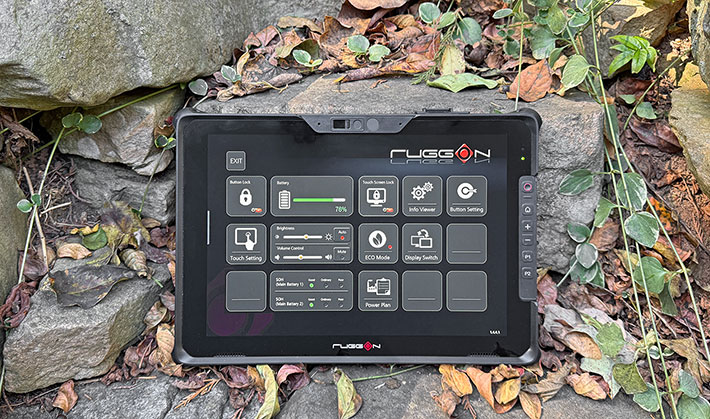
Designed for a wide range of sectors including public safety, automotive applications, warehousing, logistics, and agricultural, the SOL 7 is a remarkably flexible field data collection tool that can be configured with a barcode scanner, NFC reader, smart card reader, fingerprint reader and UHF RFID reader.
Unlike fragile consumer tablets, the well-sealed RuggON SOL 7 can handle hazards on the job, even in harsh environments. That includes five foot drops, vibration resistance, and operation in extreme temperatures.
A bright (1000 nits) capacitive multi-touch display, a number of programmable physical buttons, excellent ergonomics, hot-swappable batteries good for at least a full shift, and fast wired and wireless onboard communication make the SOL 7 an excellent choice for anyone looking for a powerful modern rugged Windows tablet. -- Conrad H. Blickenstorfer, December 2025
|
RuggON SOL 7 Specifications
|
| Status |
Added 12/2025
|
| Type |
Rugged Windows Tablet PC
|
| Processor |
Intel "Arrow Lake" Core Ultra 5 225U (1.50 GHz base frequency, 4.80 GHz max turbo frequency)
|
| Graphics |
Intel Graphics (max 2.00 GHz)
|
| NPU |
Intel AI Boost (12 peak TOPS )
|
| OS |
Windows 11 GAC
|
| Standard/Max RAM |
8GB to 32GB LPDDR5 SO-DIMM
|
| Storage |
128GB to 1TB M.2 SSD storage
|
| Display type |
Sunlight-readable TFT with LED backlight and stealth mode, 1,000 nits luminance, glove support, water/palm rejection, Gorilla Glass |
| Display size/resolution |
12.0-inch, 2160 x 1440 pixel resolution, 216 PPI |
| Digitizer |
Capacitive multi-touch, glove touch, 2mm hard-tip stylus |
| Keyboard/keys |
Onscreen, hardware buttons (power, Windows, volume up/down, 2 x programmable])
|
| Navigation |
Touch, stylus
|
| Card slots |
1 x mini SIM, 1 x eSIM
|
| Housing |
Rubberized ABS plastic over magnesium chassis
|
| Size |
12.0" x 8.2" x 0.94" (304mm x 209mm x 24mm)
|
| Weight |
3.30 lb. (1.5kg) with battery
|
| Operating temperature |
-4° to 145°F (-20° to 63°C) |
| Ingress protection |
IP65 (totally dustproof, sealed against low pressure water jets from all directions) |
| Humidity |
MIL-STD-810H |
| Drop |
MIL-STD-810H, 26 x 5-foot drop resistance |
| Shock |
MIL-STD-810H, Method 516.8 Procedures I (functional shock 40g/11ms) and V (Crash Hazard shock 75g/6ms) |
| Vibration |
MIL-STD-810H Method 514 Category 4, Fig 514.8C-2, Fig 514.8C-4, Fig 514.8C-6 |
| Altitude |
Est: MIL-STD-810H, Method 500.5, Procedures I & II |
| Power |
Dual standard rechargeable Li-Polymer batteries with fast charging support, with typical specifications of 3,010mAH, 11.625V, 34.9Whr, for a total of 69.8Whr
|
| Camera |
Rear: 11-megapixel AF with LED flash, front: 2-megapixel webcam; optional 5MP Windows Hello camera
|
| Sensors |
Gyroscope, G-sensor, E-compass, ambient light |
| Communication |
Wi-Fi 7 802.11be, Bluetooth v5.4, optional: uBlox NEO-M9N GNSS (GPS/GLONASS/BeiDou, Galileo), 4G LTE, 5G sub-6
|
| Interface |
1 x USB 3.2 Gen 1 Type A, 2 x USB 3.2 Thunderbolt4 Type-C, microphone, dual speakers, dock, 1 x RS232 (or optional RJ45 OR USB 2.0 Type A OR RJ45)
|
| Expansion options |
2D barcode reader (OCR option), Fingerprint reader, Contactless Smart Card Reader, FIDO2 NFC, UHF RFID
|
| Price |
Inquire |
| Spec sheet |
 RuggON SOL 7 brochure (PDF) RuggON SOL 7 brochure (PDF)
|
| Web page |
RuggON SOL 7 web page |
| Contact |
RuggON Corporation
4F., No. 298, Yang Guang St., NeiHu Dist.
Taipei City 11491, Taiwan
Fax: 886-2-8797-1881
Web: https://www.ruggon.com
info@ruggon.com
|