

Case Study:
Mt. Everest

Case Study:
Marine Exploration

Case Study/Video:
Red Bull Racing

Case Study:
Tablet PC at Beer Wholesaler

Tablet PC
Torture Chamber

|

|

|
|
MobileDemand xTablet Flex 10C
Remarkably affordable Intel "Alder Lake-N" quad-core powered 10.5-inch Windows 11 capacitive multi-touch tablet in a custom-designed, preinstalled protective case
by Conrad H. Blickenstorfer
Ruggedized mobile computers often cost several thousand dollars, placing them out of reach for many potential customers. The MobileDemand xTablet Flex 10C reviewed here, however, starts at just US $850 — less than the price of a mid-range iPhone. How is that possible?
A few years ago, MobileDemand expanded its lineup of heavy-duty rugged tablets with a series of thinner, lighter, and "business-ready" devices designed to offer greater durability than consumer tablets at a far more accessible price point. The company refers to this category as "value-priced." The original xTablet Flex 10 marked the beginning of this approach, and the new Flex 10C reviewed here represents the latest generation of that proven design — updated with newer technology while retaining the same practical, affordability — focused philosophy.
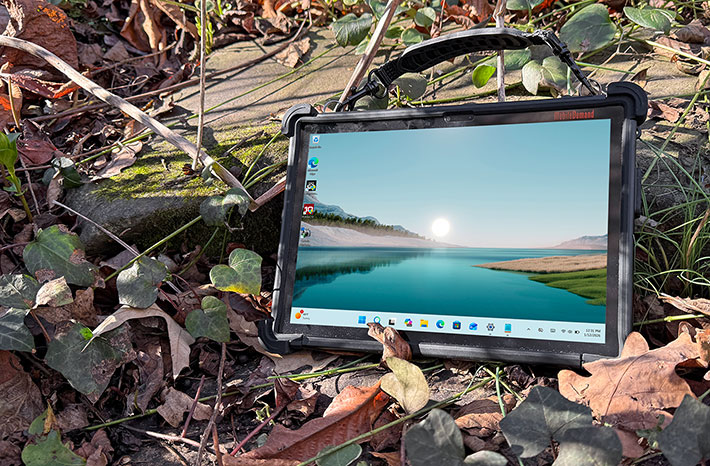
So how can MobileDemand offer a rugged Windows 11 Pro tablet at such a comparatively low price? The answer lies in its design approach. Rather than engineering an expensive purpose-built rugged platform from scratch, MobileDemand starts with a well-equipped consumer/business-class Windows tablet and integrates it into a carefully engineered protective enclosure. This enclosure adds reinforced bumpers, a carry handle, and a scratch-resistant screen protector, transforming the underlying tablet into a ready-to-deploy rugged solution.
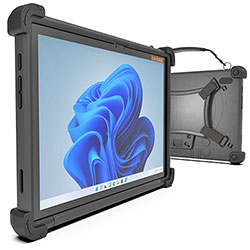 The result is a device that arrives fully outfitted with the essential attributes of a rugged tablet. Instead of relying on third-party aftermarket cases of uncertain effectiveness, buyers get a turnkey solution designed and assembled by specialists. MobileDemand has been building rugged tablets for more than two decades, and that experience is clearly reflected in the Flex 10C's thoughtful and practical design. The result is a device that arrives fully outfitted with the essential attributes of a rugged tablet. Instead of relying on third-party aftermarket cases of uncertain effectiveness, buyers get a turnkey solution designed and assembled by specialists. MobileDemand has been building rugged tablets for more than two decades, and that experience is clearly reflected in the Flex 10C's thoughtful and practical design.
With its value-oriented pricing, the xTablet Flex series — including the larger Flex 12 — is aimed squarely at customers deploying tablets for light- to medium-duty applications. Tablets have become ubiquitous in both personal and business environments, with hundreds of millions sold worldwide each year. That ubiquity represents a tremendous opportunity, yet traditional rugged tablet vendors have often struggled to fully capitalize on it.
There are several reasons for this. Classic rugged tablets tend to be bulky and heavy, which clashes with user expectations shaped by sleek consumer devices. In addition, the high cost of fully rugged tablets can be a significant deterrent for organizations planning large-scale deployments. As a result, many enterprises have opted for inexpensive consumer tablets paired with generic protective cases, accepting the higher failure and replacement rates that inevitably follow.
MobileDemand's Flex line offers a compelling alternative: a cost-effective consumer tablet integrated into a purpose-built rugged enclosure that provides substantially more protection than typical consumer-grade cases or sleeves, while remaining far more affordable than traditional fully rugged platforms.
MobileDemand's Flex platform
It is important to understand MobileDemand's philosophical approach to the Flex line. The distinction between the company's higher-end xTablets and the Flex models is straightforward: the flagship xTablets are purpose-built, fully integrated rugged systems offering higher performance and more advanced features, whereas the Flex series focuses on delivering a ruggedized tablet solution at the lowest possible cost.
For its Flex models, MobileDemand sources consumer- or business-class tablets that meet the company's functional and performance requirements. Around these tablets, MobileDemand then designs a custom protective system, starting with a form-fitting rubber boot featuring thick bumpers that cushion and securely cradle the device. This assembly is mounted to a rugged, custom-engineered polycarbonate backplate. The result is a level of protection that goes well beyond what generic aftermarket cases can provide, as illustrated in the images below.
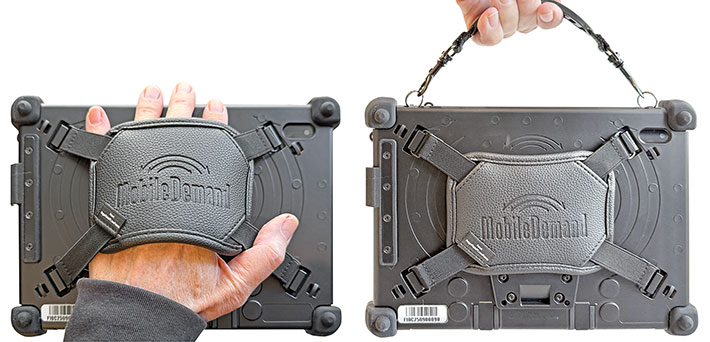
As the pictures show, MobileDemand does far more than simply wrap the tablet in heavy-duty protection. The backplate is also designed to accommodate a briefcase-style carrying handle, a robust hand strap, and an easily accessible holster for the tablet's capacitive stylus. All of these elements are included in the base configuration. Customers ordering an xTablet Flex 10C receive the unit exactly as shown in the images.
What does the tablet inside actually look like? Many Flex customers may never find out, as there is little reason to remove the tablet from its protective shell — and the enclosure itself is not intended for frequent removal or reinsertion.
Shown below, however, is the slender tablet at the core of the xTablet Flex 10C (top), alongside the elaborate, multi-layer protective casing that surrounds it.
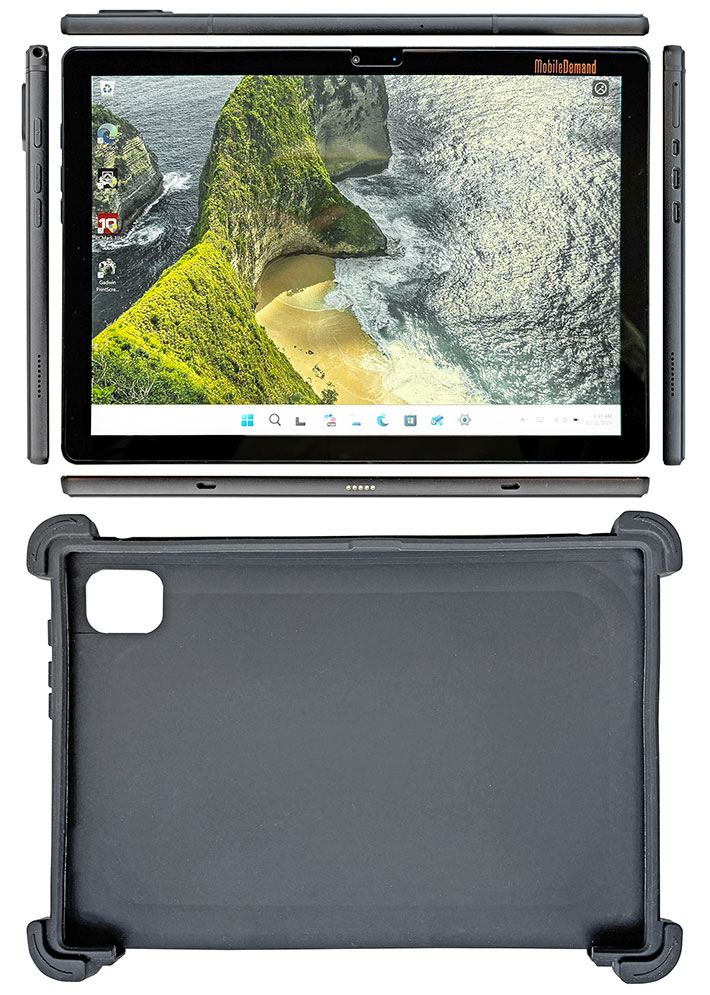
What differentiates the xTablet Flex 10C from simply buying a consumer tablet and adding a third-party case is that the entire solution arrives preassembled, with the protective hardware designed by a company that has extensive experience building rugged tablets. This is not an off-the-shelf tablet dropped into a generic enclosure, but a carefully integrated system.
There is also an additional layer of protection that is not immediately obvious from the images above. The xTablet Flex 10C includes a factory-installed screen protector made from scratch-resistant glass rather than simple plastic film. The glass is treated with an oleophobic (fingerprint-resistant) coating, and according to MobileDemand, it increases impact resistance by approximately 20 percent — an especially welcome enhancement for field use.
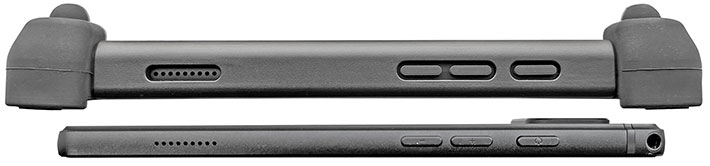
The image below shows a close-up of the left side of the xTablet Flex 10C, including the left-side speaker, the volume up and down buttons, and the power/sleep button. It also clearly illustrates just how slender the underlying base tablet is beneath its rugged protective shell.
Shown next below is the right side of the xTablet Flex 10C, again both inside the protective case and with the tablet removed. The system includes two USB-C ports: one is data-only, while the other supports charging and additional functions. A stylized battery icon molded into the protective rubber flap indicates which port is used for charging — helpful, as the two ports would otherwise be easy to confuse.
Note that both the micro-HDMI port and the microSD card slot are obstructed and can only be accessed once the tablet is removed from its protective enclosure. This is most likely a deliberate design choice, as adding additional cutouts would have compromised the structural strength of the protective case. In practice, the limited access to the HDMI port is not a major issue, since one of the USB-C ports supports DisplayPort output for connection to an external monitor. Access to the microSD card slot, however, is another matter — and considerably less convenient.
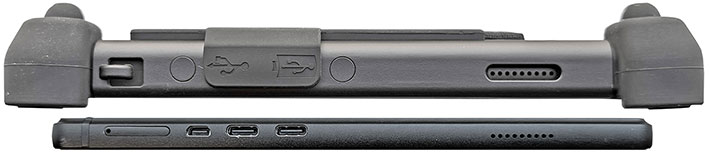
We also miss the full-size USB Type-A port found on the predecessor model. Full-size USB connectors are simply more robust and far less prone to damage than the smaller, flimsier micro-connectors of any kind, especially in field environments.

Based on Intel "Alder Lake-N" processors
Intel's processor naming has become increasingly confusing, and the "Intel Processor N100" used in the xTablet Flex 10C is a good example. The N100 belongs to a processor family Intel originally code-named Alder Lake-N, which makes it sound closely related to the 12th-generation Alder Lake Core processors that introduced Intel's hybrid architecture combining high-performance "P-cores" with highly efficient "E-cores."
 Alder Lake-N, however, is a different design altogether. It uses only efficiency cores, without the hybrid P-core/E-core combination found in Core processors. In Intel's terminology, the "N" series generally denotes very low-power mobile processors, and the N100 fits that role well, with a thermal design power of just 6 watts — only a fraction of what even low-end Core processors require. Alder Lake-N, however, is a different design altogether. It uses only efficiency cores, without the hybrid P-core/E-core combination found in Core processors. In Intel's terminology, the "N" series generally denotes very low-power mobile processors, and the N100 fits that role well, with a thermal design power of just 6 watts — only a fraction of what even low-end Core processors require.
That said, the architecture is far more modern than the "Atom" label many still associate with Intel's earlier low-power designs. The four efficiency cores in the N100 are derived from Intel's latest E-core technology. While they lack Hyper-Threading and the large performance cores of the Core lineup, they are substantially more capable than past Atom-based processors. They deliver steady, sustained performance without relying on brief turbo bursts, and they do so while generating very little heat.
The bottom line is that the N100 is not a hybrid Alder Lake processor, but rather a streamlined design built entirely around Intel's current efficiency cores. It offers reliable, predictable performance for the types of warehousing, retail, field service, and general business applications the xTablet Flex 10C is intended to support. Calling it "entry-level" undersells it; this is a frugal, modern processor designed to run real workloads all day, every day.
To put the xTablet Flex 10C's computing performance into perspective relative to earlier Flex models, the table below shows results from two benchmarks we have used in our test lab for many years: PassMark Software's PerformanceTest 6.1 and the CrystalMark benchmark suite. For additional context, we also included MobileDemand's xTablet T1175, which is powered by a high-end mobile Intel Core processor.
|
MobileDemand xTablet Flex 10C Benchmarks and Comparisons
|
|
PERFORMANCE COMPARISON
|
MobileDemand
|
MobileDemand
|
MobileDemand
|
MobileDemand
|
MobileDemand
|
|
Model
|
xTablet Flex 10C
|
xTablet Flex 10B
|
xTablet Flex 10A
|
xTablet Flex 10
|
xTablet T1175
|
|
Year tested
|
2026
|
2020
|
2016
|
2014
|
2023
|
|
Processor Type
|
Intel Processor
|
Intel Celeron
|
Intel Atom
|
Intel Atom
|
Intel Core
|
|
Processor Type: Intel
|
N100
|
N4100
|
X5-Z8550
|
Z3770
|
i5-1335U
|
|
Code name
|
Alder Lake-N
|
Gemini Lake
|
Cherry Trail
|
Bay Trail
|
Raptor Lake
|
|
CPU Clock
|
NA/3.40GHz
|
1.10/2.40GHz
|
1.44/2.40GHz
|
1.46/2.39GHz
|
NA/4.60GHz
|
|
CPU Cores/Threads
|
4/4
|
4/4
|
4/4
|
4/4
|
6/8
|
|
CPU Mark
|
6,559.9
|
6,197.8
|
1,599.7
|
1,590.9
|
11.325.6
|
|
2D Graphics Mark
|
184.5
|
188.7
|
96.3
|
179.8
|
430.4
|
|
Memory Mark
|
1,378.5
|
607.2
|
324.4
|
412.8
|
3,161.4
|
|
Disk Mark
|
3,675.8
|
463.4
|
615.9
|
294.4
|
22,315.9
|
|
3D Graphics Mark
|
151.0
|
258.1
|
109.7
|
127.3
|
636.6
|
|
Overall PassMark
|
2,812.0
|
1,945.3
|
640.1
|
603.2
|
8,240.5
|
|
ALU
|
59,946
|
46,486
|
22,251
|
30,027
|
104,775
|
|
FPU
|
27,543
|
29,498
|
18,487
|
18,413
|
58,792
|
|
MEM
|
34,973
|
25,958
|
19,711
|
22,904
|
142,371
|
|
HDD
|
40,338
|
24,853
|
21,304
|
10,634
|
113,913
|
|
GDI
|
11,928
|
8,312
|
3,680
|
5,793
|
22,633
|
|
D2D
|
3,575
|
3,541
|
2,540
|
3,216
|
4,724
|
|
OGL
|
3,890
|
4,811
|
3,015
|
3,366
|
18,320
|
|
Overall CrystalMark
|
178,618
|
143,459
|
90,988
|
94,353
|
465,528
|
The benchmark results above are, for the xTablet Flex 10 line, something of a walk down memory lane. Every Flex 10 generation has used an Intel quad-core processor, yet the new Flex 10C scores roughly twice as high overall in one benchmark suite and more than four times as high in the other. A closer look at the individual results shows that processor, memory, and storage performance improved far more dramatically than graphics performance. That is likely less a reflection of slow graphics progress and more a consequence of the types of applications these entry-level processors are typically expected to run.
Put into perspective, the inexpensive xTablet Flex 10C with its Intel Processor N100 delivers PassMark performance comparable to that of a high-end, high-performance rugged laptop from roughly a decade ago — an impressive reminder of how far baseline computing capability has advanced.
Of course, time never stands still, and today's high-end systems are faster than ever. MobileDemand has never positioned the Flex line as a high-cost, high-performance solution, but the company's xTablet T1175 — introduced in 2023 and still part of the lineup — clearly illustrates the performance gap between inexpensive entry-level systems and premium rugged platforms. Some applications demand every ounce of performance available; others simply require a reliable, cost-effective computing tool.
The bottom line is that MobileDemand has done an excellent job steadily increasing the performance of its Flex 10 models over the years while keeping pricing as low as possible. That is no small achievement, especially given that Intel's low-end processors cost considerably more today than they did a decade ago.
Power consumption
A comparison of the specification sheets for the original xTablet Flex 10, the Flex 10A, and the new Flex 10C shows notable changes in battery capacity over time. The original Flex 10 shipped with a 28.9 watt-hour battery, which dropped to 21.5 watt-hours in the Flex 10A and has now increased again to 26.6 watt-hours in the Flex 10C. Correspondingly, MobileDemand's battery life estimates have varied, from "6 hours" for the original model, to "10 hours" for the Flex 10A, and "up to 4-6 hours" for the new Flex 10C.
Part of this variation is explained by the processors used in each generation and by how Intel specifies processor power. The processors in the two earlier Flex models were rated at 2 watts SDP. SDP, or Scenario Design Power, reflects average real-world power consumption under typical usage conditions. This differs from Intel's more commonly cited TDP (Thermal Design Power), which represents the maximum sustained power draw a system must be able to handle thermally.
The processor used in the new Flex 10C — the Intel Processor N100 — is rated at a 6-watt TDP. While this number appears significantly higher than the earlier SDP ratings, it reflects a different measurement methodology and does not directly translate to average power draw during everyday operation.
To better understand real-world power behavior, we measured power consumption and estimated battery life using PassMark's BatteryMon utility on the xTablet Flex 10C. The results are shown below.
|
MobileDemand xTablet Flex 10C Power Draws (at idle)
|
|
Backlight level
|
0%
|
50%
|
100%
|
|
Power Saver
|
5.9 watts (4.5 hrs)
|
6.5 watts (4.1 hrs)
|
7.1 watts (3.7 hrs)
|
|
Max Performance
|
6.4 watts (4.2 hrs)
|
7.0 watts (3.8 hrs)
|
7.8 watts (3.4 hrs)
|
With the tablet set to Windows Best power efficiency mode and the display backlight at its lowest setting, we measured a power draw of 5.9 watts. With the backlight set to a mid-level brightness, power draw increased to 6.5 watts, and at maximum brightness it rose to 7.1 watts.
In Windows Best performance mode, power consumption increased modestly. We measured 6.4 watts at the lowest backlight setting, 7.0 watts at mid-level brightness, and 7.8 watts with the display set to maximum brightness.
 What do these numbers mean in practice? Dividing the Flex 10C's 26.6 watt-hour battery capacity by the lowest measured idle draw of 5.9 watts yields a theoretical battery life of about 4.5 hours. Using the highest measured draw of 7.8 watts reduces that theoretical runtime to approximately 3.4 hours. These figures are somewhat higher than what we measured for the predecessor Flex 10B model, reflecting both the higher TDP rating of the Intel Processor N100 and the limitations of low-end platforms in aggressively managing idle power. What do these numbers mean in practice? Dividing the Flex 10C's 26.6 watt-hour battery capacity by the lowest measured idle draw of 5.9 watts yields a theoretical battery life of about 4.5 hours. Using the highest measured draw of 7.8 watts reduces that theoretical runtime to approximately 3.4 hours. These figures are somewhat higher than what we measured for the predecessor Flex 10B model, reflecting both the higher TDP rating of the Intel Processor N100 and the limitations of low-end platforms in aggressively managing idle power.
It is important to note, however, that these measurements reflect a system largely idling, with no meaningful workload running. To evaluate battery life under sustained, real-world use, we also ran the UL PCMark 10 Battery test. This benchmark continuously executes a mix of typical business tasks with the display calibrated to 200 nits, until the battery is fully depleted. In this test, the xTablet Flex 10C achieved a runtime of 4 hours and 14 minutes. That result falls squarely within MobileDemand's stated battery life estimate of 4-6 hours.
That said, battery life remains somewhat disappointing. In an era where the runtime of tablets and laptops continues to improve thanks to ever more sophisticated power-efficiency techniques — and where mobile systems are often expected to last at least a full work shift — 4 to 6 hours may be limiting.
What is also striking is that the measured power draws appear relatively high when compared to those of systems equipped with significantly more powerful Intel Core processors with much higher thermal design power ratings. How can that be? Shouldn't systems built around low-TDP processors draw substantially less power than platforms designed for far higher peak performance?
The most likely explanation is that today's high-end processors incorporate extremely sophisticated power-management mechanisms, supported by large numbers of sensors and finely tuned control logic. These allow modern Core processors to aggressively minimize power consumption when full performance is not required. Entry-level processors, by contrast, tend to lack this level of granular power management, resulting in higher baseline power draw even though their peak performance — and peak power — is much lower.
A look inside the Flex 10C protective cover
Most xTablet Flex 10C customers may never remove the tablet from its protective enclosure. At RuggedPCReview.com, we always want to know what's inside as that provides important clues to a device's quality of design and execution.
To get to the actual body of the Flex 10C means you first have to separate the tablet from its elaborate protective plastic/rubber case. This requires very careful twisting and prodding to gently torque the tablet out of its cocoon. Do note that MobileDemand designed this case system as a semi-permanent protective armor. It can removed by customers, but doing that is more difficult than just putting a tablet or phone into a 3rd party case or sleeve. So if you do it, be careful and patient so as to minimize the potential of damaging or breaking things.
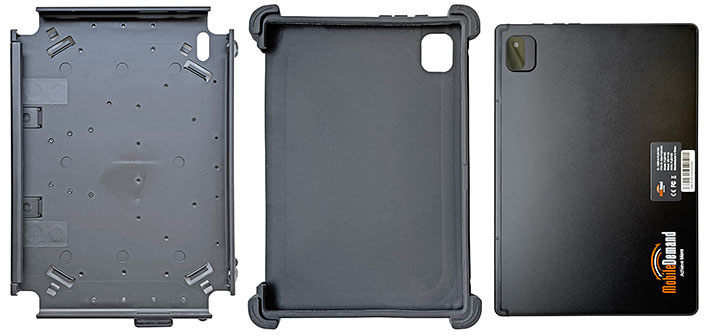
Once that's done, you're holding in your hands the bare Flex 10C, a remarkably sleek and elegant tablet device measuring 10.1 x 6.8 inches, and perhaps a third of an inch thick, if that.
Despite the Flex 10C's low price, the more or less generic "white box" tablet inside the hefty custom casing actually does't look cheap at all. There's an understated elegance to it, with a matte-black backside, solid materials, and very precise manufacturing.
As is our custom, we had planned to take apart the actual tablet inside the Flex 10C's external armor. The housing of earlier Flex 10's had consisted of two black ABS plastic halves. Separating the two halves had required very careful prying the case open with suitable plastic wedge tools, without breaking any of the small plastic snaps and retainers inside. 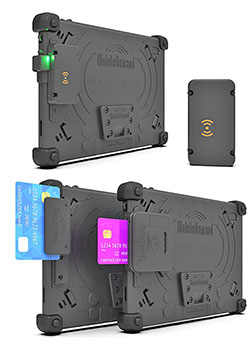 The new Flex 10C, however, seems to employ a different construction, one more like modern smartphones where the display is recessed into a box-like housing. We didn't want to inadvertently destroy our review Flex 10C, and therefore decided against complete disassembly. The new Flex 10C, however, seems to employ a different construction, one more like modern smartphones where the display is recessed into a box-like housing. We didn't want to inadvertently destroy our review Flex 10C, and therefore decided against complete disassembly.
To get the tablet back into its protective multi-layered casing, you first pull the soft rubber boot over it, then push the assembly back into the rigid backplate. It requires a bit of careful pushing and prodding to get everything settled again in its proper place, so we wouldn't do this too often, or t all.
One of the things that we really liked about the predecessor Flex10B was its very nice keyboard. It was a reasonably priced option and was generally used with the with a special easel. The extra US$100 for the two options converted the older Flex 10 into a remarkably flexible and productivity-enhancing 2-in-1 hybrid. From we can tell, that may be not available for the latest Windows-based Flex 10. We'll check again with the company.
What continues to be available are a magstripe reader that allows frontline workers to speed service, and also an NFC module for mobile authentication and identification as well as all sorts of scanning, tracking and access granting applications.
1920 x 1280 pixel capacitive multi-touch IPS display
Designing entry-level products within a broader lineup is never easy. Customers appreciate low pricing, but still expect solid functionality and acceptable performance. Achieving that balance inevitably requires tradeoffs between features and concessions.
The original Flex 10, for example, impressed with an excellent 1920 × 1200 pixel display, but not so much with its modest Intel Atom processor and comparatively slow storage. In response, MobileDemand significantly improved overall performance with the second-generation Flex 10B. However, maintaining affordability required compromises elsewhere. As a result, the Flex 10B's display resolution dropped to 1280 × 800 pixels — just 149 pixels per inch versus the original model's 224 ppi — and maximum brightness was reduced to about 280 nits from the original's 350.
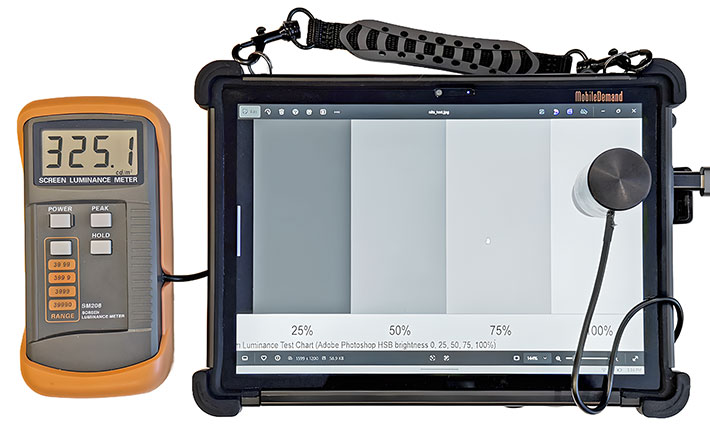
Fortunately, MobileDemand returned to a higher 1920 × 1280 resolution with the new Flex 10C, and display brightness is also back up into the roughly 325-nit range. The higher resolution represents 2.4 times as many pixels as the earlier 1280 × 800 format, a difference that is immediately noticeable in everyday use. And do note, it's 1920 x 1280, not the more common 1920 x 1200. 1920 x 1280 makes for a 3:2 aspect ratio, which many consider perfect for business users.
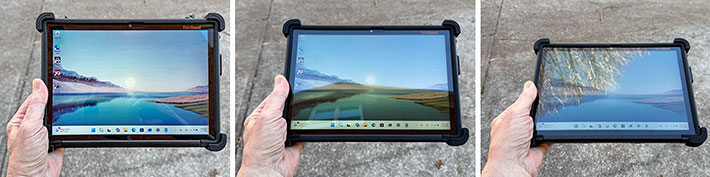
Viewing angle performance is another important consideration for tablet displays. Ideally, brightness, color, and contrast should remain consistent regardless of viewing angle. On the plus side, the Flex 10C's LCD panel itself performs very well in this regard, maintaining image quality even at steep angles. On the downside, surface reflections become more pronounced as the viewing angle increases.
The image series below shows the Flex 10C outdoors with the backlight set to maximum. At roughly 325 nits, the display is brighter than that of a typical value-priced laptop, though well below the brightness levels of higher-end rugged tablets, which often exceed 1,000 nits. Even so, we found the Flex 10C's display sufficiently bright for most outdoor situations. As the photos illustrate, reflections can be present, but they generally do not render the screen unusable.
As far as touch technology goes, it's almost superfluous to say that the xTablet Flex 10C uses 10-point projected capacitive multi-touch for the effortless tapping, panning, pinching and zooming that's become second nature for just about everyone.
MobileDemand supplies a capacitive pen with a foot-long lanyard. The pen is of the passive capacitive variety and has the broad tip that works well for tapping and panning, but not very well for precision work. To MobileDemand's credit, they replaced the usually short and chintzy generic capacitive pens with their rubber tips with a metal mesh tipped stylus that's more durable, works somewhat better, and is longer and thicker than generic styli. And they also used their standard and very durable tether and stylus holder to store the pen when it's not in use. Nonetheless, by now we'd like to see a narrower tip stylus.

It's been our experience that capacitive touch controllers have very narrow tolerances of what they do and do not recognize as touch/contact. There are now some such controllers that can sense touch even from a small fraction of an inch away from the surface, and that makes such systems somewhat usable with thin gloves. The Flex 10 is not one of them, and it appears that the addition of the relatively thick protective screen cover, which adds a small bit of distance between finger and glass surface, means the Flex 10 requires a slightly firmer touch than it otherwise would.
Cameras
The xTablet Flex 10C includes two integrated cameras. The user-facing 5-megapixel camera is intended primarily for video conferencing, while the rear-facing 5-megapixel camera — unlike that of its predecessor — does not appear to include an LED flash and is intended for basic documentation tasks.
Cameras integrated into vertical-market and industrial handhelds and tablets have historically lagged far behind even low-end dedicated cameras and, more recently, the cameras found in virtually every smartphone. While camera quality in rugged systems has improved over time, it still often falls short of eliminating the need to carry a smartphone or dedicated camera when photo or video documentation is an important part of the job.
Across the four generations of the Windows-based xTablet Flex 10 platform, camera quality has varied noticeably. The cameras in the original Flex 10 and the second-generation Flex 10A were quite good by rugged-tablet standards, and in fact significantly better than the documentation camera used in the Flex 10B, and also better than the one integrated into the latest Flex 10C.
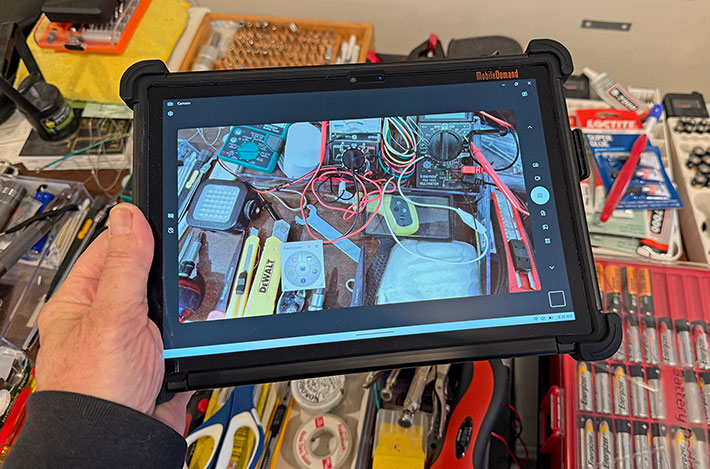
The Flex 10C's rear-facing documentation camera offers a maximum still-image resolution of 2592 × 1944 pixels. Autofocus performance is reasonably quick, though focus tends to be somewhat soft. Image compression is not overly aggressive, so photos retain usable detail, but the camera struggles with scenes that have high contrast.
Shown below are sample images captured with the Flex 10C camera at its default 2560 × 1440 pixel resolution (click for full size).

Video recording is supported at resolutions up to 1440p at 30 frames per second. While usable for basic documentation in a pinch, video quality does not approach that of mid-range modern smartphones. The user-facing camera, however, performs adequately for video conferencing and general communication tasks.
Both cameras rely on the standard Windows Camera app. On the Flex 10C, this app allows adjustment of white balance, shutter delay, exposure compensation, shutter speed, ISO, and even manual focus. Beyond these controls, however, options are limited. Users requiring more advanced imaging features or better image processing will need to rely on third-party camera applications.
Remarkable ruggedness
Here it gets interesting. While the bare Flex 10C tablet itself is consumer-grade, neatly protected inside its rugged case it can actually survive the MIL-STD-810G 26 drops from four feet onto concrete. That's impressive.
MobileDemand says that you can also drop an 8-ounce steel ball from a meter onto its screen and it won't get hurt due to the special screen protector (we didn't try that!).
The operating temperature range is narrower than for MobileDemand's fully rugged gear, but 32 to 113 degrees Fahrenheit should cover most business users' needs.
Despite its protective casing and nicely implemented protective rubber plug for all I/O ports, the Flex 10C isn't considered a sealed unit and does not have an IP rating. That means no working in the rain. However, the special coating on the screen protector makes water perl off.
The video clip to the right shows some of the "torture chamber" tests MobileDemand subjected the Flex 10 to.
In MobileDemand's own words, "the rugged case has two layers for drop protection. The first layer is rubber with bumpers similar to what you see on other fully rugged MobileDemand tablets. The second layer is a high impact polycarbonate case that holds the rubber layer in place, but also provides mounting details for critical user carrying accessories including a back hand strap, a briefcase handle, a stylus holder, and an I/O door cover."
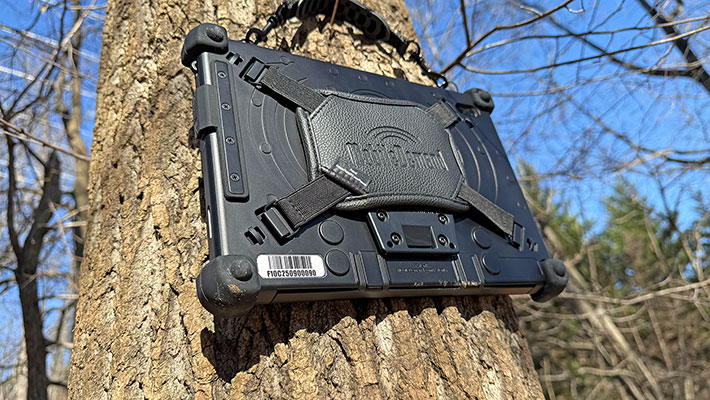
So, again, while the xTablet Flex 10C looks like a fully rugged device, it is a consumer tablet inside a very intelligently designed case system. It can handle a lot more abuse than any sleek consumer tablet, but it is not a sealed unit and it is not designed for use in truly harsh and unforgiving environments.
xTablet Flex mounting options
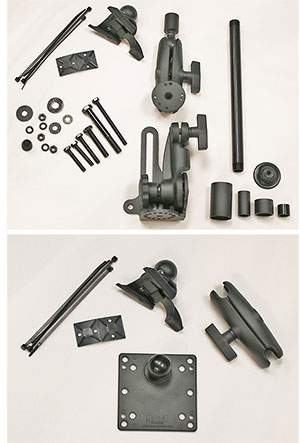 Most tablets used in business or on the job come with some kind of docking and mounting options, and the Flex 10A is no different. And whereas MobileDemand did not offer the kind of full office and vehicle docks available for most of its higher end tablets for the original Flex 10, things have been improved for the new Flex 10A. Most tablets used in business or on the job come with some kind of docking and mounting options, and the Flex 10A is no different. And whereas MobileDemand did not offer the kind of full office and vehicle docks available for most of its higher end tablets for the original Flex 10, things have been improved for the new Flex 10A.
 For vehicle use, MobileDemand provides the professional-grade xTablet Flex Standard Vehicle Mount a flexible arm that makes for ergonomic access to the tablet in virtually any vehicle. For vehicle use, MobileDemand provides the professional-grade xTablet Flex Standard Vehicle Mount a flexible arm that makes for ergonomic access to the tablet in virtually any vehicle.
The mount features a quick release mechanism for rapid switching from vehicle to field operations. Included in the package is the previously available Snap Mount no-drill base that attaches to the passenger seat floor bolt that secures the passenger seat to the floor.
Also available is the xTablet Flex Standard Wall Mount. It includes a Snap Mount plate that attaches to the back of the Flex device, and arm, a wall plate and all the anchors a and ties to mount the Flex tablet on a wall.
The image to the right shows the components of the two kits, the one above the no-drill base installed in a vehicle.
Bottom line: MobileDemand xTablet Flex 10C
With the third-generation xTablet Flex 10 — now called the Flex 10C — MobileDemand delivers a welcome update to its innovative concept of combining a modern, entry-level Windows tablet with a carefully engineered, preinstalled rugged protective system. The layered casing has been further refined, the internal technology has been meaningfully updated, and the price remains low. The new xTablet Flex 10C challenges the old saying that "you get what you pay for" — here, you arguably get more than you pay for. While the low price inevitably comes with tradeoffs, the overall result is an excellent value.
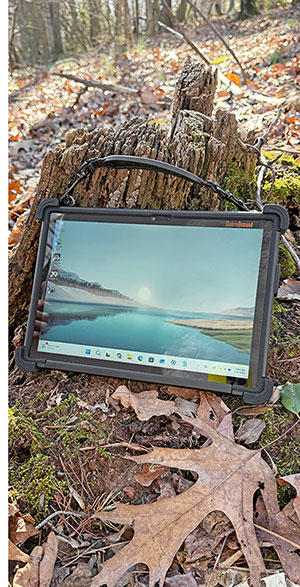 Weighing barely over two pounds including its protective case, briefcase-style handle, rear hand strap, and capacitive stylus, MobileDemand's 10.1-inch "thin-and-light" offers a compelling option for customers who want the convenience, low cost, and ease of use of a sleek consumer tablet — paired with significantly better protection and at a fraction of the cost of a fully rugged (or even semi-rugged) system. Weighing barely over two pounds including its protective case, briefcase-style handle, rear hand strap, and capacitive stylus, MobileDemand's 10.1-inch "thin-and-light" offers a compelling option for customers who want the convenience, low cost, and ease of use of a sleek consumer tablet — paired with significantly better protection and at a fraction of the cost of a fully rugged (or even semi-rugged) system.
Performance from the quad-core Intel Processor N100 represents a meaningful step forward. In fact, the Flex 10C delivers computing performance comparable to that of Intel Core — powered devices that commanded much higher prices just a few years ago.
While the low cost might suggest cut-rate components, the xTablet Flex 10C surprises in several areas. Its display is back to a sharp 1920 × 1200 resolution (after the predecessor's limiting 1280 × 800 panel) and offers excellent viewing angles. The 10-point projected capacitive touchscreen is responsive, works well with Windows 11 and touch-optimized applications, and supports effortless multi-touch interaction. The included capacitive stylus has a relatively broad tip, but its metal-mesh design works better than generic rubber-tipped alternatives.
For charging and wired connectivity, the Flex 10C provides dual USB-C ports. Micro-HDMI and combo audio ports are also present, though access is obstructed by the protective case. Both front- and rear-facing 5MP cameras are included; while image quality is modest, the front-facing camera is particularly useful for video conferencing.
Inside its well-designed rubber-and-polycarbonate enclosure, the xTablet Flex 10C is impressively protected and should withstand a fair amount of real-world abuse. While it is not a sealed device and therefore not intended for submersion, it is rated to operate across a wide temperature range and feels well suited for demanding environments short of fully rugged duty.
Taken as a whole, the fanless xTablet Flex 10C combines surprisingly capable performance, a pleasant display, and excellent protection into a very attractive value-priced package. It is well suited for users who need Windows in the field for tough jobs that do not justify the cost — or weight — of a fully rugged tablet.
We do miss the optional keyboard and easel that turned the predecessor Flex 10A into a notably cohesive 2-in-1 tablet/laptop hybrid (an option that remains available for the larger Flex 12C). And, inevitably, the low price brings compromises: the Flex 10C is not sealed, performance remains well below Intel Core levels, the internal battery is not user-replaceable, and battery life is limited. There is no barcode scanner option, though optional NFC and magnetic stripe reading are available.
If these compromises are acceptable, the xTablet Flex 10C may very well fit the (relatively small) bill for a wide range of prospective customers looking for a practical, affordable, and well-protected Windows tablet.
-- Conrad H. Blickenstorfer, January 2026
MobileDemand xTablet Flex 10C Specs:
| Type |
Thin-and-light rugged Windows Tablet PC
|
| Added |
Full review 01/2026
|
| Processor |
Quad core Intel N100 Processor
|
| Processor speed |
3.40GHz max turbo frequency
|
| Thermal Design Power |
6 watts |
| Graphics |
Intel UHD Graphics, 750MHz max dynamic frequency, 24 execution units |
| OS |
Windows 11 Pro or 11 IoT Enterprise LTSC |
| Memory |
12GB |
| Display |
IPS LCD with 320 nits LED backlight, scratch-resistant glass, oleophobic screen protector |
| Display size/res |
10.5-inch, 1920 x 1280 pixel, 3:2 aspect ratio, 220 ppi
|
| Digitizer |
OGS (One Glass Solution) 10-point capacitive multi-touch/capacitive stylus |
| Keyboard |
Optional detachable keyboard for 2-in-1 functionality (US$80, highly recommended)
|
| Storage |
256GB M.2 2242 SATA 3.0 |
| Expansion slots |
1 x microSD |
| Housing |
ABS plastic tablet housing inside rubber glove with protective rubber bumpers, polycarbonate case, and briefcase handle |
| Size |
10.5 x 7.7 x 1.2 inches (282 x 196 x 31mm)
|
| Weight |
1.9 lbs. (0.86 kg) with case, handle and hand strap |
| Operating temperature |
23° to +122°F (-5° to +50°C) |
| Humidity |
0 to 85% non-condensing |
| Ingress protection |
Not rated
|
| Drop/shock |
MIL-STD 810G, 516.6 IV: 26 repeated drops to 1 operating unit on to plywood over concrete from 48 inches |
| Tumble |
1,000 one-meter tumbles (simulates 5 years worth of drops and tumbles)
|
| Vibration |
Est: Accelerated extreme truck and forklift vibration testing, 21G peak acceleration, 10 to 1,000Hz (6 hour test simulates intense forklift vibration extremes and a total of 100,000 miles at 55mph on average US roads)
|
| Power |
Internal non user-replaceable Li-Ion 7.6V, 3,500mAh, 26.6 watt-hours ("up to 4-6 hours") |
| Cameras |
5mp camera front, 5mp camera with LED flash rear (up to 2592 x 1944 pixel) |
| Sensors |
Est: Light, G-sensor, Gyrometer, e-Compass
|
| Interface |
1 x USB-C (for charging, PD, DP, data), 1 x USB-C (for data), 1 x micro-HDMI, audio combo, power, docking |
| Wireless options |
Wi-Fi 6 AX201 with Bluetooth 5.2
|
| Price |
US$850 with Windows 11 Pro |
| Warranty |
1 year
|
| Contact |
xTablet Flex 10C web page |
| Brochure |
 xTablet Flex 10C PDF spec sheet xTablet Flex 10C PDF spec sheet |
(copyright 2026 RuggedPCReview.com)
|
|
|
|