

February 2022 Interview with Rick Hwang, President of Rugged & Video Solutions Business Group at Getac

Getac's Mighty Class of 2021
January 2021 Interview with Rick Hwang, President of Rugged & Video Solutions Business Group at Getac

Getac V110 at Cirque du Soleil

Getac 25th Anniversary at 2014 Miramar Air Show

Getac FedEx TechConnect

TDI Panamericana 2011 team using Getac V100 on 16,000 mile endurance challenge
|

|

|
|
GETAC V120
The next generation of Getac's unique rugged convertible — now named V120 — runs on "Arrow Lake" Intel Core Ultra Series 2 processors, and represents a huge technology leap, right to the very front of the current rugged laptop state-of-the-art.
By Conrad H. Blickenstorfer, photography by Carol Cotton)
Getac's V120, introduced September 2, 2025, is a unique and remarkably rugged convertible notebook computer that is, and isn't, brand-new. That's because Getac could have decided to launch it as the 8th generation of the company's venerable V110. The unique rotating swivel hinge platform has been around since like forever, in computer years anyway. And even when Getac launched the first V110 in 2013, it wasn't new. The V110 itself was a follow-up to the 2007 Getac V100, and that one was a spiritual successor to the 2001 Acer TravelMate TM100, which was part of Microsoft's 2001 Tablet PC initiative (note that tablets themselves go back to the late 1980s). So here we are, and the new-old V120 is very much still around, with the same concept other than improvements here and there, and all new powerful tech under the hood. And powerful it is, we'll say that right upfront. The V120 is the fastest rugged laptop we've ever tested, and in the PCMark 10 benchmark it's faster even than the big and fully loaded Lenovo Idea Centre tower with its nVidia GPU in our office.
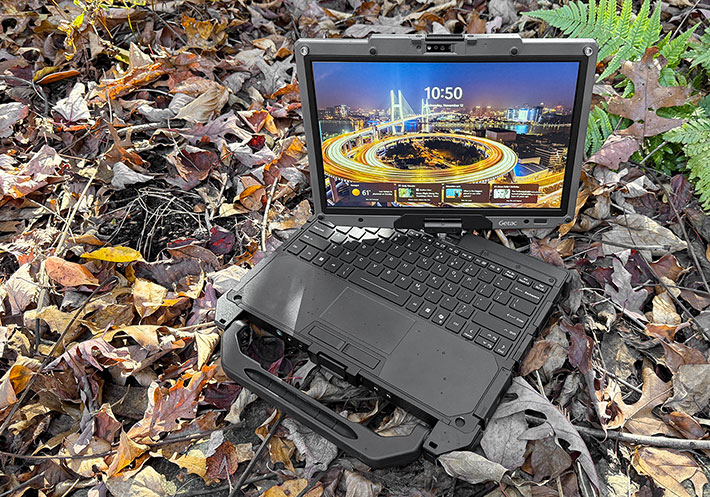
So let's talk about the overall concept of a convertible notebook. The idea of combining laptop and tablet functionality has been around for a very long time, predating even Microsoft's 2001 initiative by over a decade. The specific rotating hinge design that's used on the Getac V120, though, was pioneered by Acer and Toshiba in 2001 as one of many different laptop/tablet hybrid solutions. Ever since, most providers of rugged computing equipment have had at least one convertible notebook in their lineup at one point or another. Today, convertibles are generally called 2-in-1s — mobile computers that can be used both as laptops or as tablets, some with integrated keyboards and some with detached ones specially designed for use with a certain tablet.
How does the Getac V120's rotating screen work? It's simple. The LCD case of the notebook has a single central rotating hinge, allowing the display to be turned around so that the laptop can be closed with the LCD facing up. This way it can be used either as a notebook or as a tablet, albeit a fairly thick and heavy one by modern consumer tablet standards. The sequence below shows how it works.
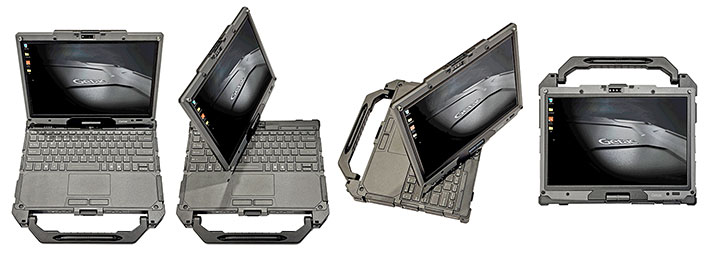
The convertible design of the Getac V120 adds enough extra flexibility and unique versatility to its operation that it warrants having it in the lineup, and certainly now with its spectacular performance boost. And it's not just the dual notebook/tablet personality that comes in handy. Being able to rotate the display is useful when you quickly want to show a co-worker or a small group what's on the screen. And the rotating display can be used to make presentations, too, without people needing to lean over your shoulders.
What you get with the Getac V120
The Getac V120 is a fully rugged laptop that is more versatile than standard laptops. With this latest update it now has a new name to go with its substantial computing power, much more than any of its V110 predecessors. And, given its dual nature, the V120 is still a remarkably compact package. Its 11-1/2 x 8-3/4 inch footprint (though the corner bumpers stick out a bit from that) is barely larger than a sheet of paper. Despite its ruggedness and sturdy build and versatility, the V120 is less than an inch and a half thick and weighs about 4-1/2 pounds.
|
|
|
V120 G1 (2025)
|
V110 G7 (2023)
|
V110 G1 (2013)
|
|
|
Default CPU
|
Core Ultra 5 225H
|
Core i5-1235U
|
Core i7-4600U
|
|
|
Graphics
|
Intel Arc 140T
|
Intel Iris
|
HD 4400
|
|
|
RAM
|
8GB to 64GB DDR5
|
8GB to 64GB DDR4
|
4GB/8GB DDR3
|
|
|
Std. storage
|
256GB to 2TB SSD
|
256GB to 2TB SSD
|
128GB SSD
|
|
|
LCD nits
|
1000
|
1000
|
800
|
|
|
Keyboard
|
100%-scale
|
100%-scale
|
100%-scale
|
|
|
Battery
|
2 x 31.5 whr
|
2 x 23.3 whr
|
2 x 23.3 whr
|
|
|
USB
|
1 x 3.2 Gen 2, 2 x TB4
|
2 x 3.2 Gen 2, 1 x TB4
|
2 x 3.0, 1 x 2.0
|
|
|
Cameras
|
5mp cam + 13mp rear
|
5mp cam + 8mp rear
|
HD cam + 5mp rear
|
|
|
Listed weight
|
4.63 lbs.
|
4.63 lbs.
|
4.6 lbs.
|
|
|
Size
|
11.89 x 8.82 x 1.41
|
12.32 x 9.37 x 1.53
|
11.8 x 8.8 x 1.34
|
|
|
Display
|
12.2-inch
|
11.6-inch
|
11.6-inch
|
|
|
Resolution
|
1920 x 1200
|
1920 x 1080
|
1920 x 1080
|
|
|
Digitizer
|
Capacitive multi
|
Capacitive multi
|
Capacitive multi
|
|
|
Glove-capable
|
Yes
|
Yes
|
No
|
|
|
Ingress Protection
|
IP66
|
IP65
|
IP65
|
But why not just get a "pure" tablet and bring along a wireless or USB keyboard? Because with the V120, you're never in a situation where you forget to bring along a separate, detachable keyboard when you need it most. The flipside, of course, is that you have to bring the keyboard along; it is part of the V120.
Why is the V120 platform still around after all these years? Because the solution has merit. This, too, goes back to Microsoft's Tablet PC initiative. Microsoft had first planned for all Tablet PCs to be just that, pure tablets. But then they got cold feet, and the Microsoft Tablet PC launched as a convertible, which wasn't as scary to customers as just a tablet with a pen. And all this time later, that same logic still makes sense in many situations.
What other advantages does the integrated convertible concept have? The answer may surprise: the design isn't "top-heavy" when used as a laptop. Look at a conventional laptop: it has a slender display and then the heavier system part with the keyboard, electronics, and battery. Laptops never tip over.
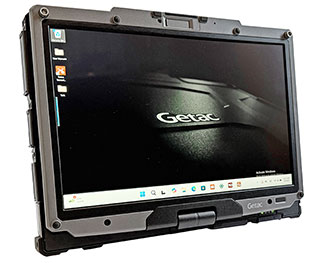 Tablets, on the other hand, must have display, electronics and battery all in one box. Which means that, when used as a laptop with a snap-on or insert-into keyboard, the tablet is the bulky, heavy part and the keyboard the much lighter and thinner one. Which means the assembly is top-heavy and easily tips over. The V120 never tips over, because the battery and heavy stuff is all in the keyboard part. Tablets, on the other hand, must have display, electronics and battery all in one box. Which means that, when used as a laptop with a snap-on or insert-into keyboard, the tablet is the bulky, heavy part and the keyboard the much lighter and thinner one. Which means the assembly is top-heavy and easily tips over. The V120 never tips over, because the battery and heavy stuff is all in the keyboard part.
So why are integrated convertibles not more popular? Probably because they make for a heavier 2-in-1 solution than a pure tablet with a separate keyboard.
How good of a tablet does the V120 make? If weight isn't an issue, a fully functional one. Today, the V120 actually makes for a better tablet than when it was first launched. Why? Because capacitive multitouch and Windows 11 make for much better tablet functionality than the resistive touchscreen and older versions of Windows the V110 originally started out with. In addition, the V120 has more wired connectivity than almost any "pure" tablet, the swivel screen can come in very handy, and the solid, full-scale keyboard is always there.
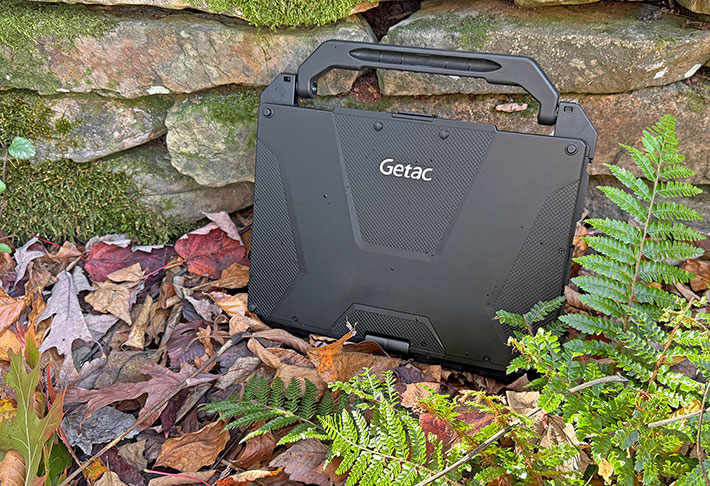
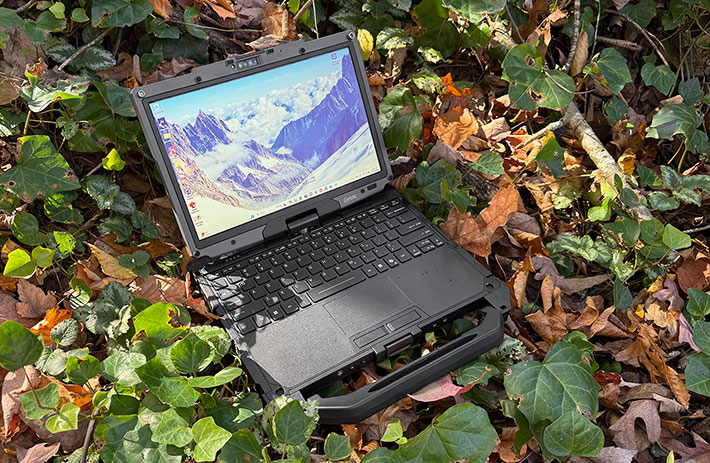
And how good of a laptop does the V120 make? It's fully rugged and its 12.2-inch display (up from 11.6-inch in the earlier V110) means it's quite compact. By comparison, Getac's conventional rugged laptops have 13.3 (B360), 14.0 (S410), and 15.6 (S510) inch displays. As far as "feel" goes, the V120 is sturdy and substantial. It's almost all cast magnesium alloy, with a polymer bottom plate and rubberized polymer edge bumpers. Below is a look at the V120 from the top and from all four sides:
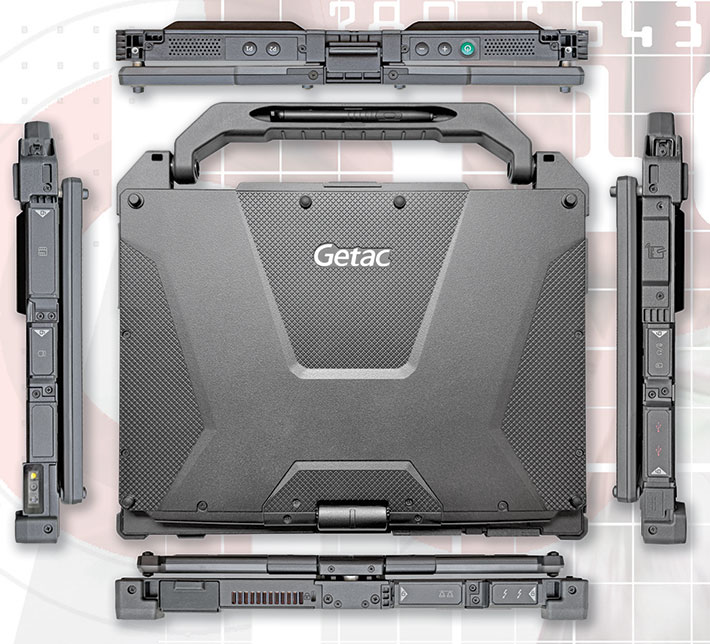
Those familiar with the legacy V110 platform will quickly realize that while the V120 employs the same overall concept, it's really an entirely new machine. The top of the V120 looks all different. It's all black now, compared to the heavily contoured black and silver finely powder-coated look of older V110 models. Virtually every other part of the new V120 is re-designed as well. While the two batteries of the V110 slid into its left and right sides, in the V120 they are recessed into the bottom. That means the V120 can accommodate ticker extended batteries whereas the V110 couldn't. The fan intake is now on the bottom and the exhaust in the back. I/O has been completely re-arranged and re-designed. As have the protective lockable port covers. Even the locking mechanism of the LCD lid is redesigned.
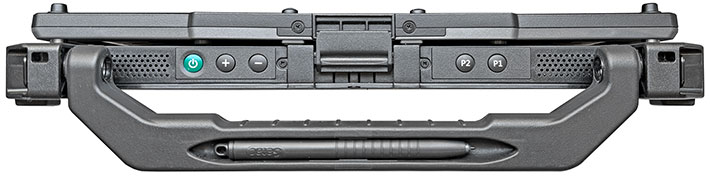
The big carry handle is an option that we very much recommend, especially when spending a lot of time in the field with the V120 in tablet mode. The handle is sturdy, offers ample room to use it even with thick gloves on, and there it even includes a parking space for the active digitizer pen. That's perhaps not the greatest spot because it's hard to pry the pen out and without a tether it'd be easy to drop, forget, or lose. Getac, however, does offer a dedicated pen holder with tether.
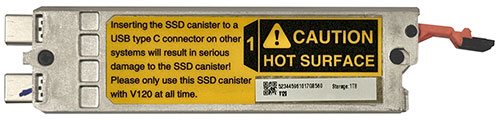 To the right, a picture of the V120's small quick-release SSD canister. Quick-release storage is required by certain industries and agencies due to security, data sensitivity or operational efficiency. Note that this is a different size and design from that used in V110 models. To the right, a picture of the V120's small quick-release SSD canister. Quick-release storage is required by certain industries and agencies due to security, data sensitivity or operational efficiency. Note that this is a different size and design from that used in V110 models.
Unlike with consumer or enterprise laptops whose (fewer and fewer) ports are largely unprotected, in rugged computers the sealing and protection of ports is imperative. Getac has ample experience in that area and the V120 features those elaborate sealed snap-click protective doors. They consist of an inner seal with a rubber lip around it, and an outer polycarbonate door that is then slid to the right for a very secure, tight seal and fit. You have to be careful to properly snap them into place, but once you get the hang of it, it's a good solution.
The picture below shows the front of of the V120. Here you find buttons that on a pure laptop would be on top of the keyboard — two programmable buttons plus sound up/down and the hardware volume controls (which can also be used for brightness control after engaging Function Lock with the P1 button), plus the power/sleep button. The Windows button on the display is gone, its spot taken by an optional fingerprint scanner.
The backside (below) has, from left to right, an expansion area for the optional DB9 serial port, then the fan exhaust and a Kensington lock-slot. To the right of the central rotating hinge mechanism are a HDMI connector for external video and an RJ45 LAN jack, and then dual Thunderbolt 4 ports using the USB-C type connector.

The left side (below) houses, first, the conventional power jack (you can also charge the V120 via the Thunderbolt 4 ports), then two USB 3.2 Gen 2 ports with the Type A connector, then a covered slot for the optional nano-SIM card, and next to it a standard 3.5mm combo audio connector. Next to that is space for the optional RFID antenna or Smart Card reader.

The right side (below) houses the optional Smart Card reader, then the slot for the SSD canister. Next to it are an optional Micro SD card slot and an also optional second USB 3.2 Gen 2 Type A port. Finally, there's the spot for an optional barcode reader.

All of this amounts to significantly more connectivity, versatility and room for customization than is available on most standard tablets.
Attention to details
Examining the Getac V110 more closely, you'll find some remarkable details that make this interesting convertible notebook easier to operate, more reliable, and more resistant to damage. The details also make abundantly clear that Getac has many years of experience in designing reliable, optimized rugged computing gear.
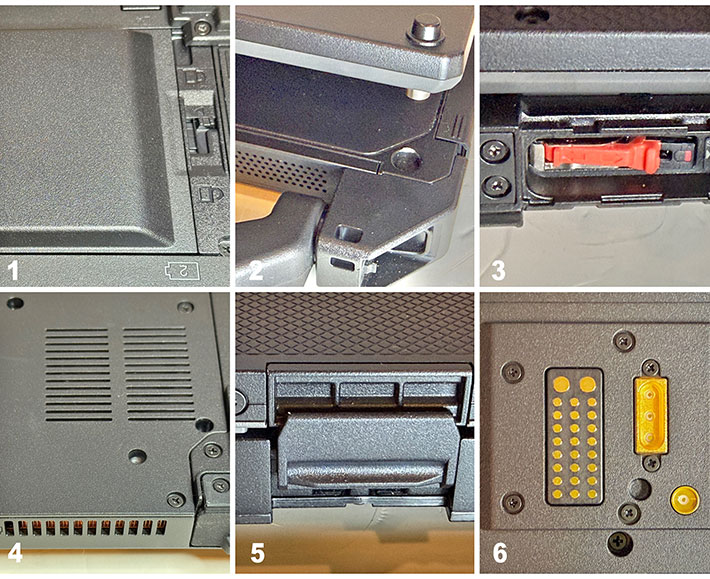
Clockwise and starting from the upper left, you can see:
- Unlike with the predecessor V110 where the batteries slid into compartments on each side, on the V120 the battery are recessed into the bottom of the laptop. This allows the use of the standard batteries, or the slightly thicker extended batteries,
- LCDs can twist and break when a device is dropped. On the V120, metal bolts on the LCD housing fit into corresponding holes in the system case, securely keeping the screen in place and thus reducing the chance of damage.
- All of the V110's ports have protective covers with seals. They snap into position and can easily be replaced. This one shows the SSD canister, which allows storage to be removed in seconds, should the need arise.
- The V120 has a fan for active cooling. It's actually outside of the sealed inner part of the housing, and it's waterproof.
 - Not only does the V120's LCD case have those metal bolts, it also has a (redesigned)) mechanical lock that keeps the lid from opening when it shouldn't. And it had to be designed to secure the LCD downside-up OR upside-down.
- Gold-plated surface mount for the dock (with antenna pass-through plug next to it).
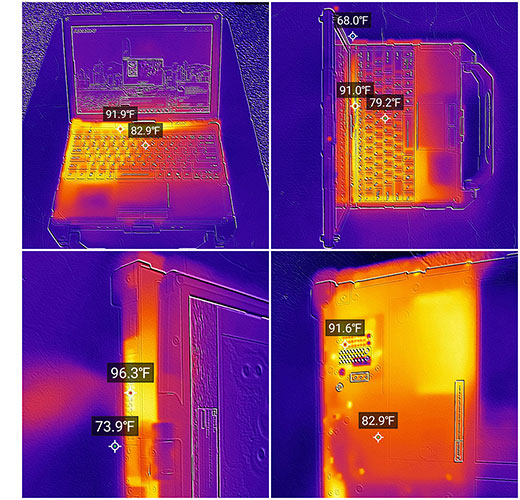
Per Getac's request we did not fully dismantle the V120 to get an idea what it looks like inside, how easy or difficult it is to disassemble and reassemble the unit, and get an idea of the type of thermal management system. We did, however, use our thermal imaging camera to see heat flows and heat dissipation.
The images to the right show the V110's thermal signature while it was running the demanding UL PCMark 10 benchmark. Temperatures are well within the expected and acceptable range, even with the much more powerful new processors. With the cooling fan going during high-load processing, we didn't record surface temperatures over 100F anywhere. Note that while the cooling fans intake and outlet make it look like liquids might get right inside the computer, the fan compartment is fully sealed against the actual interior of the V120. The fan itself can handle liquid immersion.
Finally, below a look at the backsides of the earlier V110 and the new V120. Note how Getac kept the docking connector type and location, and also the optional antenna pass-through for backward compatibility, but pretty much everything else is new. Here you can also see the new placement of the batteries in the V120, which allows the use of optional extended, taller batteries. Worth mentioning is that the new V120, unlike the older V110G7, also offers an optional quad pass-through for 5G that covers GPS, WLAN, WWAN and WWAN MIMO.

Keyboard and hardware controls
Having a real, physical keyboard that is always available is a good part of appeal of the Getac V120 convertible. But is it as perfect as a keyboard can get? Because if it isn't perfect, one might as well use a tablet. The really good news here is that the V120 LED backlit membrane keyboard is pretty much identical to the third generation Getac B360's fully rugged laptop's keyboard, and we like that one a lot.
These days, almost everyone uses the "island-style" look with fairly short key travel but good tactile feedback. That's important in the field; everything must be optimized for functionality, clarity and ease of use. Compared to the keyboards we saw in older V110 generations, the labeling and icons in the new V120 machine is much clearer, less busy, and much more elegant.
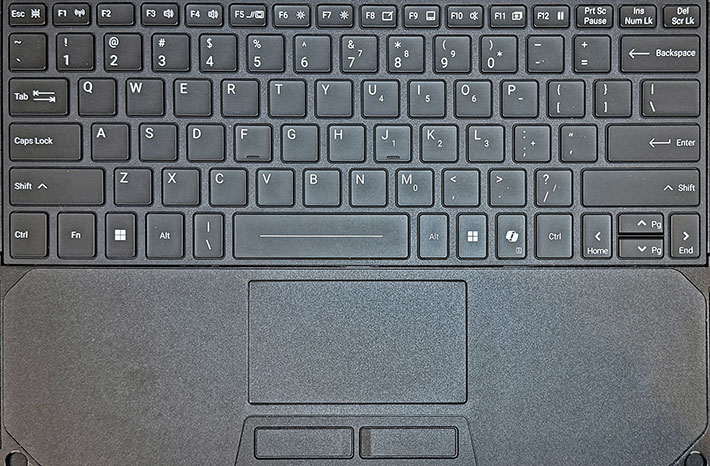
The difference is quite dramatic. In fact, the whole design looks and feels much like the standard Apple keyboard, which today is pretty much the standard for good keyboard design. Even some of the key widths and arrangements have been re-designed, for the better. An example is switching the Fn/Ctrl keys on the lefthand bottom of the keyboard to the more common Ctrl/Fn sequence. A small change, but one that a lot of users will appreciate. On the right side, the old "hamburger" key that made menus and pulldown pop up has been replaced by the Microsoft CoPilot key.
 Placement of the keyboard in relation to the slightly recessed capacitive multi-touch touchpad and the two "mouse" buttons is just right. The touchpad itself is a bit larger than in older versions. The all-important QWERTY layout is 100%-scale. That means the distance between the center of the letter Q and the center of the letter P is exactly 6-3/4 inches. That's VERY IMPORTANT. This way, touch-typists and anyone who is used to a standard keyboard will have no problem finding the keys without looking and feeling right at home, even if they are not full touch typists. Placement of the keyboard in relation to the slightly recessed capacitive multi-touch touchpad and the two "mouse" buttons is just right. The touchpad itself is a bit larger than in older versions. The all-important QWERTY layout is 100%-scale. That means the distance between the center of the letter Q and the center of the letter P is exactly 6-3/4 inches. That's VERY IMPORTANT. This way, touch-typists and anyone who is used to a standard keyboard will have no problem finding the keys without looking and feeling right at home, even if they are not full touch typists.
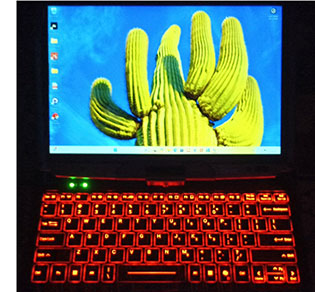
The LED-based backlight can be toggled on/off via a function key combination. Illumination is reddish-tinted white, and it clearly illuminates the keys in semi and full darkness.
Unlike some earlier Getac laptop keyboards we reviewed, illumination doesn't bleed out much around the keys in the dark. That makes the layout easier to read in the dark.
Powered by AI-enabled processor technology
Getac introduced the V120 as "a major leap in AI-ready mobile computing," largely due to its Intel Core Ultra Series 2 processors with powerful integrated Intel Arc graphics and Intel AI Boost. This combination warrants a bit of extra discussion and explanation.
Everything seems to be about AI these days. ChatGPT — the friendly online assistant with seemingly all the answers — is everywhere. According to OpenAI, it now has close to a billion weekly active users. Add to that Microsoft's Copilot, Google's Gemini, Anthropic's Claude, DeepSeek, Meta's offerings, Kimi, and countless others. Then include the rapidly growing number of specialized AI tools appearing across every industry. It's a different world, and one that's clearly here to stay.
Sorting through all this isn't simple. AI has become woven into daily life, and it's easy to see the appeal of asking ChatGPT a question and getting a clear, direct response — something traditional search engines never managed. AI systems now draw from the collective digital knowledge of humanity, often delivering answers in seconds. New applications emerge almost daily, transforming the way we work, communicate, and live — a technological shift of massive proportions.
Yet all of this depends on the cloud. No matter how compressed and optimized those vast neural models are, they remain enormous and require immense computing power. How ChatGPT delivers near-instant responses while most web pages still load slowly remains almost magical. But what happens when there's no cloud access? What if you're in the field without signal or network, with only your rugged tablet or laptop?
That is the challenge mobile computing now faces. You can't fit the entire cloud into a portable device, but the question becomes: what parts of modern AI can be brought to the field? What can still work when connectivity is limited or nonexistent? Even a fraction of AI capability can be useful if it runs locally — providing real-time insight, automation, or assistance where it's needed most. That's where edge AI comes in: bringing intelligence to the very edge of connected networks, and beyond.
 For now, that remains a fairly open question. Progress is coming in small but steady steps as AI-style processing begins to enter mobile devices. Early implementations handle relatively simple tasks — enhancing real-time audio and video, helping touchscreens distinguish between a finger, a stylus, the user's palm, or even raindrops, or monitoring patterns and spotting anomalies without draining the battery or overloading the CPU. For now, that remains a fairly open question. Progress is coming in small but steady steps as AI-style processing begins to enter mobile devices. Early implementations handle relatively simple tasks — enhancing real-time audio and video, helping touchscreens distinguish between a finger, a stylus, the user's palm, or even raindrops, or monitoring patterns and spotting anomalies without draining the battery or overloading the CPU.
That's the direction mobile AI is heading. Modern processors still have their traditional computing cores, but now they also include far more capable integrated GPUs — Graphics Processing Units — and, increasingly, NPUs — Neural Processing Units. GPUs excel at the kind of parallel processing AI workloads demand, and NPUs are even better suited for it. In addition, NPUs can offload portions of the workload from the CPU and GPU, improving performance and efficiency through a more optimized division of labor.
 In other words, mobile computing is moving into new territory with new rules. Microsoft, for example, has established minimum requirements for what qualifies as a "Copilot+ PC" — a system capable of running its advanced AI tools and utilities. That's where we find ourselves today in the Windows ecosystem, with Intel Core Ultra processors that bring a real degree of AI readiness. The first generation, Series 1, offered some of these capabilities; Series 2 expands on them, delivering up to 40 TOPS (trillion operations per second) of AI acceleration. Some versions also integrate Intel's new Arc graphics, replacing the older integrated Intel GPU for a major boost in visual and AI performance alike. In other words, mobile computing is moving into new territory with new rules. Microsoft, for example, has established minimum requirements for what qualifies as a "Copilot+ PC" — a system capable of running its advanced AI tools and utilities. That's where we find ourselves today in the Windows ecosystem, with Intel Core Ultra processors that bring a real degree of AI readiness. The first generation, Series 1, offered some of these capabilities; Series 2 expands on them, delivering up to 40 TOPS (trillion operations per second) of AI acceleration. Some versions also integrate Intel's new Arc graphics, replacing the older integrated Intel GPU for a major boost in visual and AI performance alike.
The table below shows all four CPU options for the Getac V120, with the 225H being the default chip:
|
CPU
|
Intel Core Ultra 7 Series 2
|
Intel Core Ultra 7 Series 2
|
Intel Core Ultra 5 Series 2
|
Intel Core Ultra 5 Series 2
|
|
Model
|
265H
|
255H
|
235H
|
225H
|
|
P-Cores
|
6
|
6
|
4
|
4
|
|
E-Cores
|
8
|
8
|
8
|
8
|
|
Low Power E-Cores
|
2
|
2
|
2
|
2
|
|
Total Threads
|
16
|
16
|
14
|
14
|
|
P-cores Max Turbo
|
5.30 GHz
|
5.10 GHz
|
5.00 GHz
|
4.90 GHz
|
|
E-cores Max Turbo
|
4.50 GHz
|
4.40 GHz
|
4.40 GHz
|
4.30 GHz
|
|
Thermal Design Power
|
28/115 watts
|
28/115 watts
|
28/115 watts
|
28/115 watts
|
|
Smart Cache
|
24MB
|
24MB
|
18MB
|
18MB
|
|
Integrated graphics
|
Intel Arc 140T
|
Intel Arc 140T
|
Intel Arc 130T
|
Intel Arc 130T
|
|
GPU Peak TOPS
|
75
|
74
|
74
|
63
|
|
Graphics max speed
|
2.30 GHz
|
2.25 GHz
|
2.25 GHz
|
2.00 GHz
|
|
NPU Peak TOPS
|
13
|
13
|
13
|
13
|
|
Intel vPro
|
Enterprise
|
NA
|
Enterprise
|
NA
|
So, what does all of that mean? First, you'll notice that all four processor options for the new V120 are Intel "H" Series CPUs. Intel classifies these chips as high-performance laptop processors — different from the Series 2 "V" processors used in the Getac F120 tablet and the Getac B360 Plus laptop, which we'll review separately. The "H" Series chips in the V120 are hybrid designs that combine performance cores and efficient cores, plus an additional set of "low-power" efficient cores for handling background tasks with minimal energy use.
Another change is that the performance cores in these processors are no longer hyper-threaded, so the total thread count now matches the actual number of cores. Note also that the two Core i7 options have six performance cores, while the two Core i5 models have four — a difference that directly affects performance, along with the i7's larger cache and slightly higher clock speeds.
You'll also see that three of the four CPUs include Intel Arc 140T graphics, while one uses Arc 130T graphics. The only apparent distinction is that the 130T version employs seven graphics cores instead of the 140T's eight. That may make sense in Intel's internal segmentation logic, but practically speaking, running seven instead of eight GPU cores results in a small drop in peak TOPS performance. The NPUs across all four processors are identical.
To gauge where the Getac V120 stands in terms of raw performance, we compared it against the most recent Getac V110, the new Getac F120, and key rugged-laptop competitors from Dell, Durabook, and Panasonic. We ran our standard suite of benchmarks — PassMark 6.1 and 9, PCMark 10, 3DMark, Geekbench, and CrystalMark, with the results summarized below:
|
Getac V120 Benchmarks and Comparisons
|
|
PERFORMANCE COMPARISON
|
Getac
|
Getac
|
Getac
|
Dell
|
Durabook
|
Panasonic
|
|
Model
|
V120
|
V110 G7
|
F120
|
14 Rugged
|
Z14I
|
CF33
|
|
Year tested
|
2025
|
2024
|
2025
|
2024
|
2025
|
2024
|
|
Type
|
Convertible
|
Convertible
|
Tablet
|
Laptop
|
Laptop
|
2-in-1
|
|
Display
|
12.2" (1920x1200)
|
11.6" (1920x1080)
|
12.2" (1920x1200)
|
14.0" (1920x1080)
|
14.0" (1920x1080)
|
12.0" (2160x1440)
|
|
Luminance
|
945 nits
|
1,246 nits
|
1,060 nits
|
906
|
1,065
|
1,220
|
|
Processor Type: Intel
|
Core Ultra 7
|
Core i7
|
Core Ultra 7
|
Core Ultra 7
|
Core Ultra 7
|
Core i7
|
|
Processor Model
|
265H
|
1265U
|
268V
|
165U
|
165U
|
1270P
|
|
Cores/threads
|
6/8/2
|
10/12
|
4/4
|
2/8/2
|
10/12
|
14/20
|
|
Max Turbo Speed
|
5.30 GHz
|
4.80 GHz
|
5.00 GHz
|
4.90 GHz
|
4.90 GHz
|
4.80 GHz
|
|
Thermal Design Power (TDP)
|
28/115 watts
|
15/55 watts
|
17/37 watts
|
15/57 watts
|
15/57 watts
|
15/55 watts
|
|
PassMark 6.1
|
11,896
|
7,414
|
9,312
|
10,201
|
8,028
|
11,732
|
|
PassMark 9.0
|
7,692
|
5,769
|
7,448
|
6,342
|
5,603
|
5,552
|
|
CrystalMark
|
625,094
|
435,589
|
565,380
|
522,901
|
458,758
|
436,485
|
|
PCMark 10 Overall
|
7,805
|
5,102
|
7,448
|
5,742
|
5,603
|
5,055
|
|
-- PCMark10 Essentials
|
10,712
|
9,844
|
10,370
|
9,925
|
9,614
|
9,527
|
|
-- PCMark10 Productivity
|
10,840
|
6,510
|
10,793
|
9,570
|
7,872
|
6,758
|
|
-- PCMark10 Content Creation
|
11,174
|
5,625
|
10,018
|
7,327
|
6,307
|
5,446
|
|
PCMark10 Drive
|
1,562
|
1,453
|
1,950
|
2,104
|
1,284
|
2,140
|
|
PCMark10 Battery (Hours)
|
10:56 hrs
|
04:09 hrs
|
14:03 hrs
|
11:35 hrs
|
10:04 hrs
|
06:34 hrs |
|
PCMark10 Battery (whr/hr)
|
8.65
|
11.08
|
4.48
|
9.24
|
7.40
|
6.70
|
|
3DMark Time Spy
|
4,073
|
1,453
|
4,113
|
2,336
|
2,026
|
1,619
|
|
GeekBench 5 Single Core
|
1,964
|
1,609
|
1,999
|
1,769
|
1,627
|
1,524
|
|
GeekBench 5 Multi Core
|
12,728
|
6,455
|
9,817
|
8,787
|
6,644
|
7,795
|
|
GeekBench 5 Open CL
|
37,598
|
15,618
|
33,393
|
19,270
|
14,405
|
15,612
|
What do the benchmark results show? Some outcomes were expected, others more surprising.
First, despite its platform lineage going back many years, the Getac V120 is an absolute powerhouse. Even against strong, high-performance competitors, it topped most of the benchmark tests outright. We consider PCMark 10 the gold standard for overall system performance, and the V120 tore through the demanding suite with the highest score we've ever recorded at RuggedPCReview — even surpassing our desktop Lenovo tower with NVIDIA graphics. Impressive indeed.
Why is the V120 so fast? Because Intel's mobile "H" Series processors simply pack a bigger punch. The Core Ultra 7 265H, for example, has a thermal design power of 28 / 115 watts — more than twice that of the chips in any other system tested. High performance always comes at a cost, and here it's energy use: the V120 consumed 8.65 watt-hours per hour, nearly double the draw of the Intel "V" Series-powered F120 tablet.
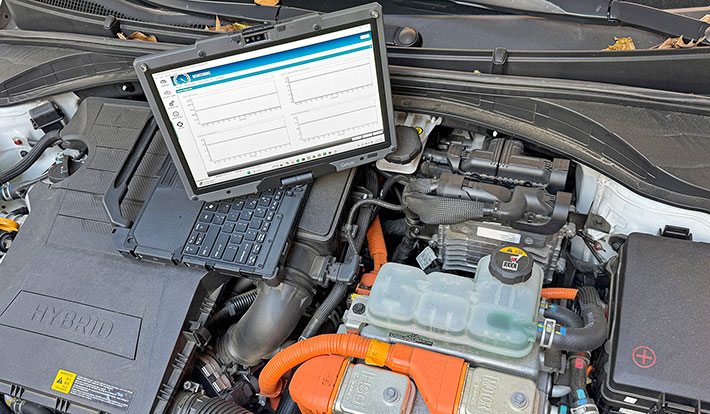
|
|
Getac V120/F120 "H" vs "V" Series CPUs
|
|
|
Intel CPU (see full specs)
|
Core Ultra 7
|
Core Ultra 7
|
|
|
Model
|
265H
|
268V
|
|
|
P-Cores
|
6
|
4
|
|
|
E-Cores
|
8
|
0
|
|
|
Low Power E-Cores
|
2
|
4
|
|
|
Total Threads
|
16
|
8
|
|
|
P-cores Max Turbo
|
5.30 GHz
|
5.00 GHz
|
|
|
LP E-cores Max Turbo
|
2.50 GHz
|
3.70 GHz
|
|
|
Thermal Design Power
|
28/115 watts
|
17/37 watts
|
|
|
Max RAM
|
128GB
|
32GB
|
|
|
Integrated graphics
|
Intel Arc 140T
|
Intel Arc 140V
|
|
|
GPU Peak TOPS
|
75
|
66
|
|
|
Graphics max speed
|
2.30 GHz
|
2.00 GHz
|
|
|
NPU Peak TOPS
|
13
|
48
|
|
|
PCMark 10 Overall
|
7,805
|
7,448
|
|
|
PassMark 9 Overall
|
7,692
|
6,328
|
|
|
3D Mark Time Spy
|
4,073
|
4,113
|
|
|
Watt-hours/hour
|
8.65
|
4.48
|
|
|
GeekBench AI OpenVINO GPU quantized
|
26,900
|
32,253
|
|
|
GeekBench AI OpenVINO NPU quantized
|
15,018
|
36,958
|
The V120's strong showing brings up an interesting question. The Getac V120 and F120 have been siblings in Getac's 12-inch lineup ever since the duo was first introduced more than a decade ago. Traditionally, the convertible and the tablet used the same class of processors, but this time the V120 employs Intel "H" Series CPUs, while the F120 uses "V" Series equivalents. So what's the difference?
More than one might expect. The comparison table to the right lists key technical specs and selected benchmark results for both units. At first glance, it looks like an easy win for the V120 — it has twice as many cores, a higher peak clock frequency, and operates at higher wattages, all of which contribute to its impressive performance in traditional benchmarks.
However, it's the F120 that carries Microsoft's Copilot+ PC designation, which the V120 does not. That's because the "V" Series processors used in the F120 include a much more powerful NPU that meets Microsoft's 40-TOPS requirement. Both systems feature Intel Arc graphics.
In practice, while the V120 is slightly faster in most conventional tests, the F120 is never far behind and even matches the V120 in graphics performance. But in AI-focused workloads, the F120's more capable NPU leaves the V120 well behind. And thanks to its lower thermal design power, the F120 is also far more efficient — consuming just 4.48 watt-hours per hour of operation, roughly half that of the V120.
In short, Getac clearly optimized these two platforms for different missions. The thicker, heavier V120 convertible prioritizes maximum CPU performance in the field, while the slimmer, lighter F120 tablet emphasizes mobility, efficiency, and readiness for emerging AI-driven applications.
Batteries and battery life
How long a laptop runs on a full charge can be just as important as its performance. After all, you can't plug in when working in the field, and you don't want to constantly worry about running out of power.
This was a major concern when Getac introduced the V120's early predecessors, the hefty 10.4-inch V100 and the 12.1-inch V200, roughly a decade and a half ago. Those machines weighed 6.2 and 6.8 pounds respectively, were about two inches thick, and relied on massive 87 watt-hour batteries. That was a lot of bulk and weight for a mobile convertible.
Getac addressed size and weight when it launched the slim and light V110 platform in 2013. That design replaced the large 85-96 watt-hour batteries of the earlier convertibles with two smaller, slender packs totaling just 46 watt-hours. That isn't much for a high-performance device, but it remained the standard configuration through successive V110 generations — until now. The new V120's two standard batteries pack 31.5 watt-hours each, for a combined 63 watt-hours.
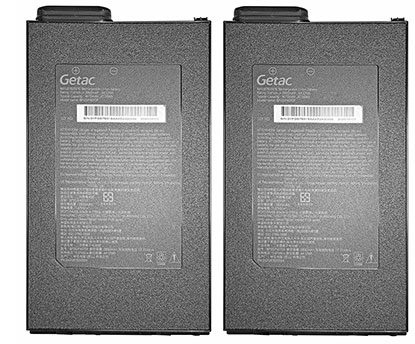 For many years we used the PassMark BatMon utility to measure battery draw at 100%, 50%, and 0% backlight settings, both in Windows "Best economy" and "Best performance" modes. We've since retired BatMon for two reasons: For many years we used the PassMark BatMon utility to measure battery draw at 100%, 50%, and 0% backlight settings, both in Windows "Best economy" and "Best performance" modes. We've since retired BatMon for two reasons:
- Modern hardware and firmware dynamically adjust power consumption through numerous sensors and conditions, making consistent average readings nearly impossible, and
- BatMon only measured idle power draw, occasionally reflecting background activity but not active workloads.
Instead, we now use the UL Solutions PCMark 10 Battery Test, which provides a much more realistic workload by continuously running a wide range of common applications and user tasks until the battery is exhausted. In that test, the new V120 achieved 10:56 hours of continuous operation. This equates to 8.65 watt-hours per hour, a sort of "miles per gallon" for battery-powered computers. That's a clear improvement over the 11.08 watt-hours per hour we measured on the 7th-generation V110 in 2024, though higher than the 6.16 watt-hours per hour we recorded on the third-generation Getac B360 laptop using the same processor.
In practical terms, this means users with two fully charged extended batteries can easily complete a full shift with hours to spare. What's missing, however, is the convenient charge-level indicator of the older V110 batteries — a small button that lit five LEDs to show remaining charge. That feature allowed quick status checks on spare batteries carried for hot-swapping in the field.
 Finally, the V120 still includes a standard, dedicated power jack for its external power supply, but it can also be charged via its Thunderbolt 4 ports. Just a few years ago, Thunderbolt 4 charging was hit or miss — sometimes it worked, sometimes it didn't. The reason was that proper charging required a "power contract" between the device and the USB charger. Early systems often refused to charge unless the USB charger matched or exceeded the wattage of the supplied AC adapter, which severely limited flexibility in the field. Finally, the V120 still includes a standard, dedicated power jack for its external power supply, but it can also be charged via its Thunderbolt 4 ports. Just a few years ago, Thunderbolt 4 charging was hit or miss — sometimes it worked, sometimes it didn't. The reason was that proper charging required a "power contract" between the device and the USB charger. Early systems often refused to charge unless the USB charger matched or exceeded the wattage of the supplied AC adapter, which severely limited flexibility in the field.
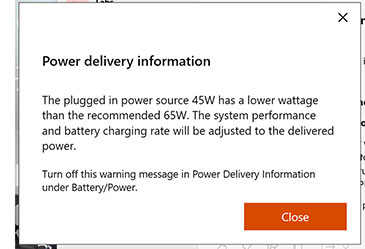
Fortunately, that's changed. Today's mobile hardware is far more accommodating with USB Power Delivery through Thunderbolt ports. When we connected the V120 to a 45-watt USB charger, it began charging immediately, accompanied by a pop-up noting that, since the charger supplied less than the recommended 65 watts, both charging speed and system performance would be adjusted accordingly.
Display and touch operation
 The quality of the display is among the most important things about any laptop. And especially so if the laptop is going to be used outdoors a lot. The quality of the display is among the most important things about any laptop. And especially so if the laptop is going to be used outdoors a lot.
The V120 comes comes with Getac's LumiBond 2 screen. Most makers of rugged laptops and tablets have their own special ways of making displays as viewable and useful outdoors as possible, and LumiBond is Getac's special recipe. With outdoor displays, it all comes down to a) backlight brightness, b) the types and layering of optical coatings and how they are applied, and c) how the various layers are bonded together — the fewer reflective surfaces, the better.
But display technologies keep advancing and requiring updating and new solutions. When capacitive touch replaced older resistive touch, LumiBond was updated to make it possible to operate the screen with gloves on, and also when it rained or there was water spray.
And since the ratio between backlight strength and the amount of incoming ambient light determines what's called the "effective" contrast ratio, the one that translates into the degree of real world outdoor readability of a display, Getac increased the backlight from initially 500 to 800 and then to 1000 nits in the V110 models, and it remains at 1000 nits in the new V120.
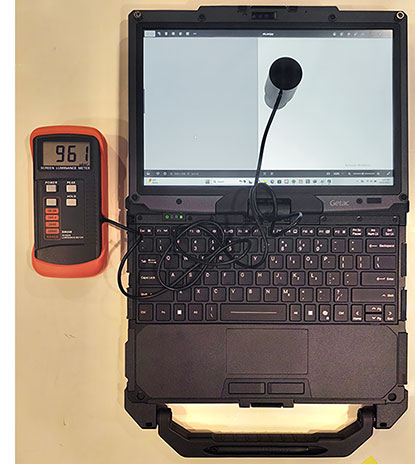
On the right, in the RuggedPCReview.com lab, the V120's display showed 961 nits luminance on our equipment. That's bright enough for outdoor use under most operating conditions, but not so bright as to drain the batteries too quickly.
The picture below shows another very important quality of a good outdoor-viewable display — how well it controls reflections. Note how the glossy screen of a 6th generation iPad iPad Pro 12.9 on the left compared to the semi-matte display of the new V120 on the right — the iPad shows harsh reflections whereas they are much more muted on the V120 display. That can make a bit difference in the field.

While the anti-glare treatment of the V120 display works very well, like all such treatments it tends to make the screen appear a bit milky when viewed from certain angles. It is significantly improved compared to earlier matte screens, and we don't know if further fine-tuning is still possible, or if there are hard limits.
Early versions of the V120's V110 predecessor, we criticized the vertical that suffered from very noticeable color and contrast shifts when viewing the display from different vertical angles. That was fixed in later V110 generations, and the V120, too, has an excellent IPS display with perfect viewing angles from all directions.
As far as touch goes, much has changed over the years. In the early days of tablet computers, there were, in essence, two touch technologies — resistive touch and active digitizers. Resistive touch worked well with a stylus and it was immune to wetness, but it wasn't very precise and required firm pressure. The latter made resistive touch frustrating to use on laptop screen.
That was then and this is now. Ever since the first iPhone, the world has gone capacitive multi-touch, and that's what the V110 platform was based on, and now, of course, the V120 as well. As one expects, touch works flawlessly.
Initially, capacitive touch only worked with fingers or a capacitive stylus, and the technology didn't like rain or water spray. That would be a problem when using rugged systems outdoors where users may encounter rain and splashing, and where they wear gloves in the cold.
The V110 can handle all of that, via different touch modes. These modes can be set in the G-Manager utility. "Touch" tab where users can select "Auto Mode", "Finger Mode," "Glove Mode," or "Stylus Mode."
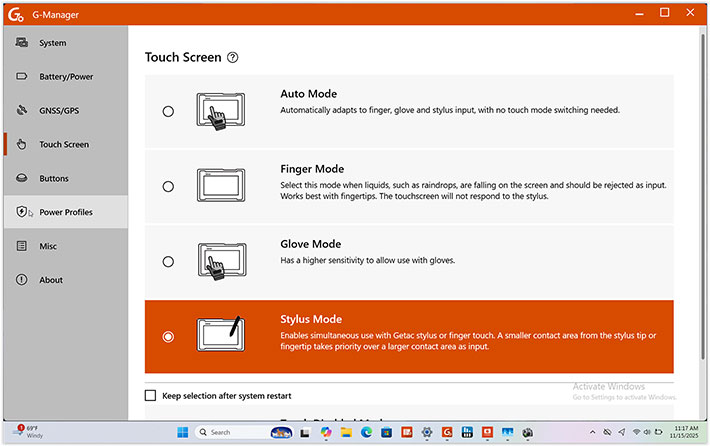
Touch and styluses and pens ... it can get a bit confusing here because of terminology. The term "pen" traditionally referred to an active digitizer pen, whereas the term "stylus" referred to passive pens. But with capacitive touch came capacitive pens that can look much like active digitizer pens. The one that comes standard with the V120 has a slightly rubbery 3mm tip. That one doesn't work in "finger mode" (though generic capacitive pens/styluses with a broader tip might work). Many systems have specific "rain" modes, but with the V120, "rain" is bundled in with "finger mode."
Below are the optional Getac digitizer pen (top) and the Getac stylus (bottom). Both are about 4-1/2 inches long.

In "stylus mode" you can use both fingers OR the Getac stylus and that's somewhat confusingly described as "a smaller contact area from the stylus or fingertip takes priority over a larger contact area as input." We think that means that if you hold the V120 in tablet mode in your hands and your palm touches or presses against the screen, it will ignore that and only interpret small contacts as input.
Active digitizers, like the one optionally available for the V120, generally an electronic grid behind the LCD to communicate with the tip of the special stylus (which doesn't need a battery). The technology is precise and works well with legacy Windows applications that tend to have a lot of small check boxes, pulldowns, and similar small items.
Active digitizers also work well for signatures that actually looks like signatures, and also with handwriting recognition, the interface technology that was initially expected to replace keyboards on early PDAs and tablets. The best part of active digitizers is "hovering" — the cursor follows the tip of the pen without the pen actually touching the display surface. With Windows, capacitive touch can often trigger an unintentional finger touch action; with the optional active digitizer's "hovering," you can get the cursor where you want it, and only then tap on the screen to initiate the touch.
Cameras
It's probably fair to say that onboard camera rarely make or break a sale of a rugged laptop. Pretty much everyone has a smartphone today, and those have great cameras. But you never know; integrated cameras may just be a requirement or come in handy somewhere. That, and seeing what you're taking a picture of on a big screen, and, of course, the occasional video call. That's probably why there still are documentation cameras in such machines.
Laptops generally have a single camera that's facing the user for video conferencing. The Getac V120 has one of those — a 5MP webcam that now has a manual privacy slider, or, optionally, a Windows Hello face-authentication camera. You can have either one or the other. Our review unit had the regular 5MP camera that recorded in as much as 2560 x 1920 resolution both in still and video.
But, being a convertible and not just a standard laptop, the V120 also has a 13MP documentation camera. It's not on the backside of the display as you'd expect from either a laptop or a tablet. That's because when the V120 is used as a tablet, the backside of the tablet is actually the bottom-side of the keyboard box. And that is where the optional 13M pixel auto-focus documentation camera is. So you can use that camera in tablet mode, but not in laptop mode.
We've never been fond of the super-basic stock Windows Camera app. The V120, like other Getac tablets and laptops, gives you the option of using Getac's own G-Camera instead. The G-Camera app is way more user-friendly with large touch buttons and very simple controls.
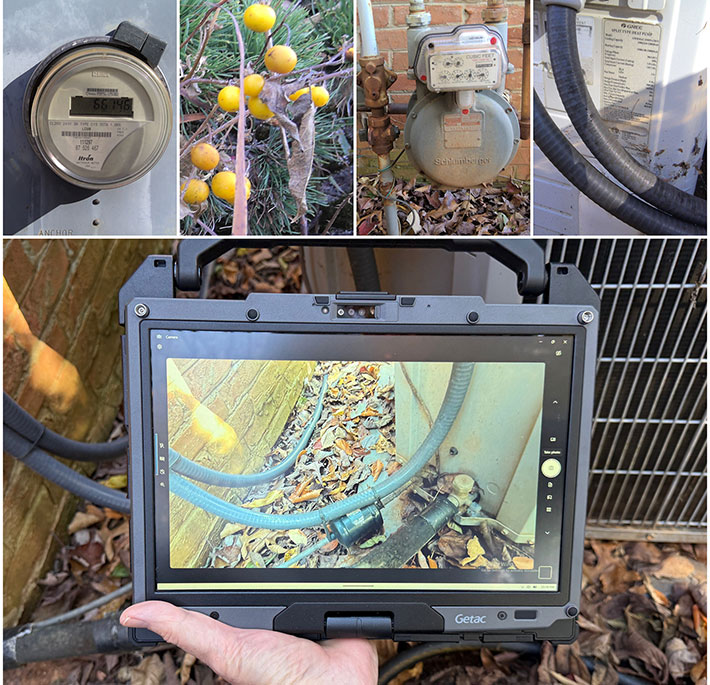
In the past, most cameras built into rugged Windows devices were lacking. That is beginning to change. Both cameras available for the V120 are good enough for many imaging tasks, such as documenting job conditions, job completions, job details, and so on. One thing we noticed: The Windows Studio Effects (automatic framing, eye contact and background effects) we noticed in the also just updated Getac UX10 rugged tablet were missing on our pre-production V120, possibly because the V120 is not officially a "CoPilot+ PC". Getac says that Windows Studio Effects are supported on production models, albeit at a different level.
The sample pics we took (four shown above) were good and sharp enough to reliably capture all the small details that can be so important in high-enough quality to be useful.
Ruggedness
On the ruggedness side, like its V110 predecessors, the V120 is considered fully rugged and designed to perform "flawlessly under extreme working environments where weather conditions and physical abuse are unavoidable." The machine can operate between -20° and 145° Fahrenheit (-29° to 63°C). Sealing is at the IP66 standard — up from IP65 in earlier V110 models — and the machine fills MIL-STD-810H testing requirements for humidity, altitude, shock, drop, vibration and others, and there is compliance with MIL-STD-461G (electromagnetic interference). The pictures below show ruggedness testing being performed on an older Getac V100. We couldn't find V120 testing images or videos, but Getac undoubtedly runs the same types of tests on the V120.
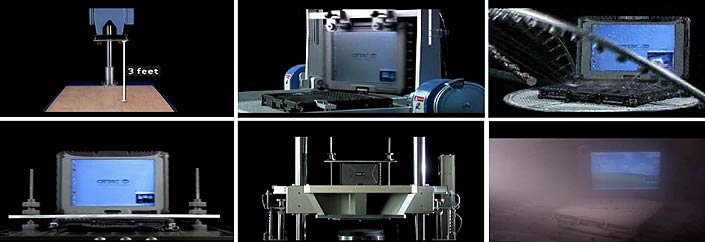
To go into a bit more detail on the individual ruggedness testing categories:
IP ratings refer to Ingress Protection standards for electrical enclosures, with the first number describing the protection level against solids and the second protection against liquids. The V120's IP66 rating indicates total protection against dust and protection against strong jets of water from all directions. That's very good for a rather complex device with a large umber of ports and areas that need to be sealed. Then again, with many consumer smartphones and even tablets carrying IP68 ingress protection, the standard of what is acceptable is higher today.
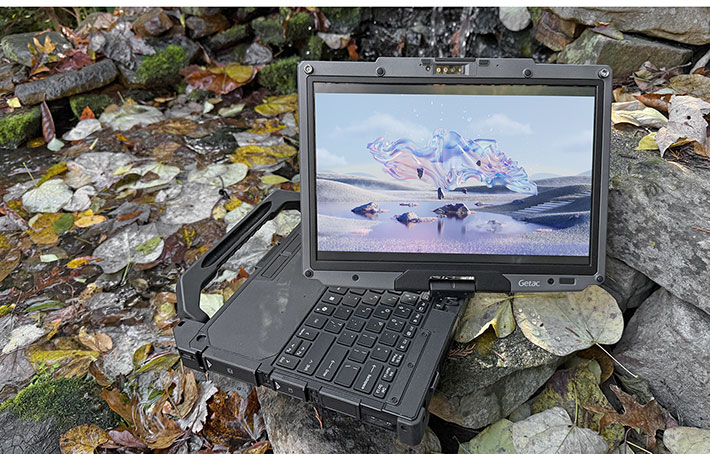
In terms of temperature resistance, the V120's -20 to 145 degrees Fahrenheit operating temperature range was tested by an independent third-party test lab following MIL-STD-810H. In the same lab, the computer also passed non-condensing humidity testing up to 95% per MIL-STD-810H. It can operate in altitudes up to 15,000 feet (and obviously in aircraft with pressurized cabins) per MIL-STD-810H.
The device is RoHS-compliant. RoHS stands for Restriction of Hazardous Substances and regulates the use of certain hazardous substances in electronic equipment. The RoHS standard is fully implemented in Europe, with lesser restrictions applying in the US.
Shock, vibration, drop and ESD resistance are all tested according to MIL-STD-810H and other relevant regulatory procedures. Not all results are in the promotional literature or owner's manual (which for now only states "vibration & drop resistant"), so inquire with Getac for specifics and also check Getac's general MIL-STD certification and compliance testing document (see here).
With respect to the ever important drop spec, Getac's web page specs states that the V120 is 4-foot drop-resistant. We presume that the tests, again, were performed in accordance with the procedures outlined in MIL-STD-810H, probably for transit drop. That one generally requires 26 drops from four feet. Why four feet? Because when designing the drop tests, the government figured that if you drop something while standing, it'll drop about four feet, as opposed to something that falls off a table or counter, which is 2.5 to three feet.
I should mention that Getac offers optional ANSI/UL 121201, CSA C22.2 NO. 213 (Class I, Division 2, Groups A, B, C, D) certification that allows safe, spark-free use of the V120 in potentially explosive environments typically found in the oil and gas, petrochemical, aviation and related industries. And for units to be deployed in marine settings, Getac offers optional salt fog certification.
Summary: Getac V120 fully rugged laptop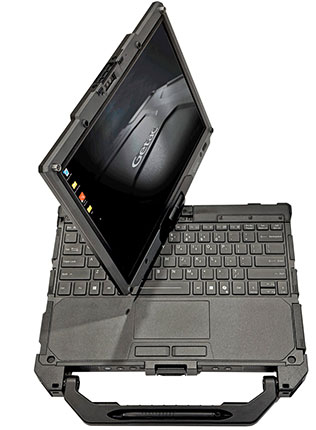
The Getac V120, introduced in 2025, follows no fewer than seven generations of the proven Getac V110. We're talking about mature, extensively field-tested technology here. The V120 represents more than just another update to Getac's convertible notebook that also functions as a tablet — it's effectively a new design. While it may look similar to the V110, the V120 now features a larger 12.2-inch display with 1920×1200 resolution, yet remains relatively light and compact for a fully rugged laptop. What customers will notice most is the platform's significantly higher performance, courtesy of Intel Core Ultra 5 and Core Ultra 7 processor technology with Intel Arc graphics and integrated Intel AI Boost.
The V120's rotating display hinge design isn't for everyone — and the device is heavier when used as a tablet — but it provides a unique, highly durable mobile computing solution. It combines leading-edge performance with full notebook and full tablet functionality in a single, fully integrated device.
The new Getac V120 features a bright 1000-nit display, up to 2 TB of fast PCIe NVMe storage, dual Thunderbolt 4 ports, Wi-Fi 7, Bluetooth 5.4, and optional 4G LTE or 5G Sub-6 mobile broadband with dual SIM support. Highly configurable I/O allows customization for specialized applications, and optional ANSI/UL 12.12.01 and salt-fog-resistant configurations are available on request. – Conrad H. Blickenstorfer, November 2025
|
Getac V120 Specifications
|
| Status |
Introduced Sept. 2025, review Nov. 2025
|
| Type |
Rugged convertible notebook
|
| Processor |
Intel Core Ultra 7 265H (6 P-cores/8 E-cores/2 LPE-cores, 5.3 GHz max turbo)
Intel Core Ultra 7 255H (6 P-cores/8 E-cores/2 LPE-cores, 5.1 GHz max turbo)
Intel Core Ultra 5 235H (4 P-cores/8 E-cores/2 LPE-cores, 5.0 GHz max turbo)
Intel Core Ultra 5 225H (4 P-cores/8 E-cores/2 LPE-cores, 4.9 GHz max turbo)
|
| Thermal Design Power |
15/55 watts (all available processors)
|
| Graphics |
Intel Core Ultra 7 265H: Intel Arc 140T, 2.30GHz, 75 TOPS (Int8)
Intel Core Ultra 7 255H: Intel Arc 140T, 2.25GHz, 74 TOPS (Int8)
Intel Core Ultra 7 235H: Intel Arc 140T, 2.25GHz, 74 TOPS (Int8)
Intel Core Ultra 7 225H: Intel Arc 130T, 2.20GHz, 63 TOPS (Int8)
|
| OS |
Windows 11 Pro
|
| Memory |
8GB DDR5 expandable to 64GB
|
| Display type |
LumiBond sunlight readable TFT LCD, 1,000 nits, anti-glare and anti-reflection film, Corning Gorilla Glass. |
| Display size/res |
12.2-inch/1920 x 1200 pixel HD |
| Digitizer |
10-point capacitive multi-touch with glove-touch setting; optional auto-sensing dual-mode adds active digitizer pen |
| Keyboard |
Integrated LED-backlit waterproof membrane keyboard; optional: rubber keyboard
|
| Storage |
256GB/512GB/1TB/2TB PCIe NVMe SSD
|
| Expansion slots |
Smart Card reader; optional 1D/2D barcode reader, SD Card reader
|
| Housing |
Magnesium alloy, sealed ports |
| Size |
11.89 x 8.82 x 1.41 inches (313 x 238 x 35.7 mm)
|
| Weight |
Starting at 4.63 lbs. (2.1 kg.)
|
| Operating temperature |
-20° to 145°F (-29° to 63°C) |
| Ingress protection |
IP66 |
| Vibration |
According to IEC 68-2-6 / MIL-STD-810H, Method 514.5 |
| Salt Fog |
Optional: Salt fog certified
|
| Intrinsic safety |
Optional: ANSI/UL 121201, CSA C22.2 NO. 213 (Class I, Division 2, Groups A, B, C, D)
|
| Power |
Dual 4,070 mAH 7.74 Volt 31.5 watt-hour Li-ion batteries for a total of 63 watt-hours. Optional dual 4,070 mAH 11.61 Volt 47.3 watt-hour Li-ion batteries for a total of 94.6 watt-hours
|
| Cameras |
5M webcam; optional Windows Hello face-authentication FHD camera; opt. 13mp auto-focus rear camera
|
| Interface |
2 x Thunderbolt 4 Type-C, 2 x USB 3.2 Gen 2 Type-A, 1 x RJ45 LAN, 1 x HDMI 2.0, audio in.out, docking connector, opt. RF antenna pass-through for GPS, WLAN, WWAN; opt: Smart card reader OR 1D/2D imager barcode reader OR USB 3.2 Gen 2 Type-A + Serial port (9-pin; D-sub) OR USB 3.2 Gen 2 Type-A + MicroSD
|
| Wireless |
Intel Wi-Fi 7 BE200, Bluetooth v5.4; optional 4G LTE mobile broadband, 5G Sub-6, discrete GPS, fingerprint reader, 13.56MHz RFID, smart card reader, 1 x Nano-SIM 4FF
|
| Price |
Inquire |
| Contact |
GETAC us.getac.com |
| Web page |
Getac V120 page |
| Specs |
 Getac V120 Getac V120 |
| Warranty |
3-year bumper-to-bumper warranty standard |
|
|
|
|
